
MODULA · COMPARISONS
Modula vs. NextGEN
NextGEN is images only, with a settings maze from another era. Modula 3.0 does photos and videos in one gallery, with an editor you’ll actually enjoy.
★★★★★ 4.7 on WordPress.org · 160,000+ businesses made the switch


☝ A live Modula gallery mixing photos and video — press play.
“If you are happy with a text watermark, it will be okay. But it’s not possible to have a PNG image as a watermark… so it’s quite useless for us.”
Bee Lounge — WordPress user, about NextGEN’s watermarking
The Modula 3.0 difference
We didn’t bolt features onto an old plugin — we rebuilt it.
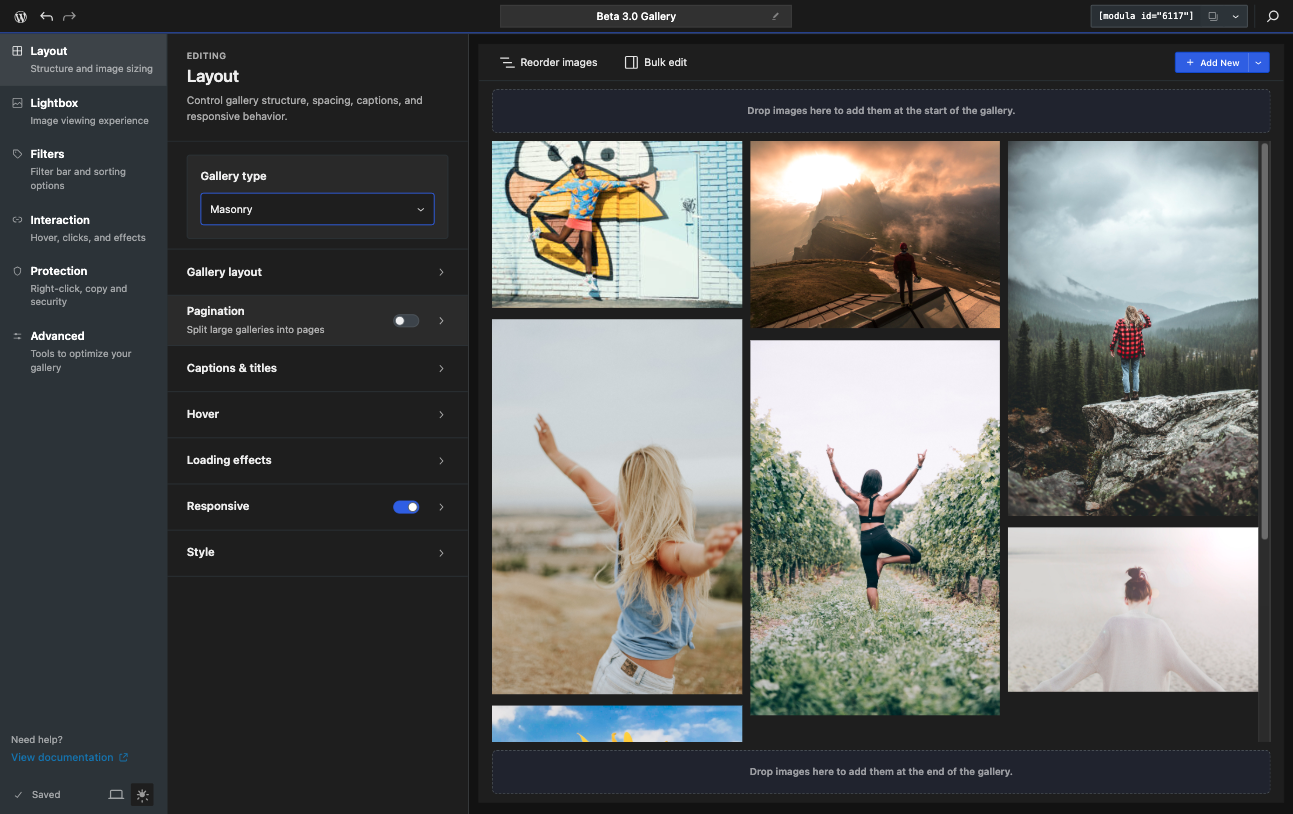
An editor rebuilt from scratch
Modula 3.0 replaced the old metabox with a fast visual editor: live preview, drag-and-drop ordering, bulk edit, and per-image focal points. You see the real gallery while you build it.
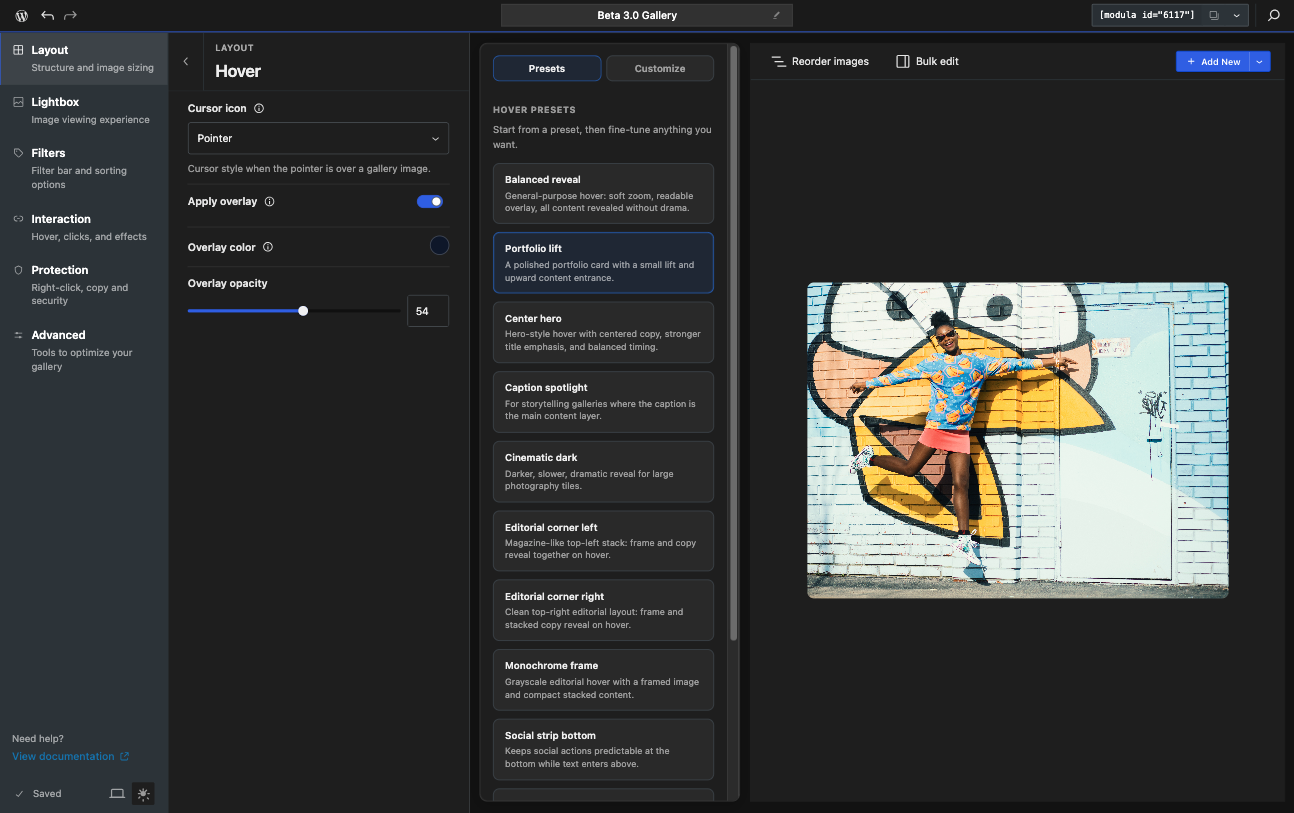
Hover effects you can feel — and build
Over 40 hover effects ship out of the box, and 3.0 adds a hover builder so you can fine-tune every transition or compose your own — titles, captions, and social icons each get their own slot.
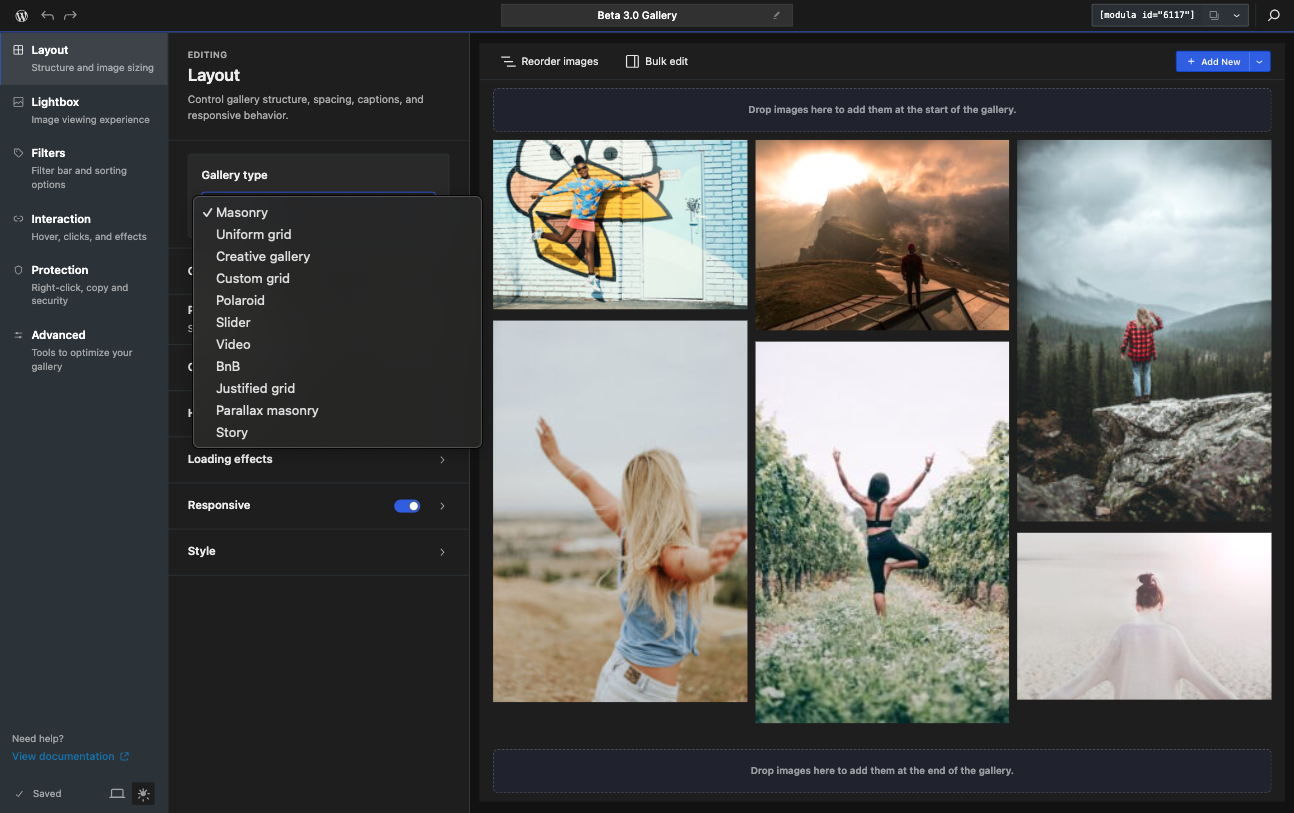
A layout pack nobody else has
Beyond masonry, grid, and justified: 3.0 adds Parallax Masonry, Story, Polaroid, and BnB layouts, plus a custom grid builder where you draw the exact arrangement you want.
Where Modula pulls ahead
The differences you notice in the first ten minutes.
Videos live in the same editor and the same grid as your photos.
Photos and videos, one gallery
Mix images with YouTube, Vimeo, or self-hosted video in the same grid — NextGEN only handles images. Autoplay previews and per-video posters come standard.
Real image watermarks
Protect your work with your actual logo — a PNG watermark, positioned and sized visually, with originals backed up. Not just a line of text over the photo.
An editor, not a control panel
NextGEN’s dozens of admin screens become one visual editor in Modula 3.0: live preview, drag-and-drop, bulk edit, and settings written in plain English.
Modula vs. NextGEN, feature by feature
From $39
one-time or yearly
Modula Pro
Everything below, in the box — with the 3.0 editor and a 14-day money-back guarantee.
✓
Unlimited galleries
✓
Video galleries (YouTube, Vimeo, self-hosted)
✓
Drag-and-drop visual builder
✓
Custom grid builder
✓
Page-builder integrations
✓
Hover effects library (40+)
✓
Hover effect builder (3.0)
✓
3.0 layout pack (Parallax Masonry, Story, Polaroid, BnB)
✓
Image (PNG) watermarking
✓
On-the-fly image optimization
✓
Free, unlimited CDN hosting
✓
Slider & carousel built in
✓
One-click import from NextGEN
Starts at $49
NextGEN
What you get — and what stays behind a bigger plan or missing entirely.
✓
Unlimited galleries
—
Video galleries (YouTube, Vimeo, self-hosted)
—
Drag-and-drop visual builder
—
Custom grid builder
—
Page-builder integrations
—
Hover effects library (40+)
—
Hover effect builder (3.0)
—
3.0 layout pack (Parallax Masonry, Story, Polaroid, BnB)
—
Image (PNG) watermarking (Text only)
—
On-the-fly image optimization
—
Free, unlimited CDN hosting
—
Slider & carousel built in
—
One-click import from NextGEN (n/a)
What reviewers keep saying
“Modula is the best option for people who want the easiest way to create stylish galleries with images or videos. The out-of-the-box designs look great, and the custom grid builder is a feature most other gallery plugins don’t offer.”
“Among the WordPress gallery plugins we compared, Modula is arguably the best suited for most use cases. Its security functionality, such as watermarking, helps to protect your images.”
“If you want a great-looking gallery in as little time as possible, you’ll probably be happiest with Modula — and it still has advanced features such as gallery filters, deep linking, and video support when you need them.”
Frequently asked questions
Yes — Modula ships a one-click importer for NextGEN. Your images, titles, and gallery structure are copied over; your originals stay untouched until you decide to remove them.
No. Galleries render inside your existing pages and posts — nothing about your permalinks changes. Deep linking even gives each filtered view its own shareable URL.
Yes. Modula Lite ships the grid, masonry and custom grid layouts, the built-in lightbox, and the new editor. Pro adds video, filtering, the protection suite, and the rest of the extensions.
Every Pro purchase comes with a 14-day money-back guarantee. If it doesn’t fit your workflow, you get a full refund — no questions asked.
Ready to switch from NextGEN?
Bring every gallery over in one click and trade the settings maze for a real editor.
14-day money-back guarantee — love it, or get a full refund.