There’s no button that moves you from Flickr to WordPress. You download your photos, add them to galleries on your own site and publish. A few albums take an afternoon. A whole account can take weeks, because Flickr’s full export alone can take that long.
Some things stay behind, like the titles you typed on flickr.com and your old links. Here’s how to download every photo at full size and move photos from Flickr to WordPress, albums intact. We checked each Flickr step against Flickr’s help pages in October 2026.
Why move your portfolio from Flickr to WordPress?
Flickr is a community, not a portfolio you control. Your work sits in everyone else’s layout, under Flickr’s rules. Your own WordPress site is the Flickr alternative where you set the rules.
Free accounts have tight limits. You can’t upload more than 1,000 items, keep more than 50 non-public ones, post anything but Safe content, or do commercial activity. If clients find you on Flickr, read that last one twice.
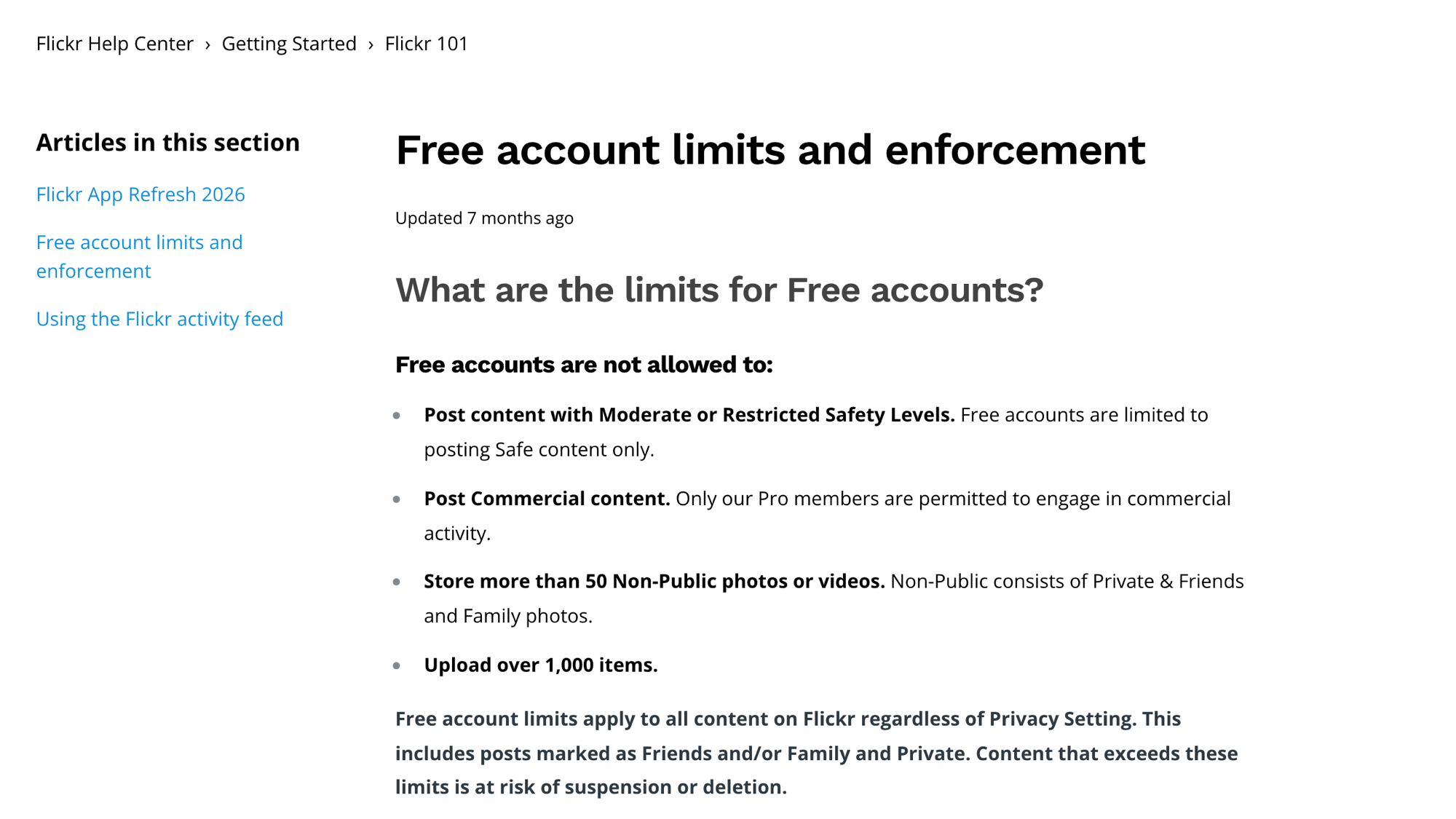
Content over the limits “is at risk of suspension or deletion.” Pro lifts the limits for $82 a year (checked October 2026).
A move is also the perfect excuse to edit. As photographer Matt Dutile puts it:
Good to know
“You’re only as good as your worst image. … All they should see is your best.”
So don’t move all 900 photos. Move your best 40.
What comes with you (and what stays on Flickr)
Your Flickr photos come with you. Most of what you typed on flickr.com doesn’t: the export keeps it only as JSON, which WordPress doesn’t read.
| On Flickr | Comes with you? |
|---|---|
| Photos | Yes: full size, or 1024px from free bulk downloads |
| Camera data (EXIF) | Yes, inside the files |
| Titles and captions saved in the files | Yes |
| Titles, descriptions, tags and comments added on Flickr | Only as JSON |
| Albums | As album ZIPs, or listed in albums.json |
| Videos | Not in bulk ZIPs; in the data export |
| Faves and views | Stay on Flickr |
| Your flickr.com links | No, and they can’t redirect |
How to download all your photos from Flickr
To download all photos from Flickr, use the full data export on a free account, or one ZIP per album on Pro. Use the website; the app can’t bulk download.
Watch out
The 1024px trap: Flickr says free accounts are “limited to downloading images at a maximum size of 1024px when using bulk download options.” That includes Camera Roll and album ZIPs: too small for a full-screen lightbox.
From your Camera Roll or one album at a time
Hover over You, select Camera Roll and pick up to 500 photos. For one album, open You → Albums and click its download icon (same 500 cap). Either way, choose Create .zip file; Flickr sends the link to your FlickrMail and email.
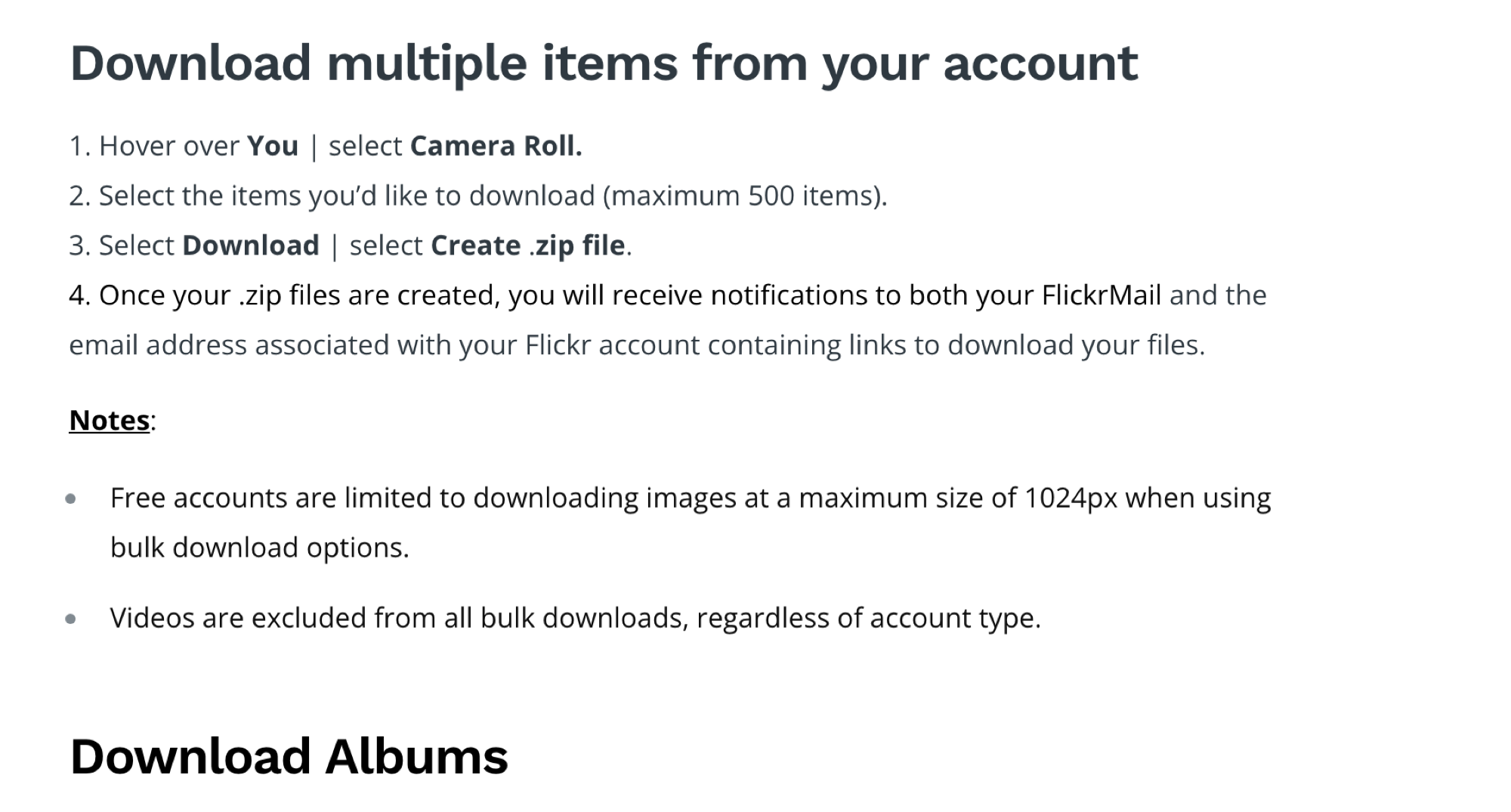
Request My Flickr Data (the full Flickr export)
Free or Pro, this covers your whole account. Click your profile photo, open Settings, and under Your Flickr Data select Request My Flickr Data. Flickr emails you when the files are ready, EXIF intact.
- It’s slow: “a few hours to a few weeks,” says Flickr.
- Links expire: download when the email arrives, or request again.
- Big accounts get several ZIPs: past 500 items, you’ll click numbered links one by one.
- Names look like this:
making-a-toddler-play-board_23604932919_o.jpg, plusphoto_23604932919.jsonwith its Flickr details (2022 write-up). Users report the_ofiles are the originals.
Which one should you use?
- Free account, say 850 photos in 12 albums: request your data. It’s the only bulk route without the 1024px cap.
- Pro, six albums under 500 photos each: six album ZIPs, six galleries.
Set up WordPress and Modula
Any host with one-click WordPress can run your portfolio site. Our photo gallery website guide covers building a photography portfolio on WordPress.
For the galleries, use Modula, the plugin we make. It has 160,000+ active installations and a 4.7/5 rating on wordpress.org (October 2026). Go to Plugins → Add Plugin, search for “Modula”, then install and activate it.
Add your Flickr photos to a gallery
Each Flickr album becomes one Modula gallery. Go to Modula → Content, click New gallery and name it after the album, say “Iceland 2019”. Then click the arrow beside + Add and pick your route.
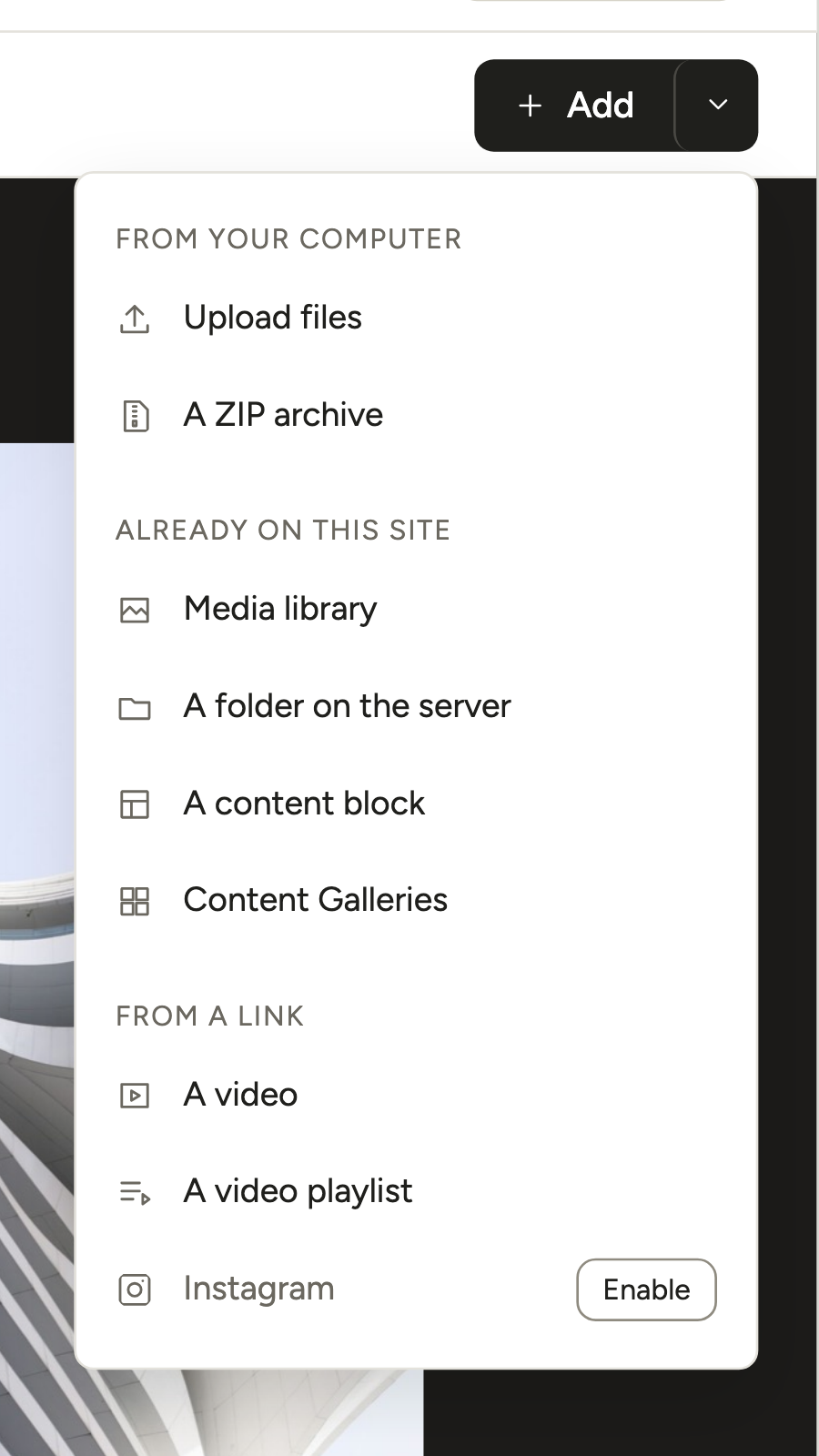
- Upload files (free): select or drop hundreds of photos straight from your download folder.
- A ZIP archive (Modula Pro, any plan): made for album ZIPs. It must fit your site’s maximum upload size (see Media → Add Media File) and needs PHP’s ZIP extension. Modula unpacks only the images and skips Flickr’s JSON and videos.
- A folder on the server (Modula Pro, any plan): the route for a multi-gigabyte data export. Copy the unzipped folder to
wp-content/uploads/modula_folder_importby FTP or your host’s file manager, then pick it in Add from a folder.
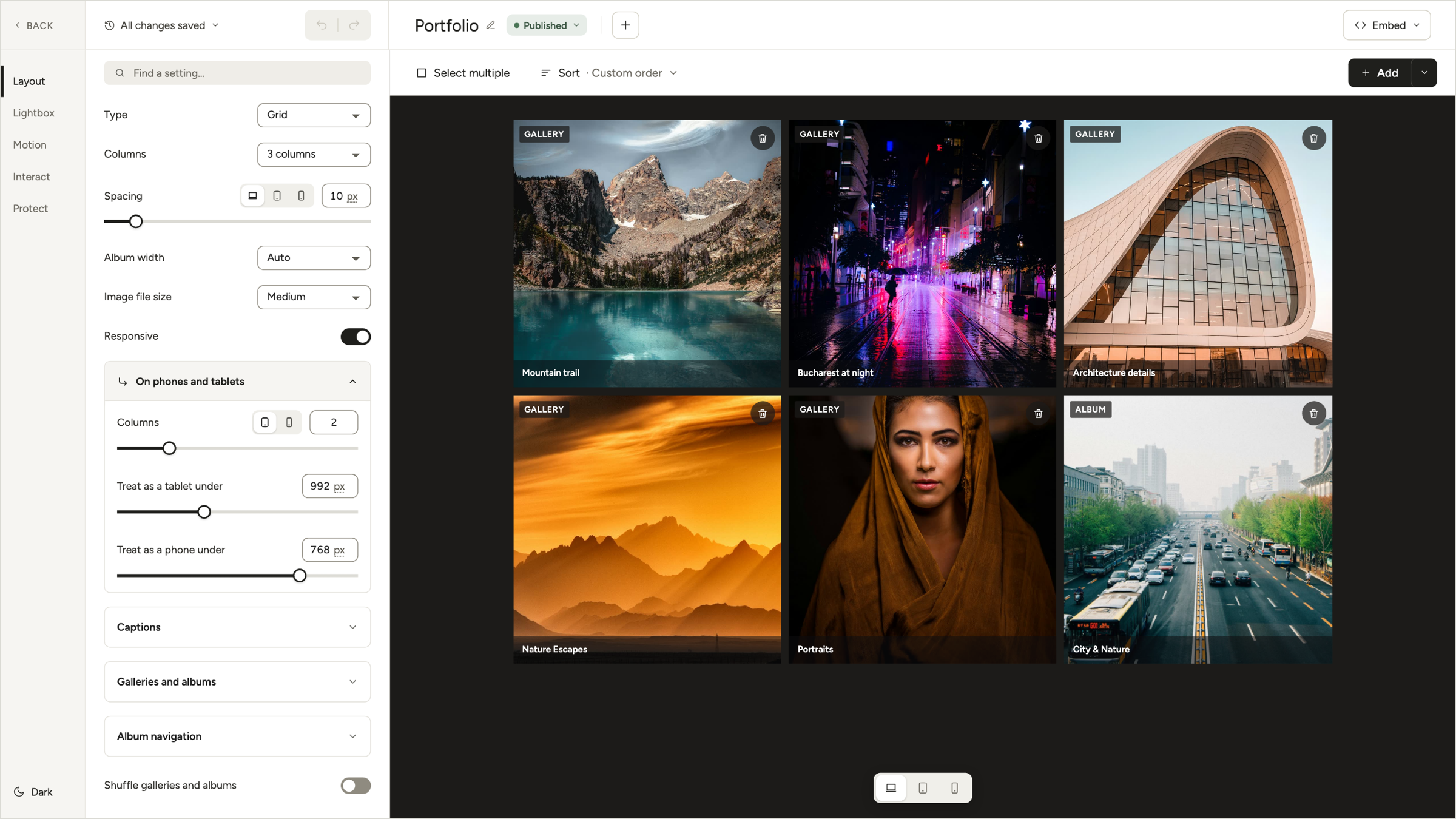
Then pick Layout → Type. Masonry keeps each photo’s shape, so portraits stay tall and panoramas stay wide. Justified grid lines them up in neat rows. Both are free, like 7 of Modula’s 14 types.
Give your photos titles, alt text and captions
Expect file names as titles, like making-a-toddler-play-board_23604932919_o, because Modula doesn’t read Flickr’s JSON. Text saved inside the files does come across: WordPress reads the titles, captions and alt text that an editor like Lightroom wrote into them.
Click a photo in the preview to edit its Alt text, Title and Caption.
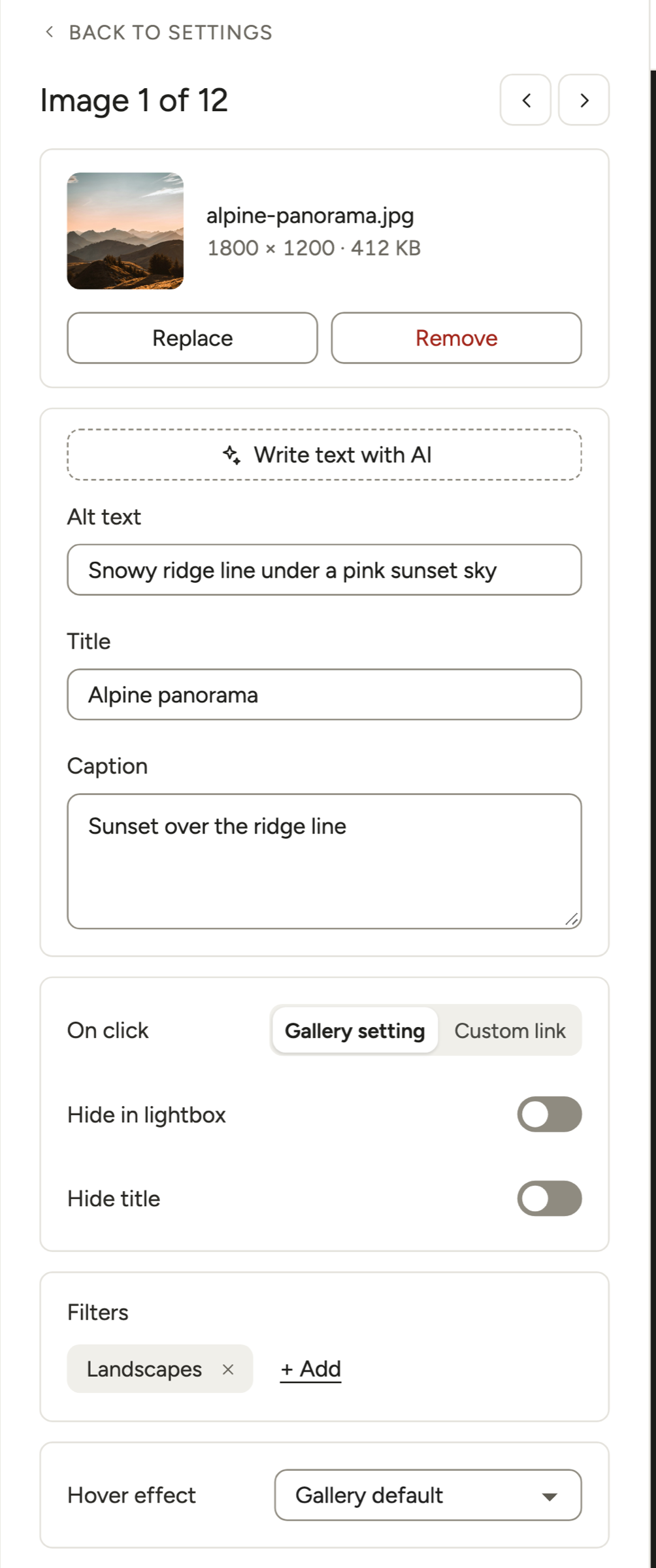
Got 300 photos to describe? Two shortcuts:
- Modula AI (paid plans): Write text with AI fills in one photo, and Settings → AI → Smart Captions → Fill in missing text does the rest. Both use your plan’s AI credits and an API key.
- Bulk edit (Modula Pro): every title, alt text and caption in one table.
Don’t skip alt text. Google calls it “the most important attribute” for image metadata.
Rebuild your Flickr albums
Album ZIPs already rebuild your Flickr albums: one gallery per album. With a data export, open albums.json: it lists each album’s photo IDs. The ID is the number in every file name, so you can sort the files into one folder per album.
Then pick how people browse:
- Albums (Trio and up): a page of gallery covers.
- Gallery Filters (Starter and up): one gallery with Weddings, Portraits and Travel buttons.
Publish it and check it on a phone
In Modula, click Embed, copy the shortcode (like [modula id="89"]) and paste it into a page. Or add the Modula Gallery block; Elementor, Divi and Beaver Builder get their own Modula modules too. Add the page to your menu, and you’re live.
Then check it on a phone. Use the Desktop / Tablet / Mobile switch under the editor’s preview, and set phone columns under Layout → Responsive → On phones and tablets (free). Finally, open the live page on your phone and tap through a few photos.
Want to keep your photos on Flickr? Embed them instead
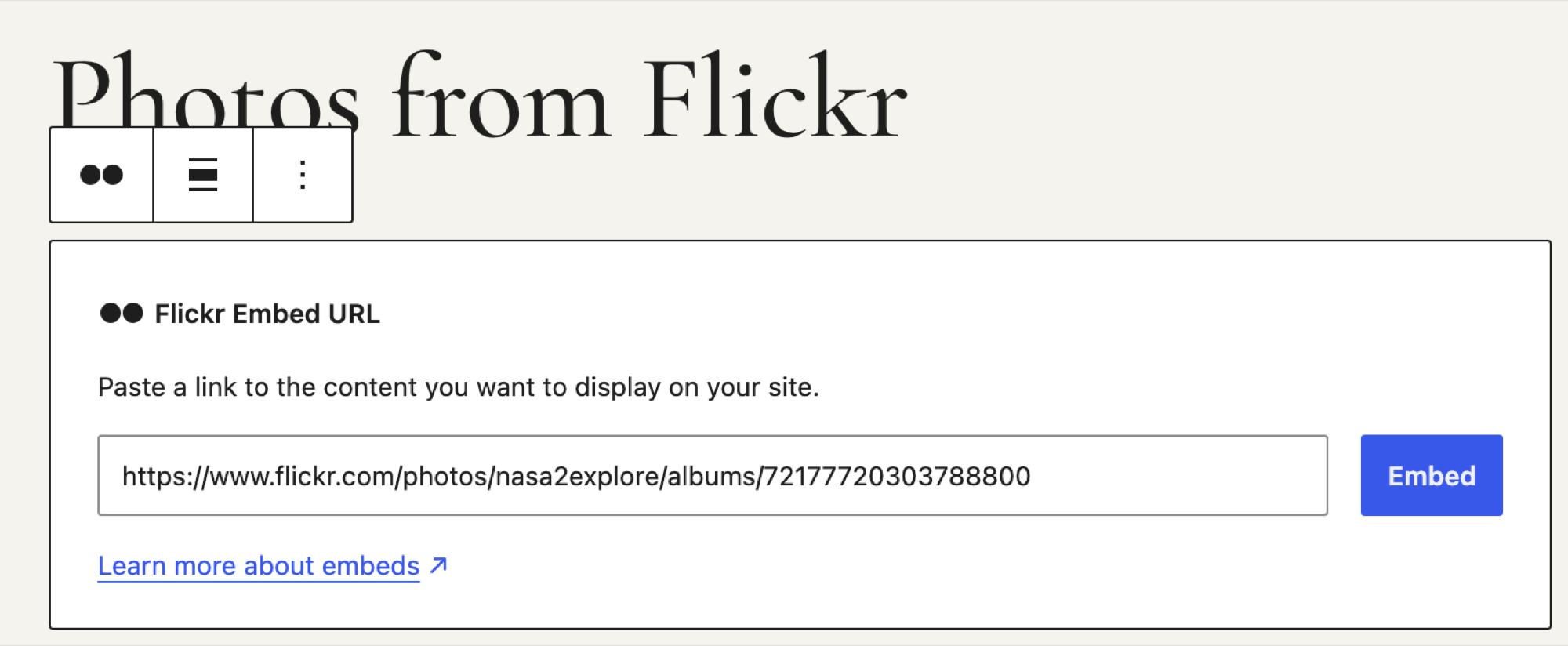
If you only want Flickr photos on WordPress, embed them. It isn’t a move, though: the photos stay on Flickr, and embeds break if you delete them or the account.
- WordPress’s built-in Flickr embed block (free): paste a photo or album link. Album embeds need every photo set to Public.
- Feed plugins: need a Flickr API key, which only Pro members can get, and free accounts’ photos stop at 1024px through the API.
- The direct .jpg address: works as long as Flickr’s file addresses don’t change.
Flickr’s embed rules also require a link back to Flickr. Modula doesn’t connect to Flickr at all; its galleries need the files.
What happens to your old Flickr links
Your old Flickr links stay put: Flickr has no redirect feature, so you can’t point them at your new pages. What you can do:
- Keep the account a while: put your new address on your About page and in your top photos’ descriptions.
- Update the links you control: email signature, social bios, business cards.
- Think before deleting: it breaks every embed and link to those photos.
Your new pages can earn their own spot in image search through alt text and, a little, file names (Google’s “very light clues”): toddler-play-board.jpg beats IMG_0023.jpg.
Squarespace URLs on your own domain can redirect, unlike Flickr’s: our Squarespace to WordPress guide shows how.
Frequently asked questions
Not with a button. Modula’s Settings → Migrate moves galleries from other WordPress plugins, not from Flickr. Developers can try Chris Hardie’s 2019 command-line tool. It reads the data export and keeps titles, captions, comments and EXIF, though he warns it will probably “fall apart in some way” for others.
Not if you start from originals: the data export, or Pro downloads. Free bulk downloads stop at 1024px. WordPress gives uploads over 2,560px a -scaled copy for the lightbox and keeps your original on the server.
No. Photos on Flickr are All Rights Reserved by default, unless the owner picks a Creative Commons 4.0 license, Public Domain or CC0. Flickr tells you to ask the owner before you use their photos.
Your own photos stay yours on WordPress. Modula’s Image Licensing (Trio and up) adds a license to them; our Creative Commons guide explains the options. This isn’t legal advice.
Yes. Flickr still runs in 2026 and sells Pro at $82 a year. You don’t have to delete your account: keep it for your followers and old links, within the free limits.
Bulk downloads leave videos out, but the data export includes them. Modula’s ZIP and folder imports skip them, so upload videos to your Media Library, YouTube or Vimeo. Then add each with A video in the + Add arrow menu (Video Gallery, Starter and up).