 Made in Europe, buy from Europe.
Modula Pro · Slider
Turn any WordPress gallery into a slider
Pick Slider as the gallery type. Then set arrows, dots, thumbnails and autoplay with one switch each. Your photos stay the same.
★★★★★ 4.7 on WordPress.org · 160,000+ sites

Photo by Sven Pieren on Unsplash.

Photo by Sergey Pesterev on Unsplash.


Photo by Daniel Seßler on Unsplash.

Photo by Hiep Duong on Unsplash.

Ridge lines fading into the evening haze.
This is a real Modula slider, live on this page. Swipe it or use the arrows.
Any gallery becomes a slider, in one click.
12
Slides visible at once
On desktop. Tablets and phones get their own number.
4
Controls, one switch each
Arrows, page dots, thumbnails and autoplay.
1
Click from grid to slider
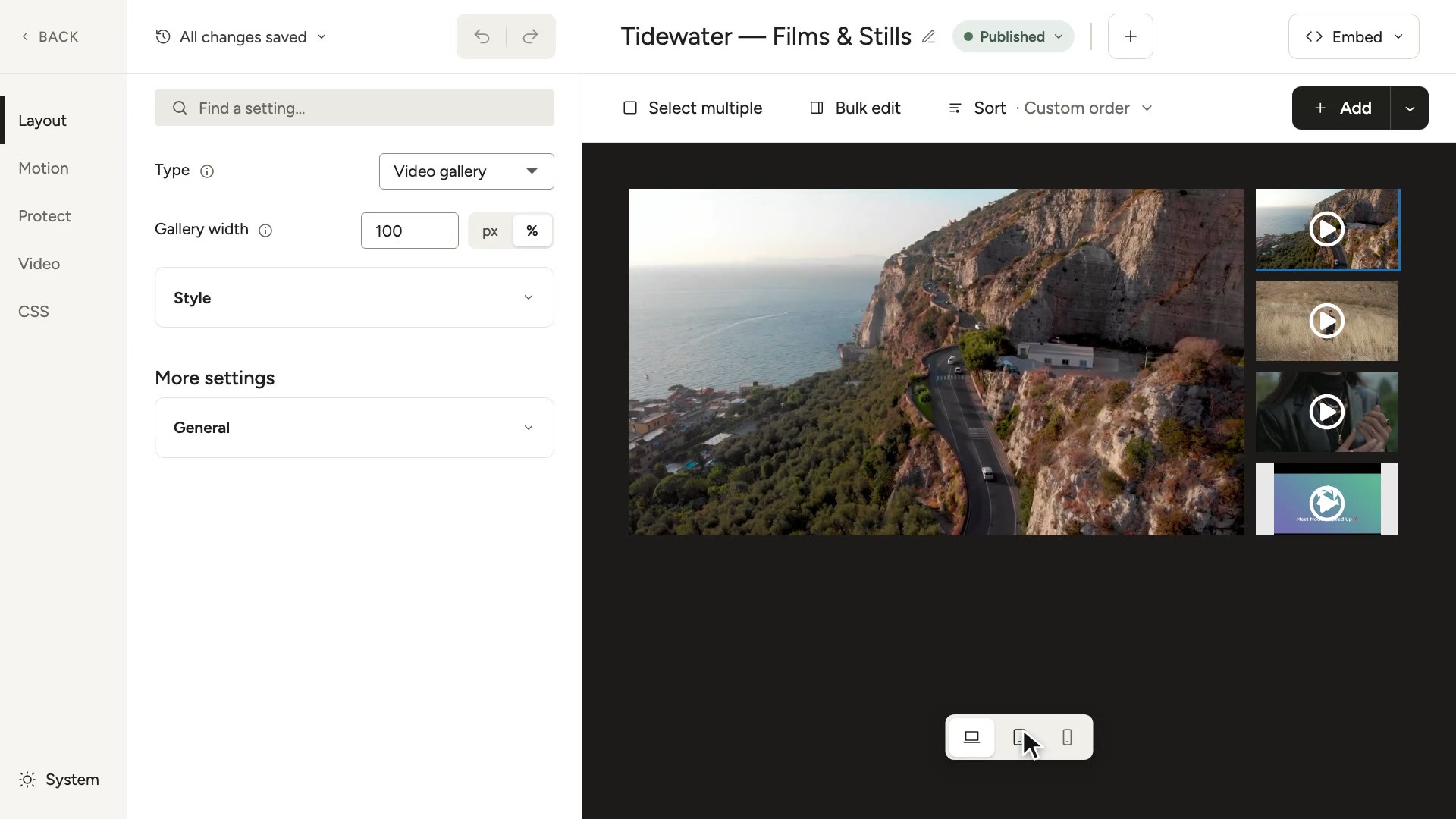
Change Type and the preview turns into a slider.
01
In the editor
One click from grid to slider
Open any gallery and change its type. The preview turns into a slider right away.
01
Open a gallery
Go to Modula → Galleries and open the one you want.
02
Set Type to Slider
You find Type at the top of the Layout section.
03
Pick what shows
Arrows, dots, thumbnails and autoplay each have their own switch.
02
Controls
Set up every part of the slider
Everything changes in the preview while you work. Click Save when you are done.
One switch for each control
Show arrows, page dots and a thumbnail strip, or hide them. Mix them any way you like.
- Show arrows, over the photo or beside it
- Show page dots under the slides
- Show thumbnails with your own spacing and border color
- Autoplay, with Pause when hovering and your own time between slides
Show one slide or several
Visible at once sets how many photos fit in the frame. Tablets and phones get their own number.
- Up to 12 slides at once on desktop
- Separate values for tablet and mobile
- Advance by moves one slide or a whole group
Let the next photo peek in
Turn on Peek side slides and the photos next to the active one show at the edges. It tells visitors there is more to see.
- Side peek size in pixels
- Fade between slides for a softer change
- Loop endlessly and Drag to move
- Right-to-left for sites in Arabic or Hebrew
★★★★★
“I downloaded the free version of this while changing over some photo galleries that were previously in sliders. The output is amazing and my site looks so much better.”
inkpen · Review on WordPress.org
More from Modula Pro


Frequently asked questions
Yes — existing Modula galleries can be converted with a single click by enabling the slider option in gallery settings. No need to rebuild anything from scratch.
Absolutely. The slider is fully responsive and touch-optimized, so swipe gestures work naturally on all smartphones and tablets.
Yes. Choose between smooth sliding and elegant fade transitions, then fine-tune animation speed and easing to match your site’s feel.
No. The slider lazy-loads images and uses hardware-accelerated CSS transitions, so your pages stay fast even with large image galleries.
Yes — display one, two, three or more slides simultaneously, configured per breakpoint. Great for showcasing product collections or portfolio highlights side by side.
Want the full walkthrough? Read how to add an image carousel in WordPress, or see every setting in the Slider docs.
Turn your next gallery into a slider
Slider comes with the Trio and Business plans · 14-day money-back guarantee