The best FooGallery alternative depends on why you’re leaving. FooGallery’s free version is one of the most generous gallery plugins on WordPress.org, so the reason is rarely “it’s bad.” It’s usually one specific thing: a feature locked in a pricier tier, a layout it doesn’t have, or a job it was never built for.
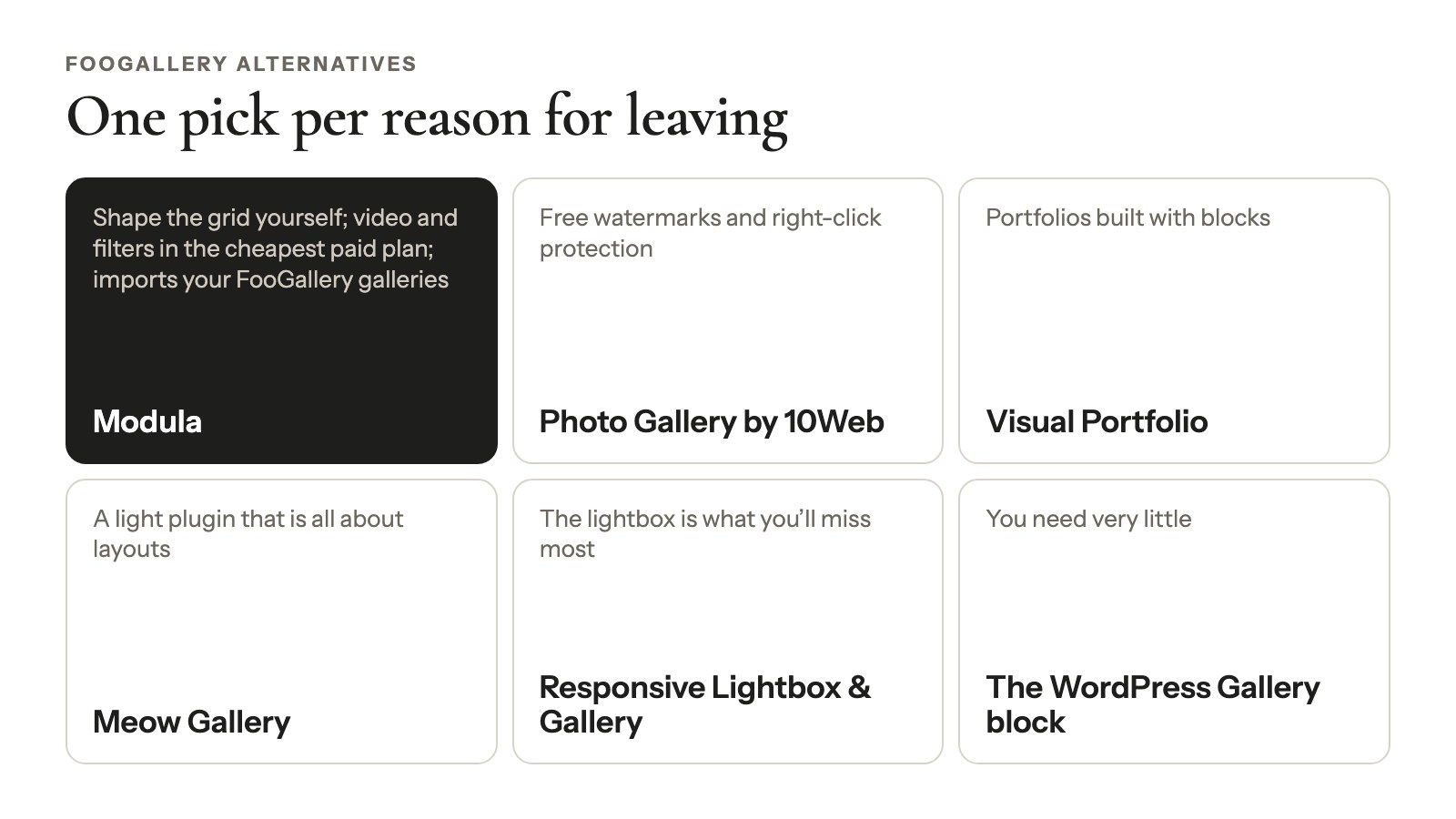
So here’s the short version, one pick per reason:
- Modula if you want to shape the grid yourself, or get video and filters in its cheapest paid plan. It’s also the only plugin here that imports your FooGallery galleries.
- Photo Gallery by 10Web for free watermarks and right-click protection.
- Visual Portfolio for portfolios built with blocks.
- Meow Gallery for a light plugin that’s all about layouts.
- Responsive Lightbox & Gallery if the lightbox (the full-screen view a click opens) is what you’ll miss most.
- The WordPress Gallery block if you need very little.
We checked every price and plugin stat below on October 24, 2026, on each vendor’s own pricing page and on WordPress.org.
FooGallery alternatives at a glance
Of six popular FooGallery alternatives checked in October 2026, only Modula can import your FooGallery galleries; the others differ mainly in how much their free versions cover. FooGallery sits in the first row so you can compare like for like. “Paid from” is the first-year price, then the renewal, checked October 24, 2026.
| Plugin | Pick it if you’re leaving because… | Free version, in short | Paid from | Imports FooGallery galleries? | WordPress.org |
|---|---|---|---|---|---|
| FooGallery (for reference) | — | 7 layouts, albums, password protection, lightbox | PRO Starter $49.99/yr, renews at the same price with auto-renew | — | 100,000+ · 4.8 |
| Modula | You want to shape the grid, or video and filters for less | 7 of 14 gallery types, incl. Custom grid; tablet and phone columns | Starter $39, then $78/yr (1 site) | Yes, free importer | 160,000+ · 4.7 |
| Photo Gallery by 10Web | You won’t pay for protection | 9 views, watermarks, right-click protection | Basic $30 (1 site, 6 months of updates) | No | 100,000+ · 4.5 |
| Visual Portfolio | You build pages with blocks | 5 layouts, post and portfolio grids | Pro $49/yr (1 site) | No | 60,000+ · 4.8 |
| Meow Gallery | You want a light plugin | 6 layouts; can restyle [gallery] shortcodes | Pro $29/yr (1 site) | No | 10,000+ · 4.9 |
| Responsive Lightbox & Gallery | You mostly need the lightbox | 8 lightbox scripts, 3 gallery templates | $29 per extension | No | 100,000+ · 4.9 |
| WordPress Gallery block | You need almost nothing | Grid plus “Enlarge on click” | Free, built in | No | Part of WordPress |
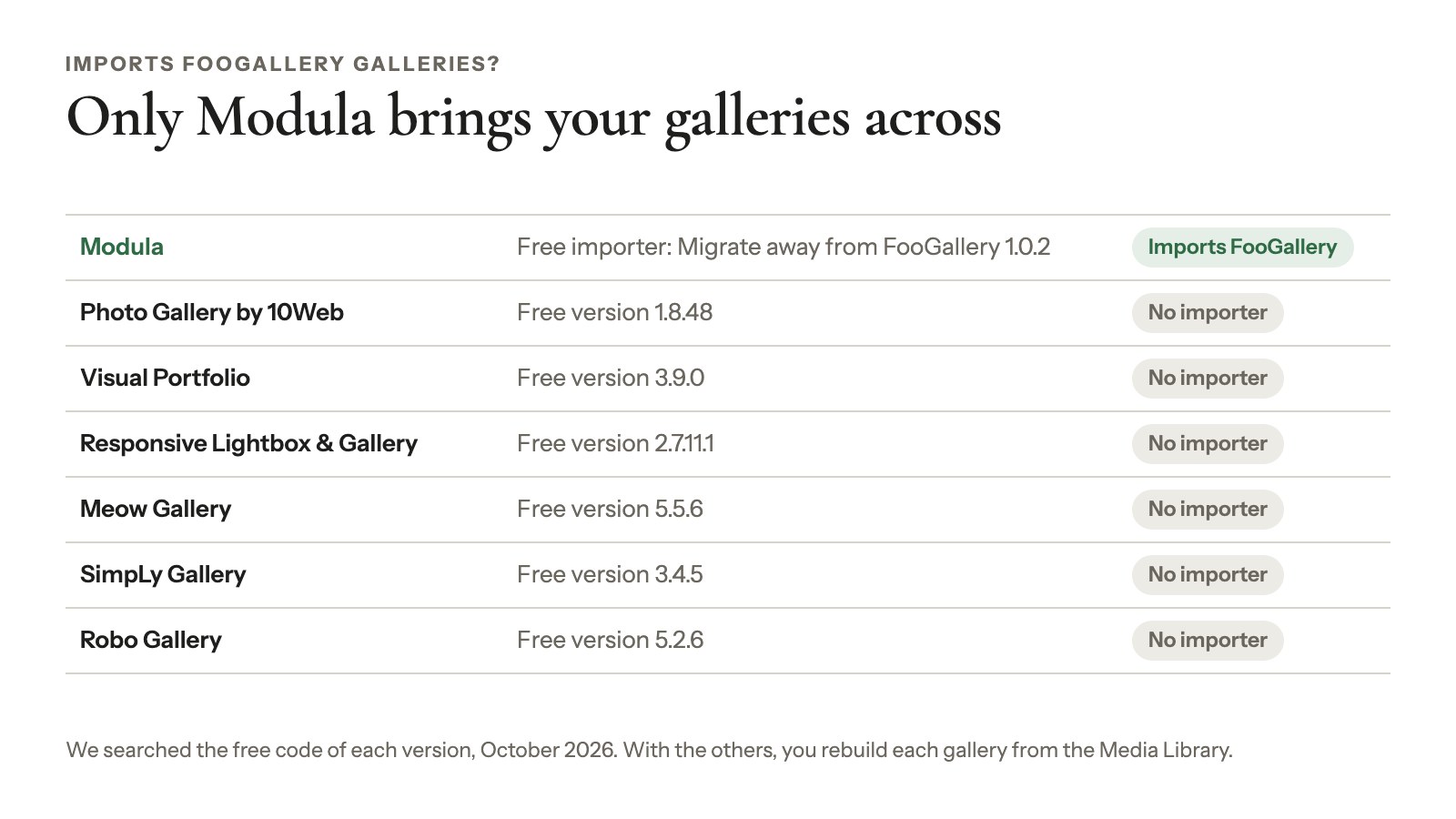
That import column matters more than it looks. We searched the free code of Photo Gallery 1.8.48, Visual Portfolio 3.9.0, Responsive Lightbox 2.7.11.1, Meow Gallery 5.5.6, SimpLy Gallery 3.4.5 and Robo Gallery 5.2.6. None of them has a FooGallery importer, so with any of them you rebuild each gallery from your Media Library.
Should you leave FooGallery at all?
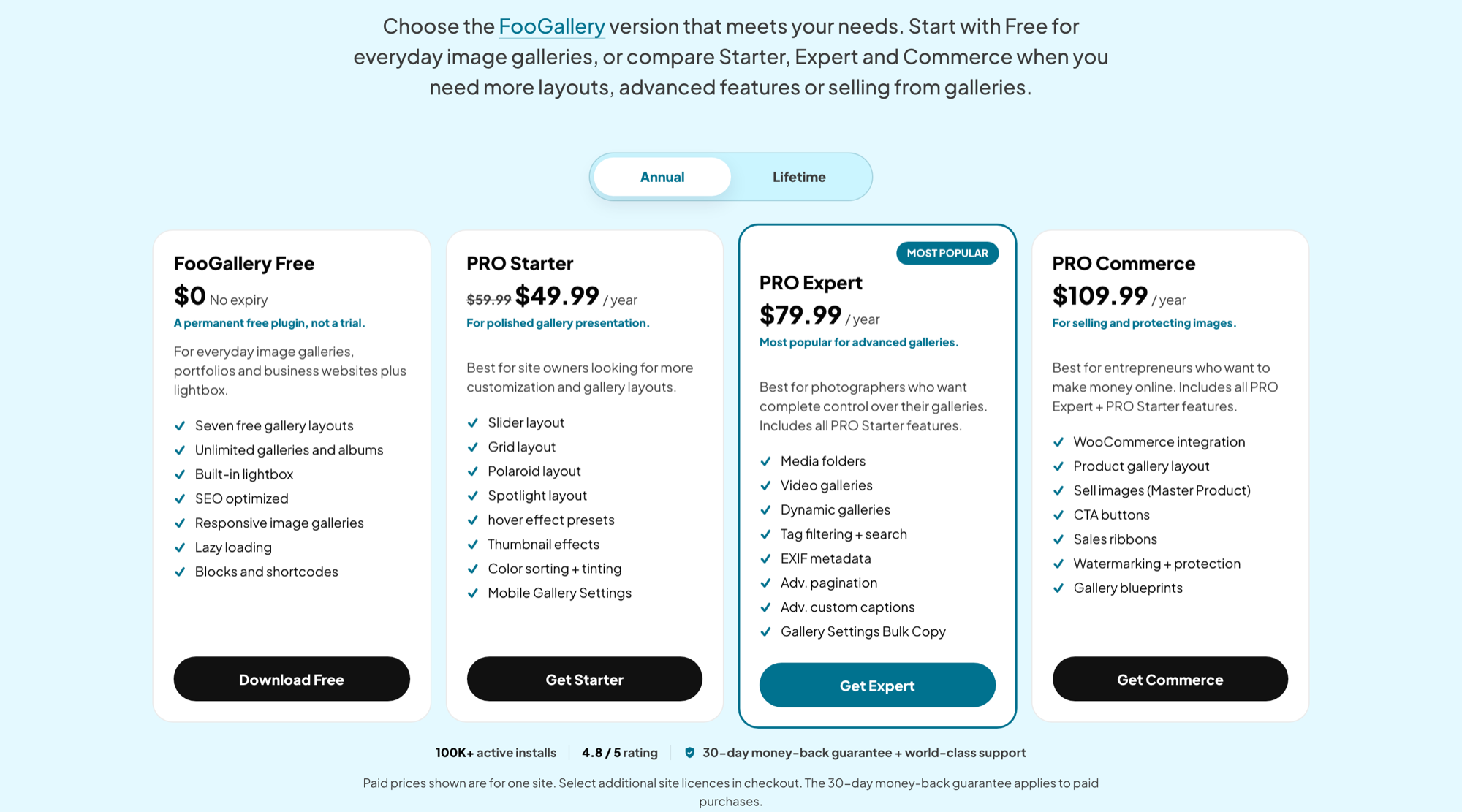
Stay on FooGallery if its free version does what you need. FooGallery has 100,000+ active installs and a 4.8/5 rating from 994 ratings on WordPress.org (October 2026), and it gives away several features other plugins charge for.
What FooGallery’s free version already gives you
FooGallery 3.3.17, updated October 19, 2026, includes all of this for free:
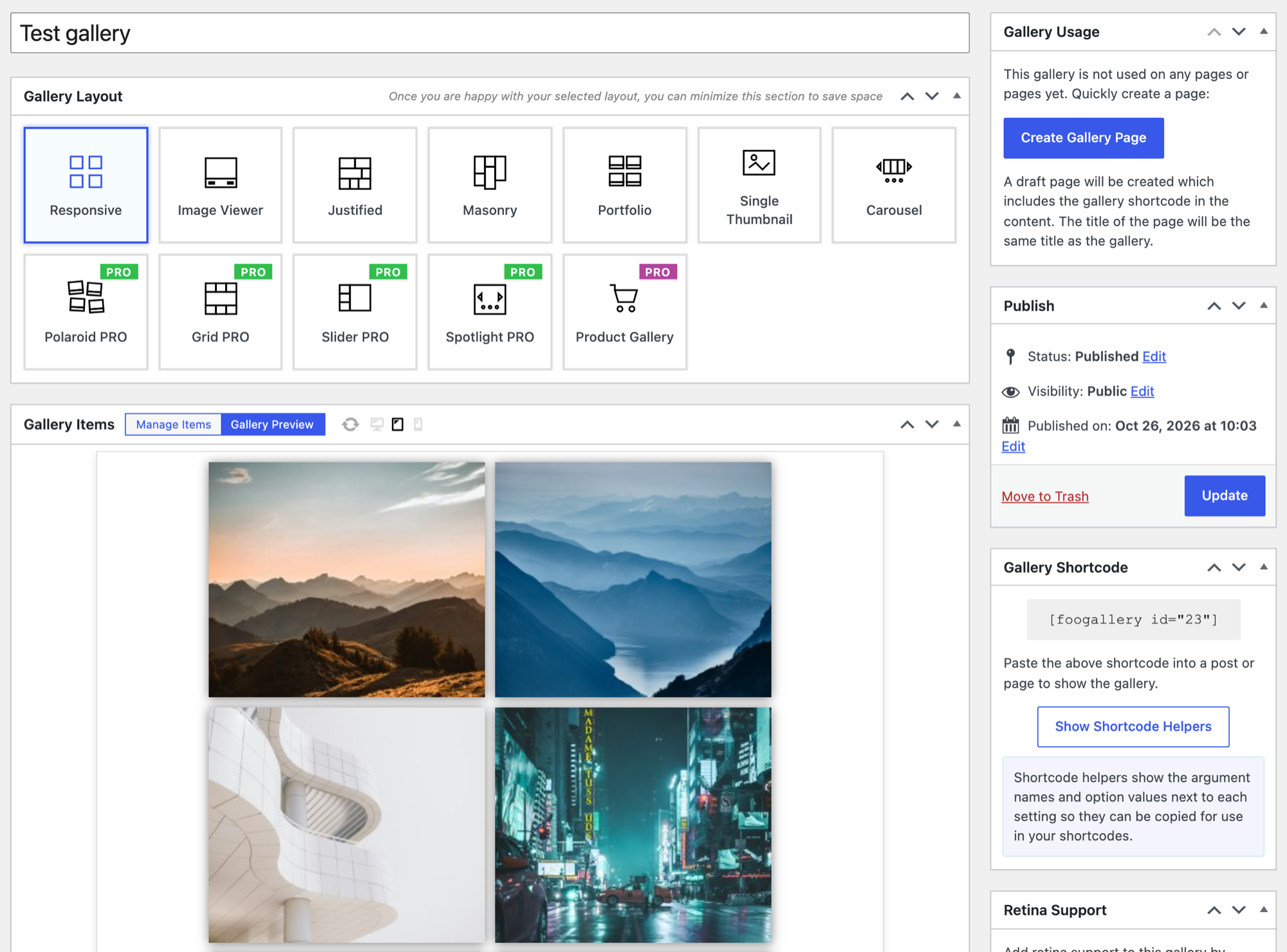
- 7 layouts: Responsive, Image Viewer, Masonry, Portfolio, Justified, Single Thumbnail and Carousel.
- Unlimited galleries and albums. Modula and Visual Portfolio charge for albums.
- A built-in lightbox with fullscreen, a thumbnail strip and a download button.
- Password-protected galleries, built on WordPress’s own post passwords.
- A live preview with a desktop, tablet and phone switch, plus phone columns on the Responsive layout.
- Drag-and-drop ordering, lazy loading (images load as you scroll) and simple dot pagination.
- Housekeeping tools: import/export between FooGallery sites, a Media Audit report, and a migrator that pulls in galleries from other plugins, Modula among them.
The paid side is fair too. FooPlugins says auto-renewing licenses keep the price you first paid (its 2026 comparison). Its plans page lists lifetime licenses from $199.99, a 7-day PRO trial and a 30-day refund.
Why people look for something else
People usually leave FooGallery for one of these reasons:
- The feature you want sits in a higher tier. Video, tag filtering and search, EXIF and Load more are in PRO Expert at $79.99/year. Watermarks and right-click protection are in PRO Commerce at $109.99/year. Mobile settings beyond phone columns take PRO Starter at $49.99/year.
- Preset layouts only. You pick a layout and adjust it. There’s no grid where you decide how big each tile is.
- Proofing is a separate add-on, $39.99/year for one site (FooPlugins).
- Upgrade prompts. Some users complained about upsell notices in the dashboard in WordPress.org reviews from 2018 to 2023. The 1–3-star reviews from 2025 and 2026 don’t repeat it.
If none of these is your reason, the cheapest move is no move.
Watch out
Try it on a copy first. Install the alternative you like on a staging copy of your site. Rebuild one real gallery, open it on your phone, and only then plan the whole move.
What to check before you switch from FooGallery
Before you switch, find every place a FooGallery gallery appears. Each one needs a replacement, and deactivating FooGallery won’t make one for you. In FooGallery 3.3.17, a gallery can turn up in six different places.
Find every FooGallery gallery on your site
FooGallery saves each gallery as its own post type (foogallery) that points to images in your Media Library. Albums are a separate post type. A gallery can appear through:
- the
[foogallery id="…"]shortcode; - the FooGallery block;
- FooGallery’s Elementor widget;
- its Divi module;
- a classic sidebar widget;
- PHP in a theme template.
Search your posts and pages for “foogallery” and keep the list. A wedding photographer with 40 client galleries spread over 25 pages will be glad of it on day two.
Know what breaks if you just deactivate it
Your photos are safe: they stay in the Media Library whatever you do with the plugin. Your galleries aren’t. Deactivate FooGallery and its shortcodes print as plain text, and its blocks stop showing anything.

So keep FooGallery active until every gallery has a replacement.
List the features you can’t lose
Some FooGallery PRO features have no automatic path to any other plugin:
- video items;
- Media Tags filters;
- dynamic galleries built from folders, Lightroom or posts;
- WooCommerce master products;
- Blueprints.
Write down the ones you use, then check which plan of the new plugin covers them. And compare the year-two price, not just year one; the cost table below does it for you.
The best FooGallery alternatives, by reason for leaving
Five plugins and WordPress’s own Gallery block can replace FooGallery, and each pick below starts with the reason for leaving it fixes best. Every entry lists its WordPress.org numbers (checked October 24, 2026), the free version, the paid plans, the catch, and what moving from FooGallery takes.
Modula: when you want to shape the grid yourself
160,000+ active installs · 4.7/5 from 616 ratings on WordPress.org · version 3.0.16, updated October 22, 2026
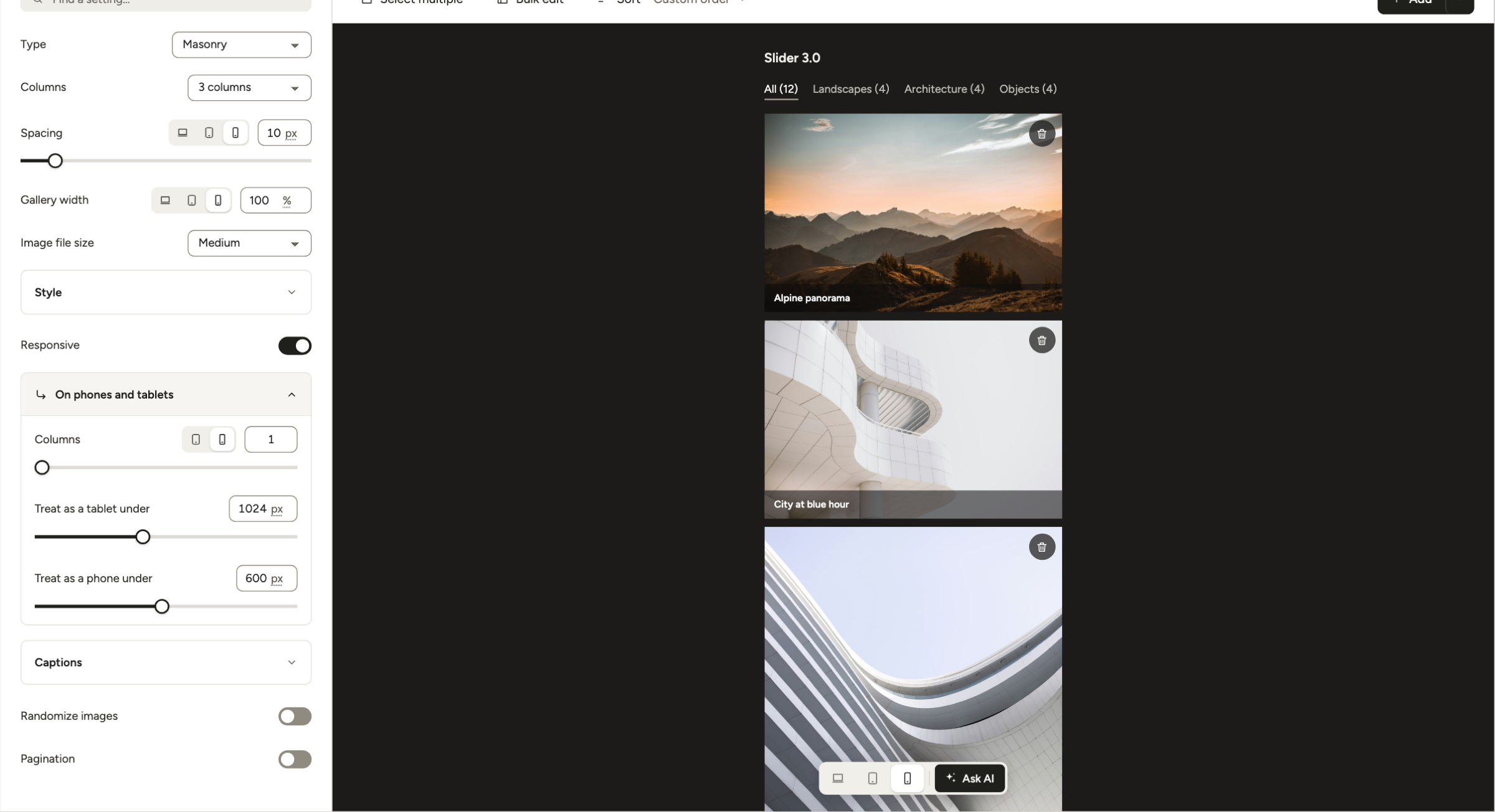
We make Modula, so weigh this entry with that in mind. Modula 3.0 (September 2026) builds each gallery in one editor: settings on the left (Layout, Lightbox, Filters, Motion, Interact, Protect), a live preview on the right, and autosave.
Free: 7 of its 14 gallery types: Masonry, Uniform grid, Fit grid, Justified grid, Custom grid, Creative and Polaroid. Custom grid is the one FooGallery doesn’t have: you decide how big each tile is. Separate tablet and phone columns live under Layout → Responsive → On phones and tablets, and the Desktop / Tablet / Mobile switch under the preview shows the result.
Paid (checked October 2026, Modula pricing):
- Starter: $39 the first year, then $78 (1 site). Video galleries, filters, sorting, lightbox slideshow, and 250 AI credits for alt text, titles and captions.
- Trio: $69, then $138 (3 sites). Adds albums, password protection, Image Guardian, Slider, Instagram, Content Galleries, image compression and a CDN.
- Business: $99, then $198 (5 sites). Adds watermarks, proofing, downloads, EXIF, zoom, pagination and Load more, and comments.
- Lifetime: $269, $479 or $689. Every plan has a 14-day refund.
Good: video and filters cost $39 in year one, against $79.99 for FooGallery PRO Expert.
Watch out:
- Albums and password protection are free in FooGallery but need Trio in Modula.
- There’s no store or WooCommerce selling. Image Licensing adds a license to your images; it doesn’t sell one.
- Renewals are at the full yearly price.
- The free version has no drag-to-reorder or Sort, and the lightbox’s background, transition and caption settings are Pro.
- FooPlugins’ June 2026 page-weight test put Modula behind FooGallery, but it tested version 2.14.30, before 3.0. There are no published 3.0 numbers yet, so test on your own pages.
Moving from FooGallery: a free importer brings your galleries over (steps below). For a row-by-row table, read Modula vs FooGallery.
Photo Gallery by 10Web: when you won’t pay for protection
100,000+ · 4.5/5 from 1,581 ratings · 1.8.48, updated October 15, 2026 (WordPress.org)
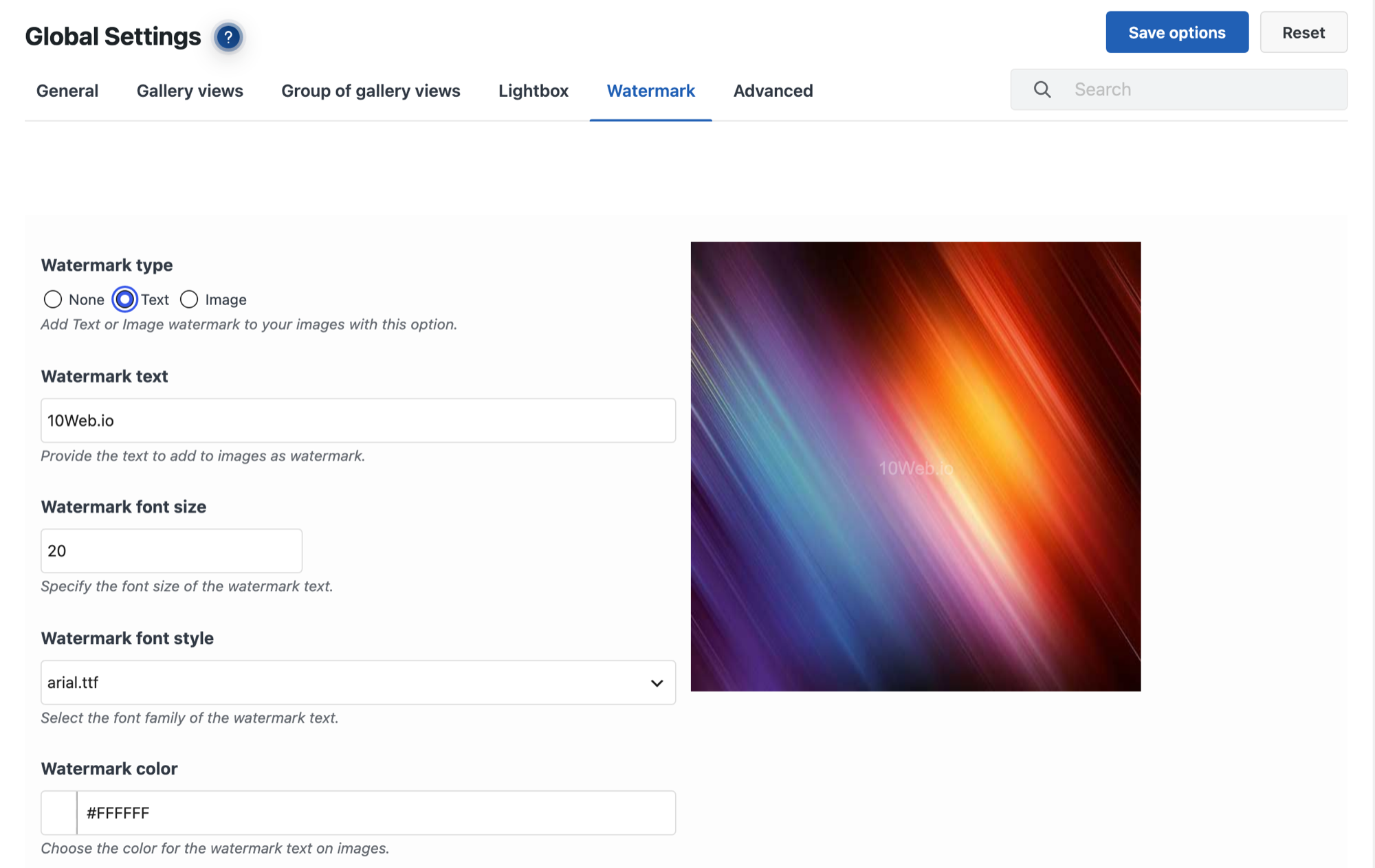
Photo Gallery gives away what FooGallery charges $109.99 a year for: watermarks and right-click protection.
Free: 9 gallery and album views, YouTube and Vimeo videos, a tag filter, text or image watermarks, right-click protection and a lightbox with 15 slideshow effects.
Paid (checked October 2026, 10Web): Basic $30 (1 site), Pro $60 (5 sites), Bundle $100 (30 sites), each with 6 months of updates.
Watch out: WordPress.org lists it as tested up to WordPress 6.6.10, while every other plugin here says 7.1 or later.
Moving from FooGallery: rebuild from the Media Library.
Visual Portfolio: when you build pages with blocks
60,000+ · 4.8/5 from 340 ratings · 3.9.0, updated October 24, 2026, tested up to WordPress 7.2 (WordPress.org)
Visual Portfolio is built around blocks: the gallery is a block with a live preview, and the same block can show posts or portfolio items as a filterable grid. Its readme says it loads scripts and styles only on pages that show a gallery.
Free: Masonry, Justified, Tiles, Grid and Slider/Carousel layouts, skins, and filterable portfolio and post grids.
Paid (checked October 2026, Visual Portfolio pricing): Pro is $49 a year for 1 site or $99 for 5 sites. Its WordPress.org page lists albums, video items, watermarks, a password form, an age gate and photo proofing as Pro features.
Watch out: albums and password protection, both free in FooGallery, are Pro here.
Moving from FooGallery: rebuild from the Media Library.
Meow Gallery: when you want a light plugin
10,000+ · 4.9/5 from 203 ratings · 5.5.6, updated October 3, 2026 (WordPress.org)
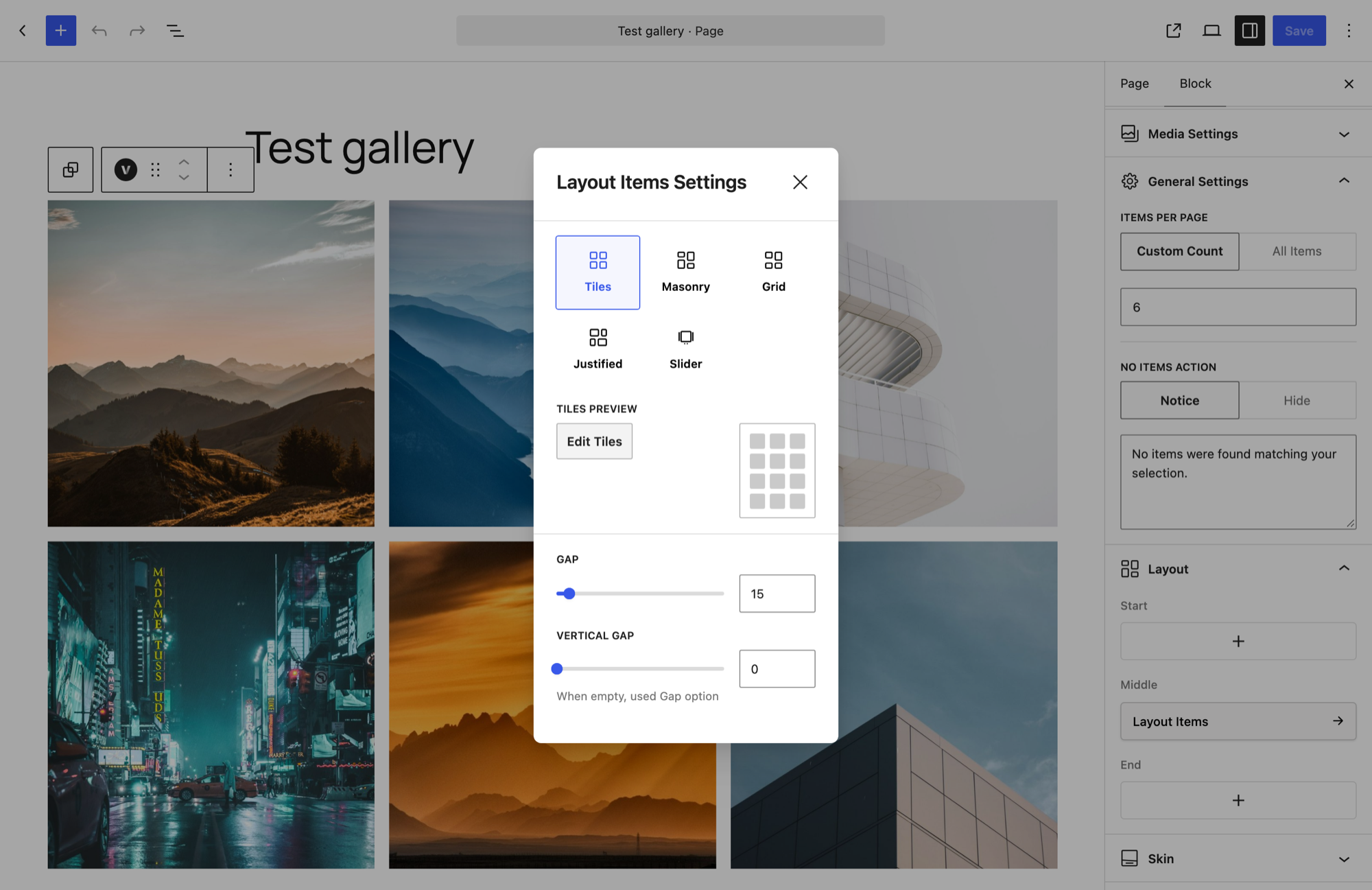
Meow Gallery does one job: it lays out photos well and gets out of the way. It can take over WordPress’s classic [gallery] shortcode, so older galleries built with it pick up Meow’s layouts.
Free: Tiles, Masonry, Justified, Square, Cascade and Horizontal layouts. It works with any lightbox; Meow Lightbox is the maker’s own.
Paid (checked October 2026, Meow Apps): Pro $29/year (1 site), $49 (5 sites) or $79 (20 sites); lifetime from $149 (5 sites). Pro adds a carousel, a map layout, infinite loading and animations. 14-day refund.
Watch out: no albums, video, protection or proofing.
Moving from FooGallery: rebuild, and it’s quick. Meow’s Gallery block can take a core Gallery block’s images through the editor’s Transform menu.

Responsive Lightbox & Gallery: when you mostly need the lightbox
100,000+ · 4.9/5 from 2,003 ratings · 2.7.11.1, updated October 20, 2026 (WordPress.org)
If the lightbox was what you liked most about FooGallery, dFactory’s plugin is the specialist.
Free: 8 lightbox scripts, an automatic lightbox for WordPress galleries, 3 gallery templates (Grid, Slider, Masonry), AJAX pagination and infinite scroll.
Paid (checked October 2026, dFactory): extensions at $29 each, or $69 for the Photo & Art bundle.
Moving from FooGallery: rebuild, ideally with Gallery blocks that the auto-lightbox picks up.
The WordPress Gallery block: when you need almost nothing
The Gallery block is free and built into WordPress. In FooPlugins’ June 2026 test with the same 10 images, the Gallery block page weighed 240 KB against 371 KB for FooGallery, the lightest page they measured.
Turn on Enlarge on click and images open in a lightbox. There are no albums, filters, video or protection, though. If you already run Jetpack, its Tiled Gallery block adds mosaic layouts and Jetpack’s image CDN. Our guide to creating an image gallery in WordPress walks through it.
Also worth a look: SimpLy Gallery (40,000+ · 4.8/5 from 118 ratings), a block-first plugin that mixes images, video and audio for free. We couldn’t find its pricing page, so it’s not compared here.
What FooGallery and its alternatives cost over two years
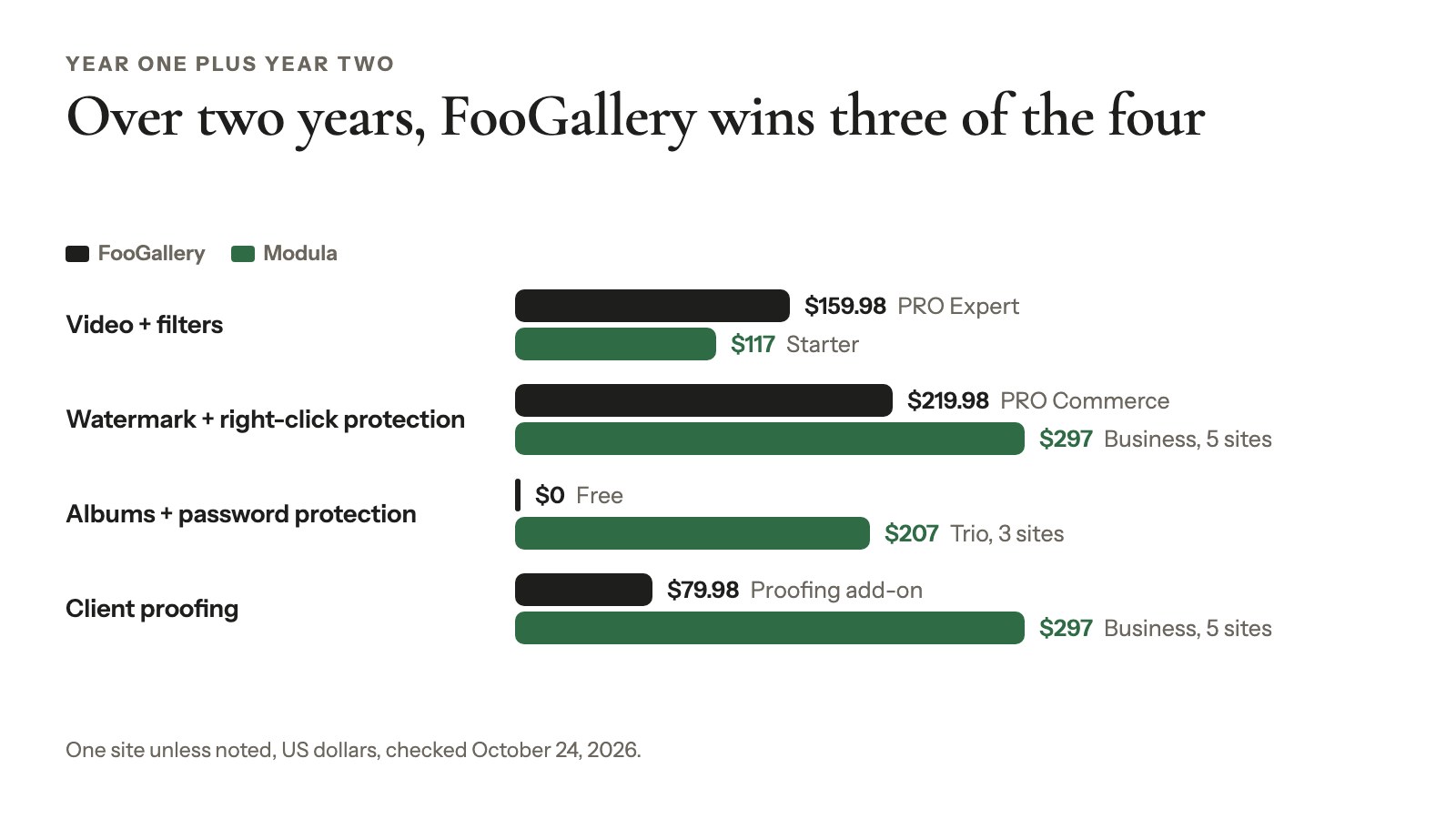
FooGallery is often the cheaper choice by year two, because its renewals stay at the price you first paid, as long as auto-renew is on. Next to Modula, it wins three of the four rows below; Modula is the cheaper one for video and filters.
Here’s year one plus year two for FooGallery and Modula, for one site unless noted, checked October 24, 2026:
| What you need | FooGallery | Modula |
|---|---|---|
| Video + filters | PRO Expert: $159.98 | Starter: $117 |
| Watermark + right-click protection | PRO Commerce: $219.98 | Business: $297 (5 sites) |
| Albums + password protection | Free: $0 | Trio: $207 (3 sites) |
| Client proofing | Proofing add-on: $79.98 (works with Free) | Business: $297 (5 sites) |
A few things the table doesn’t show:
- Photo Gallery by 10Web covers watermarks and right-click protection for $0, and its free version also embeds YouTube and Vimeo videos and has a tag filter.
- Several sites? Modula’s Trio and Business cover 3 and 5 sites. FooGallery’s prices above are per site.
How to migrate your FooGallery galleries to Modula
Modula imports FooGallery galleries with a free helper plugin, Migrate away from FooGallery (version 1.0.2, October 2026). The helper also swaps your FooGallery shortcodes and blocks for Modula’s, so most pages update themselves. These are the FooGallery-specific steps; our full migration guide covers every other source.
- Back up your site and leave FooGallery active.
- Install Modula from Plugins → Add Plugin.
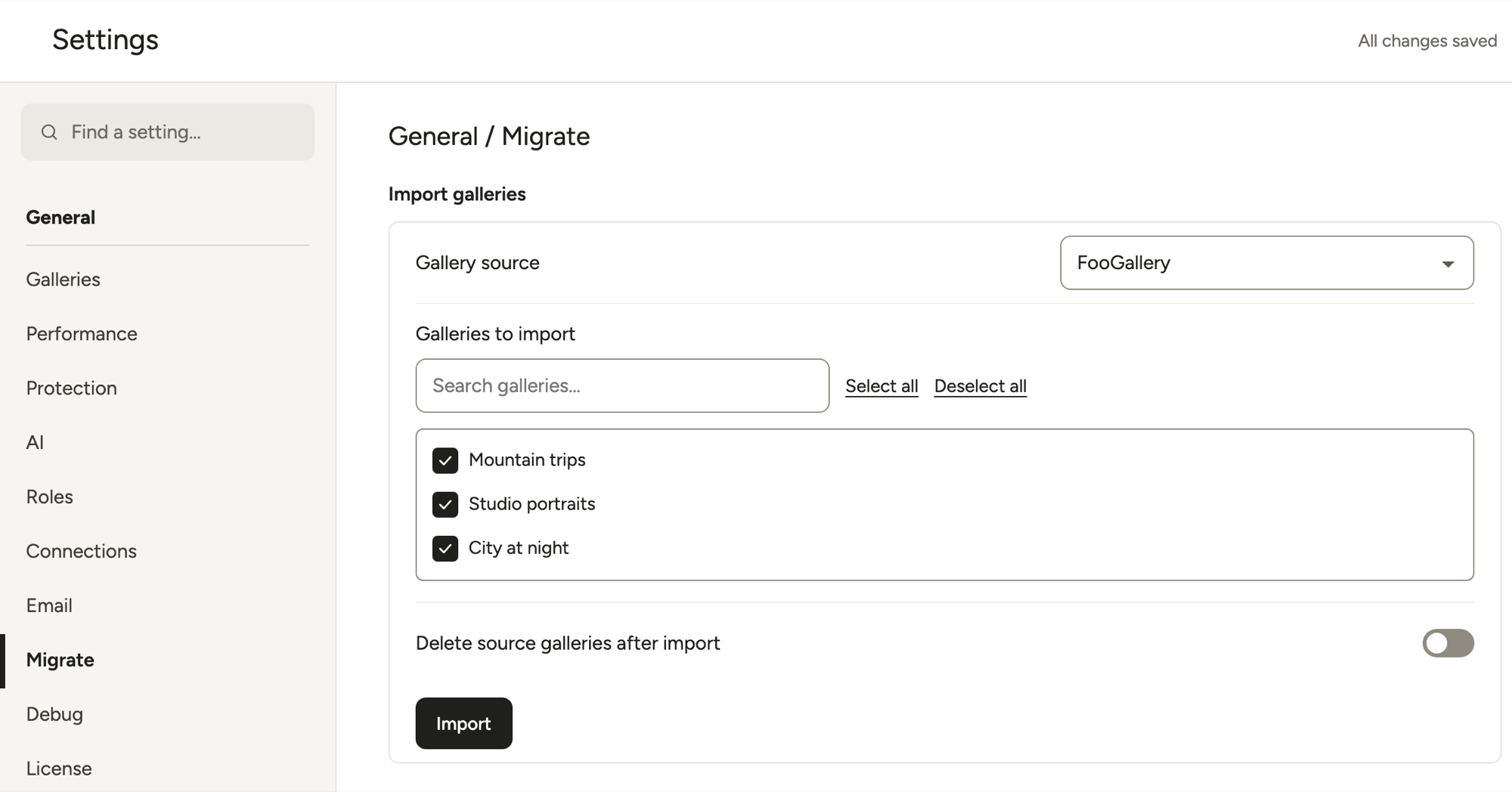
- Open Modula → Content. Modula spots your published FooGallery galleries and shows a Galleries from another plugin detected notice in its notifications. Click Install & go to Migrate (or Activate & go to Migrate if the helper is already installed): it sets up the helper plugin and opens Settings → Migrate.
- Pick FooGallery under Gallery source.
- Tick the galleries under Galleries to import, leave Delete source galleries after import off (it deletes for good), and click Import. Modula reports the result, for example “Imported 3 of 3 galleries.”
What comes across
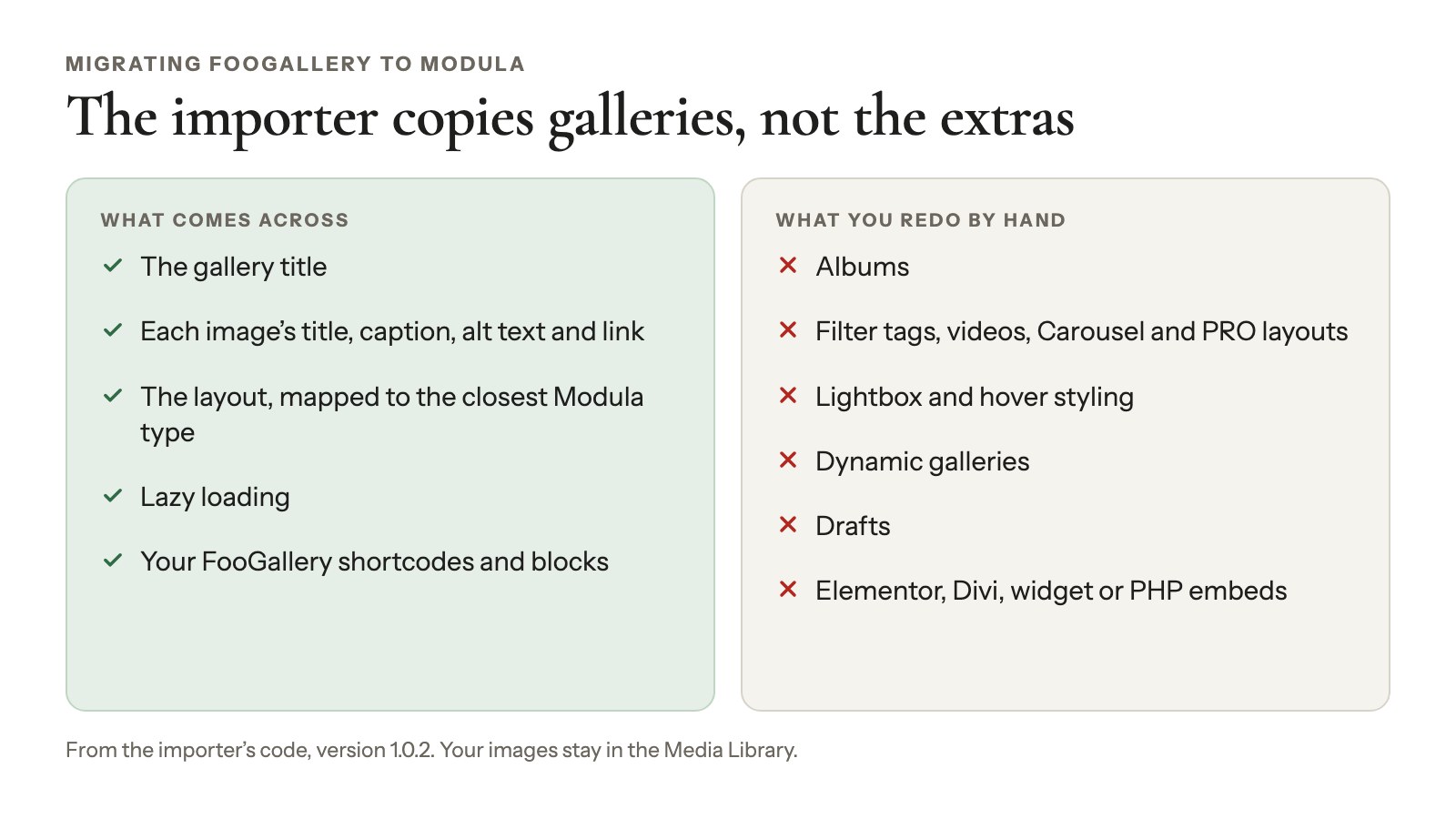
Going by the importer’s code (version 1.0.2), this is what it copies:
- The gallery title.
- Each image’s text: title, caption, alt text, custom link and “open in new tab.”
- The layout, mapped to the closest Modula type. Responsive becomes a grid with its thumbnail size and, usually, its spacing; Portfolio keeps its thumbnail size but not its spacing (set Spacing under Layout). Image Viewer becomes Creative. Justified keeps its row height and last-row setting, and Masonry keeps its column count (or its gutter, if you used the fixed-width layout).
- Lazy loading.
- Your embeds:
[foogallery id="…"]shortcodes (extra attributes included) and FooGallery blocks in posts and pages become Modula’s.
Your images don’t move or get copied. They stay in the Media Library, and because titles, alt text and captions live with each image, they show up in Modula straight away. After converting, an image’s Description shows instead of its Caption, if it has one.
What you redo by hand
- Albums. They aren’t imported. Rebuild them with Modula’s Albums (Trio plan).
- Filter tags, videos and other layouts. Carousel and the PRO layouts (Polaroid, Grid, Slider, Spotlight) fall back to a default grid.
- Lightbox and hover styling. Set them again in the Lightbox and Interact sections.
- Dynamic galleries built from a folder, Media Tags, Lightroom or a post query. They have no saved image list, so the importer skips them as empty.
- Drafts. The importer lists only published galleries.
- Galleries placed with FooGallery’s Elementor widget, Divi module, classic widget or PHP. The importer only rewrites shortcodes and blocks. Swap these for Modula’s Elementor widget or Divi module, or paste the shortcode from Embed.
We read the video and dynamic-gallery behavior from the code rather than testing it on a live site, so check those galleries first.
Finish in the new editor
Imported galleries arrive in Modula’s classic format. Convert them right away: until you do, a page with a Masonry one can show an error.
- In Modula → Content, tick the imported galleries and choose Convert to new editor from the bulk actions (or from a gallery’s ⋮ menu). Modula backs up the classic settings and keeps the same ID and shortcode, so your pages pick up the converted version.
- Try the new editor only makes a copy to test, so it won’t fix your pages. Restore classic editor takes a converted gallery back.
- Pick a Type under Layout and check each page. Search your content for leftover “foogallery” text, and only then deactivate FooGallery.
<video controls preload=”metadata” poster=”https://wp-modula.com/wp-content/uploads/2026/11/kb3-4451-walkthrough-poster.jpg” src=”https://wp-modula.com/wp-content/uploads/2026/11/kb3-4451-walkthrough.mp4″></video>
More detail: Move a gallery to the new editor and back and Migrate, import and export Modula galleries.
How to switch from FooGallery to any other plugin
Switching from FooGallery to any plugin other than Modula means rebuilding each gallery. Your images are already in the Media Library, though, so it’s mostly re-selecting them, not re-uploading. Do it in this order:
- Open each FooGallery gallery and note the image order and captions.
- Create the new gallery from the Media Library.
- Replace the shortcode or block on each page.
- Deactivate FooGallery only when every page is done.
And it isn’t a one-way door. FooPlugins’ free FooGallery Migrate (1,000+ installs on WordPress.org, October 2026) imports galleries from Modula, 10Web, Robo and other gallery plugins, so you can go back if the new plugin doesn’t work out.
Which FooGallery alternative should you choose?
Pick Modula for video, filters or a grid you size yourself, Photo Gallery for free protection, or stay on FooGallery for free albums. Prices as of October 24, 2026:
- You want video and filters without paying $79.99 a year: Modula Starter, $39 for the first year.
- You want a grid where you size each tile: Modula, whose Custom grid is free.
- You want client proofing (clients pick their favorite photos) in the same plan as watermarks and downloads: Modula Business, $99 for the first year (5 sites). It doesn’t sell photos, though.
- You sell photos: stay on FooGallery. PRO Commerce ($109.99 a year) sells them through WooCommerce.
- You want watermarks and right-click protection for free: Photo Gallery by 10Web.
- You build pages with blocks and want portfolio grids: Visual Portfolio.
- You want a light plugin for a few galleries: Meow Gallery, free.
- You need albums and password protection but no paid plan: stay on FooGallery Free.
Comparing from scratch rather than leaving FooGallery? Our WordPress gallery plugin review covers the popular ones in more depth.
Frequently asked questions
Yes. FooGallery’s free version on WordPress.org (100,000+ installs, 4.8/5) includes 7 layouts, unlimited galleries and albums, a lightbox and password-protected galleries. Video and filtering need PRO Expert ($79.99/year), and watermarks and right-click protection need PRO Commerce ($109.99/year), checked October 2026.
Modula is our first pick: its free version has the Custom grid and separate tablet and phone columns. If you need free watermarks and right-click protection, Photo Gallery by 10Web has them.
Meow Gallery is the light option, and the Gallery block is enough for simple grids. On sheer breadth, though, FooGallery Free is hard to beat.
Among the plugins here, only to Modula. Its free “Migrate away from FooGallery” plugin copies titles, image text and layouts, and replaces your shortcodes and blocks. Albums, videos, filters and dynamic galleries still need redoing. For every other plugin, you rebuild each gallery from your Media Library.
Nothing happens to them. Your images live in the WordPress Media Library and stay there. The gallery entries stay in the database too, unless you run the Full Uninstall in FooGallery’s settings, which removes them. Your pages lose the galleries, though: shortcodes show up as plain text. Replace every gallery first, then deactivate.
For some needs. Modula is cheaper for video and filters ($39 against $79.99 in year one, October 2026) and has a free Custom grid and tablet columns. FooGallery is cheaper for albums, password protection and proofing, and it renews at the same price. Our Modula vs FooGallery comparison goes row by row.
Yes, as long as auto-renew is on: FooPlugins says auto-renewing licenses keep the price you first paid (October 2026). Modula renews at its full yearly price after the first-year discount, so Modula Starter goes from $39 to $78.
Yes. FooPlugins’ free FooGallery Migrate plugin (1,000+ installs on WordPress.org, October 2026) imports galleries and albums from Modula, 10Web, Robo and other gallery plugins, and its readme says it replaces their blocks and shortcodes in your content. So trying an alternative isn’t a one-way move.