The best photography website builder is the one that fits the job your site has to do.
If you want to own the site, its files and its blog, WordPress with Modula, the gallery plugin we make, is the route, and it’s where we’d start.
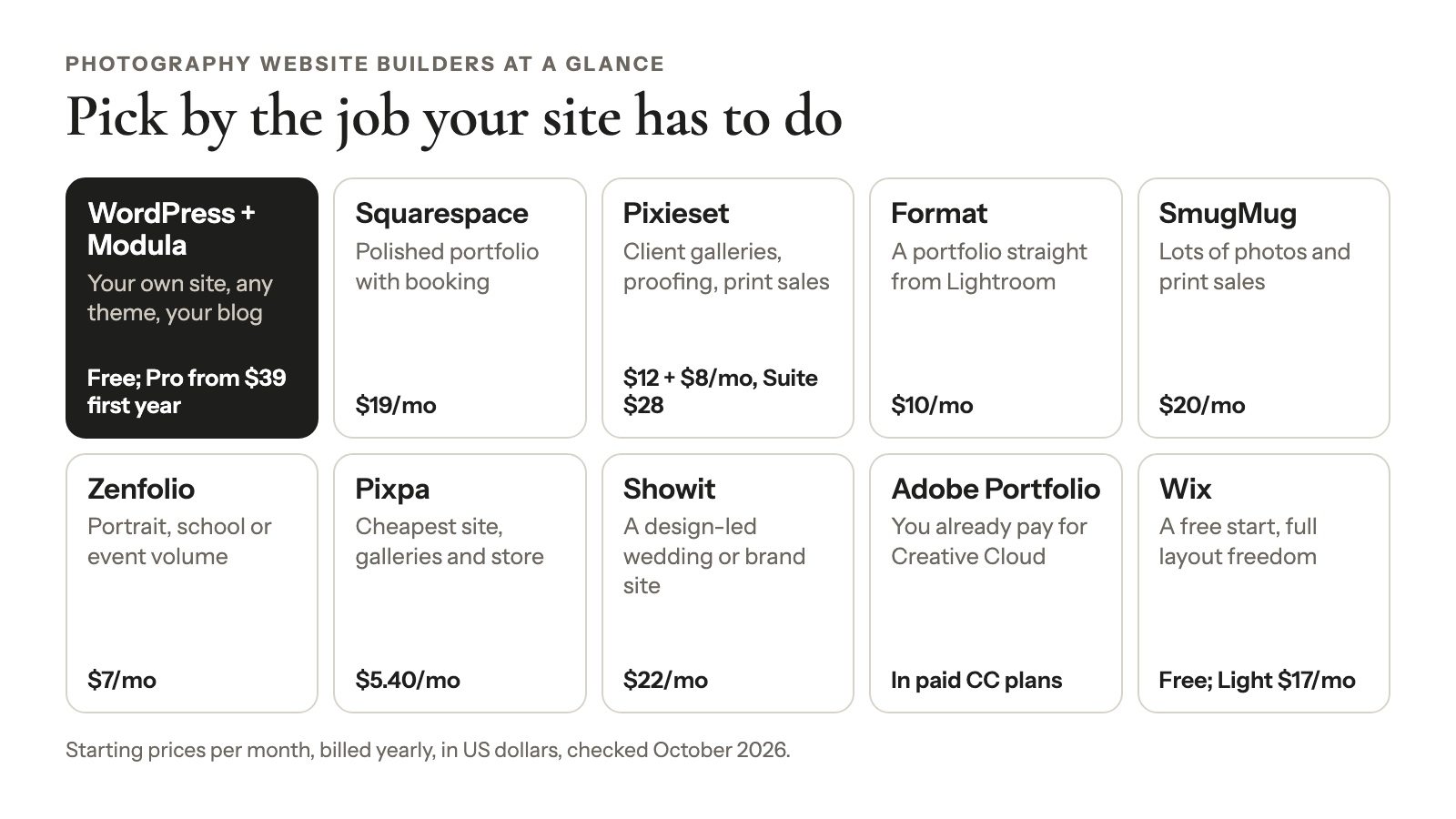
Want a polished portfolio with session booking? Squarespace. Are client galleries and print sales the business? Pixieset. Publishing straight from Lightroom? Format. Tens of thousands of photos? SmugMug. A free start? Wix.
We checked every price on the vendor’s own pricing page in October 2026 and flag the few we couldn’t. That matters this year: Squarespace raised its prices in July, and most lists still show the old ones.
Start with the quick picks, then read the hosted-vs-WordPress section before you pay for anything. It’s the choice that’s hardest to undo.
The best photography website builder for each job
No website builder for photographers wins every job, so pick by what your site mainly has to do. Prices are per month, billed yearly, in US dollars (checked October 2026).
| If you mainly need… | Pick | From | Watch out for |
|---|---|---|---|
| Your own site, any theme, a blog you control | WordPress + Modula | WordPress and Modula Lite free; Modula Pro from $39 the first year | You run the site; Modula has no store |
| A polished portfolio with session booking | Squarespace | $19/mo | No free plan; Acuity booking is billed separately; no proofing or print-lab orders listed |
| Client galleries, proofing and print sales in one login | Pixieset | Website $12/mo + Client Gallery from $8/mo, or Suite from $28/mo | Two subscriptions unless you buy Suite |
| A photo portfolio published straight from Lightroom | Format | $10/mo | Basic stops at 70 images and has no store |
| Lots of photos and print sales | SmugMug | $20/mo; selling from $23.50 | SmugMug keeps 15% of your print markup |
| Portrait, school or event volume | Zenfolio | $7/mo | 7% fee on every order |
| The cheapest site + galleries + store | Pixpa | $5.40/mo | 3 GB of storage on Basic |
| A design-led wedding or brand site | Showit | $22/mo | The blog costs extra and runs on WordPress |
| You already pay for Creative Cloud | Adobe Portfolio | Included in paid Creative Cloud plans | Portfolio only, no store |
| A free start and full layout freedom | Wix | Free; Light $17/mo | Light has 2 GB of storage |
Photography website builders compared at a glance
Storage and store terms are where one photography website maker differs most from the next: entry plans hold anything from 70 images to unlimited photos, and sales fees run from 0% to 15% (checked October 2026).
| Builder | Free plan or trial | From (billed yearly) | Storage on the entry plan | Client galleries / proofing | Store |
|---|---|---|---|---|---|
| WordPress + Modula | WordPress and Modula Lite free | Hosting + Modula Pro from $39 the first year | Your hosting plan | Yes, on Modula’s Business plan | No |
| Squarespace | 14-day trial | $19/mo | No caps listed | Not listed on its plans | Yes (2% fee on Basic) |
| Wix | Free plan | $17/mo | 2 GB | Not listed on its plans page | Payments from Core |
| Pixieset | Free Website and Client Gallery plans | $12/mo + $8/mo | Client Gallery Free: 3 GB | Yes (separate subscription) | Yes |
| Format | 14-day trial, no card | $10/mo | 70 images | Client galleries | Pro and Pro Plus |
| SmugMug | 14-day trial | $20/mo | Unlimited photos | Client favoriting on Pro | From Portfolio |
| Zenfolio | Trial, no card | $7/mo | 15 GB | Favorites and comments | From Professional |
| Pixpa | 15-day trial, no card | $5.40/mo | 3 GB | Yes | Yes |
| Showit | 14-day trial | $22/mo | 20 GB | No | No |
| Adobe Portfolio | Needs a paid Creative Cloud plan | $19.99/mo (Photography plan) | 1 TB (the plan’s cloud storage) | No | No |
Checked October 2026; the Adobe plan is annual, billed monthly. Squarespace and Wix US prices come from price trackers; their reviews explain why.
Hosted builder or WordPress: the decision that matters most
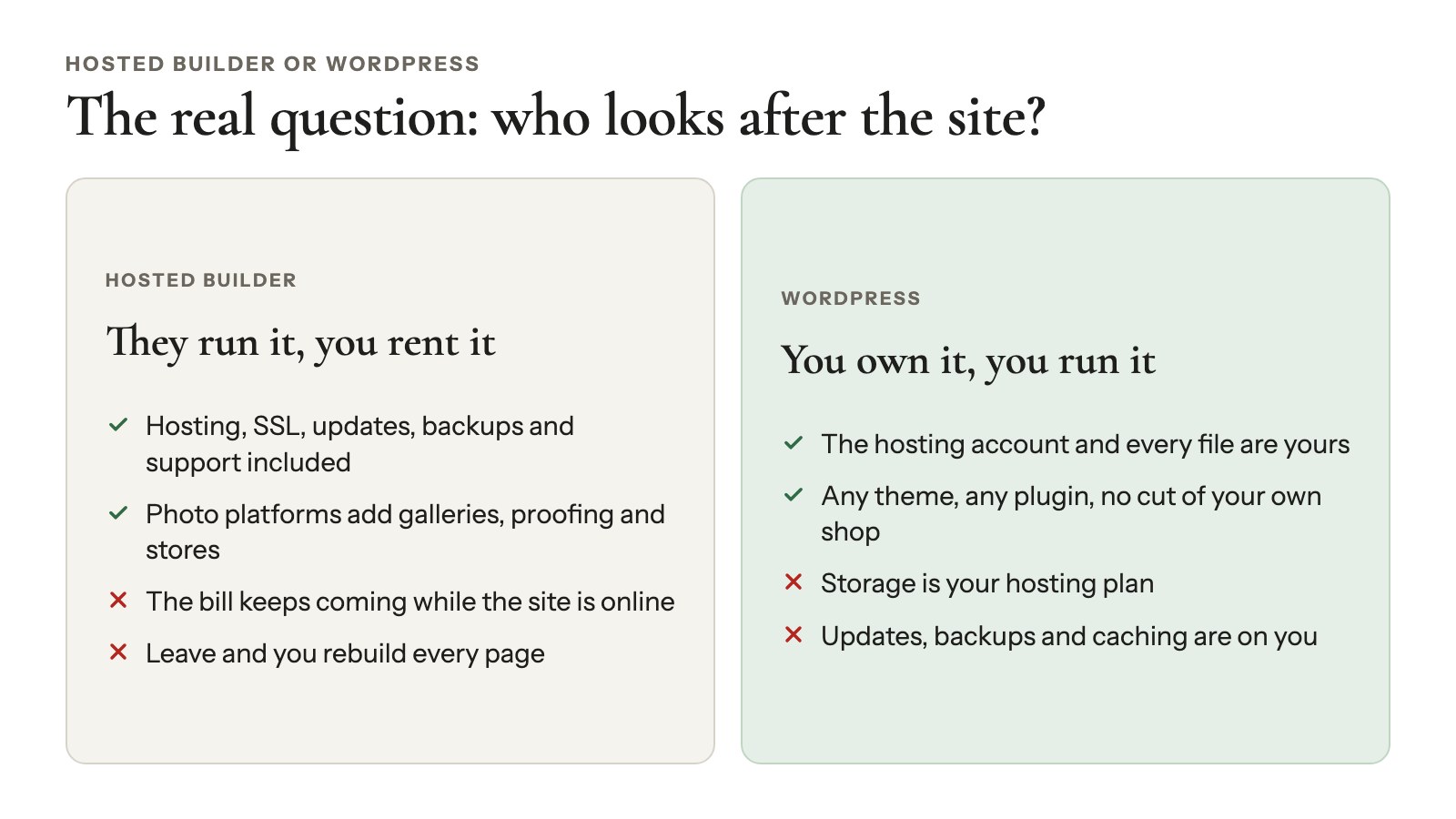
Pick a hosted builder if you want someone else to run the website and you’re happy inside their templates. Pick WordPress if you want to own the site and its files, use any theme or plugin and grow a blog, and you don’t mind looking after a website.
Neither one is the “pro” choice, and that’s the honest answer to Squarespace vs WordPress for photographers. The real question is who looks after the site.
What a hosted builder handles for you
Hosting, SSL, security updates, backups and support come with the subscription. Photographer platforms like Pixieset, SmugMug, Zenfolio and Pixpa add client galleries, proofing (clients pick their favorites) and stores, often with print-lab fulfillment (the lab prints and ships each order).
The trade-off is that you’re renting. The bill keeps coming for as long as the site is online, and your design lives on their platform. Leave, and you rebuild every page elsewhere. Wix won’t even let you swap templates on a live site without rebuilding it.
What WordPress gives you
You own the hosting account and every file on it. You can use any theme (see our pick of WordPress themes for photographers) and add plugins for galleries, SEO, forms, booking or a shop. No platform takes a cut of what you sell through your own shop.
It’s also hard to get stuck. WordPress runs 39.6% of all websites and 58.3% of sites whose CMS is known (W3Techs, checked October 2026), so help and developers are easy to find.
The middle road is WordPress.com, which runs WordPress for you. Personal is $4 a month billed yearly with 6 GB, and Business is $25 with 50 GB. Its pricing page says paid plans can install plugins (checked October 2026).
What WordPress asks of you
- Storage is your hosting plan. Check your disk space before you upload ten years of work.
- Updates and backups are yours. WordPress, your theme and your plugins update often. Turn on your host’s backups or add a backup plugin.
- Caching needs a little care. A caching plugin makes the site fast, but a page cache can get in the way of password-protected galleries.
- Your server sends the email. Messages from your own server may need an SMTP plugin, which routes them through a mail service, to reach inboxes.
Good to know
Many photographers use both. WordPress or Squarespace runs the site and the blog, and Pixieset, ShootProof or Pic-Time handles client delivery and print sales. If that’s your plan, compare Pixieset alternatives and Pic-Time alternatives before you commit.
The best photography website builders, reviewed
WordPress with Modula is the self-hosted route and our first pick; Squarespace, Wix, Pixieset, Format, SmugMug, Zenfolio, Pixpa, Showit and Adobe Portfolio are the hosted photographer website builders worth comparing in 2026. Prices are per month, billed yearly (checked October 2026).
WordPress with Modula
Best for: photographers who want to own their site, use any theme and grow a blog.
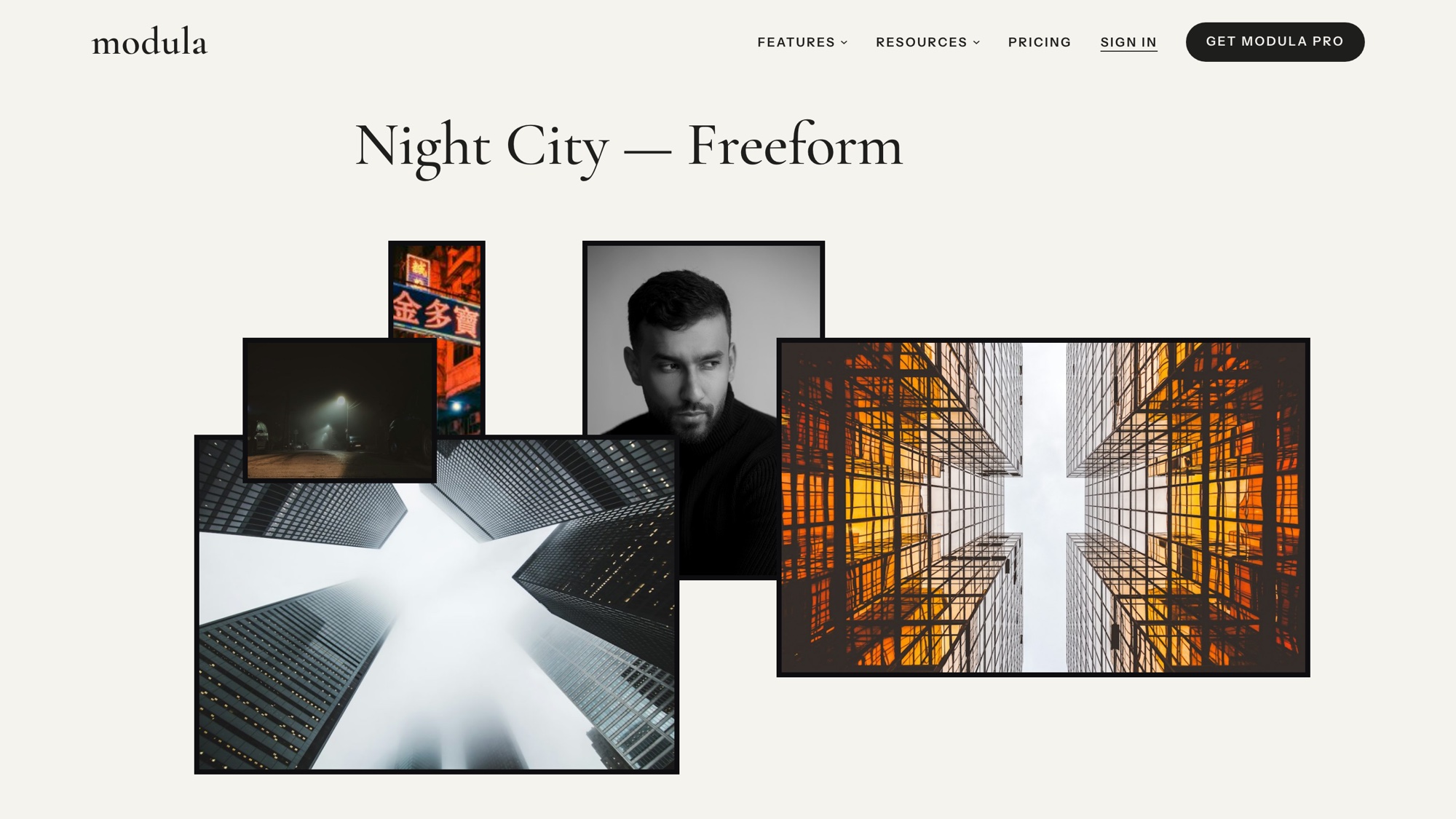
What it does well: A theme handles the design and Modula handles the photos. Proofing, downloads, watermarks and password-protected client galleries are all Modula features on its paid plans, which most builder lists skip or mention in a line.
Watch out for: You pay for hosting and a domain, and you look after the site.
Price: WordPress and Modula Lite are free, and Modula Pro starts at $39 the first year. For hosting, compare the renewal price, not the first-year promo. To compare gallery plugins, see our portfolio plugins for photographers comparison.
Squarespace
Best for: a polished portfolio with booking and a blog, with zero hosting chores.
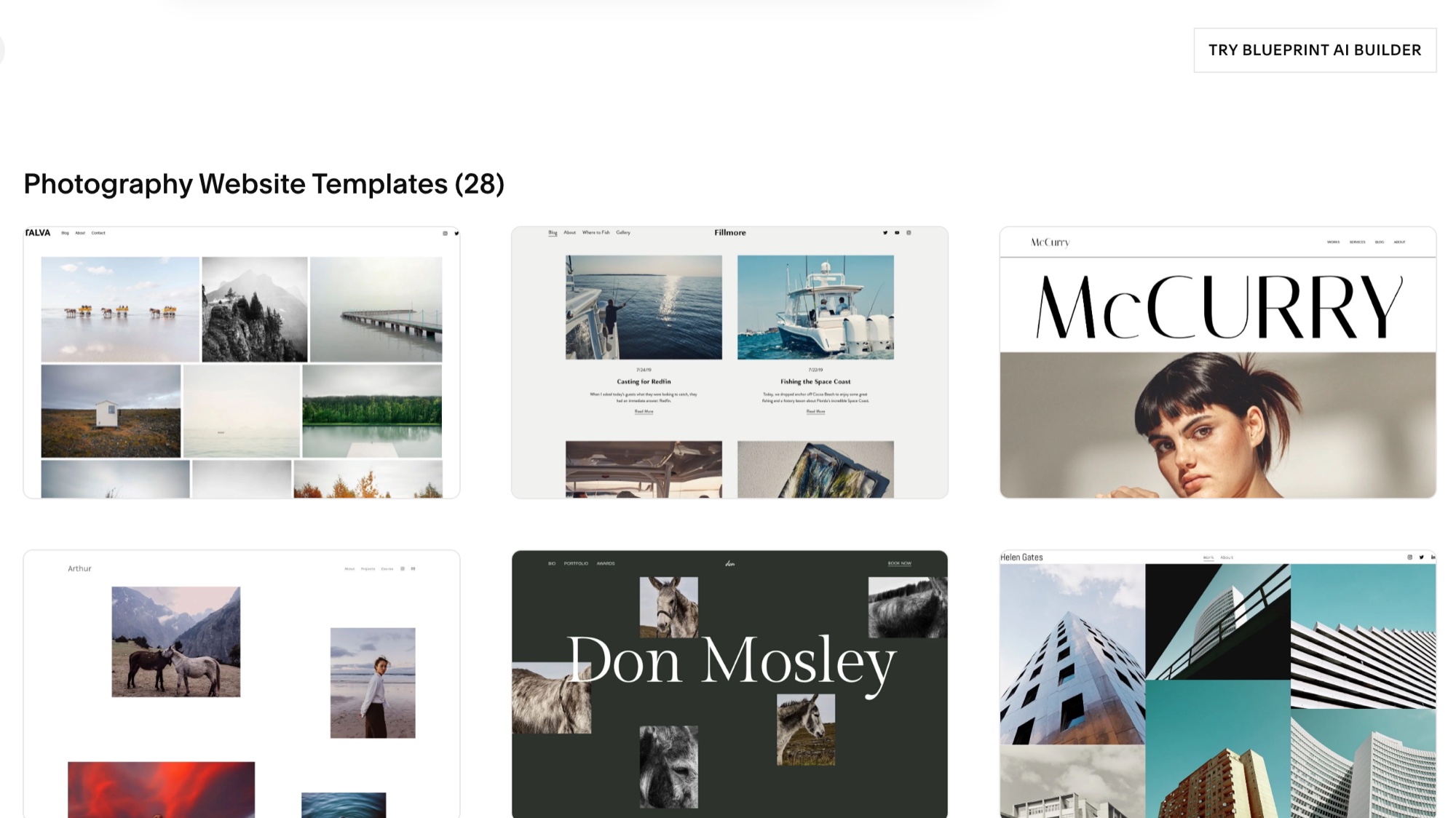
What it does well: Templates look finished from the first click, and the Fluid Engine editor lets you drag blocks where you want them. Acuity Scheduling, Squarespace’s own booking tool, handles sessions. Its pricing page lists no caps on bandwidth or storage, and video up to 30 minutes on Basic, 5 hours on Core.
Watch out for: There’s no free plan, only a 14-day trial, and Acuity is a separate subscription. Its plans don’t list proofing or print-lab ordering. Basic adds a 2% fee on store sales; Core and up charge 0%.
Price: Basic $19, Core $29, Plus $49, Advanced $99 ($25/$39/$65/$139 billed monthly). Those are US prices as listed in October 2026, up from $16/$23/$39 before the July 2026 increase. Squarespace’s page showed us euros, so the US figures come from Style Factory’s price tracker.
Wix
Best for: a free start and total layout freedom.
What it does well: The free plan lets you build and test before you pay, on a Wix subdomain with Wix ads. The drag-and-drop editor puts anything anywhere, and Wix Bookings covers session scheduling.
Watch out for: Light’s 2 GB fills fast if you upload full-resolution files. Taking payments starts on Core. Changing your template later means rebuilding the site.
Price: Light $17, Core $29, Business $39, Business Elite $159, with 2 GB, 50 GB, 100 GB and unlimited storage. These are US prices as listed in October 2026 by Website Builder Expert; Wix’s plans page showed us a regional price with GST.
Pixieset Website
Best for: photographers whose business is client galleries, proofing and print sales.
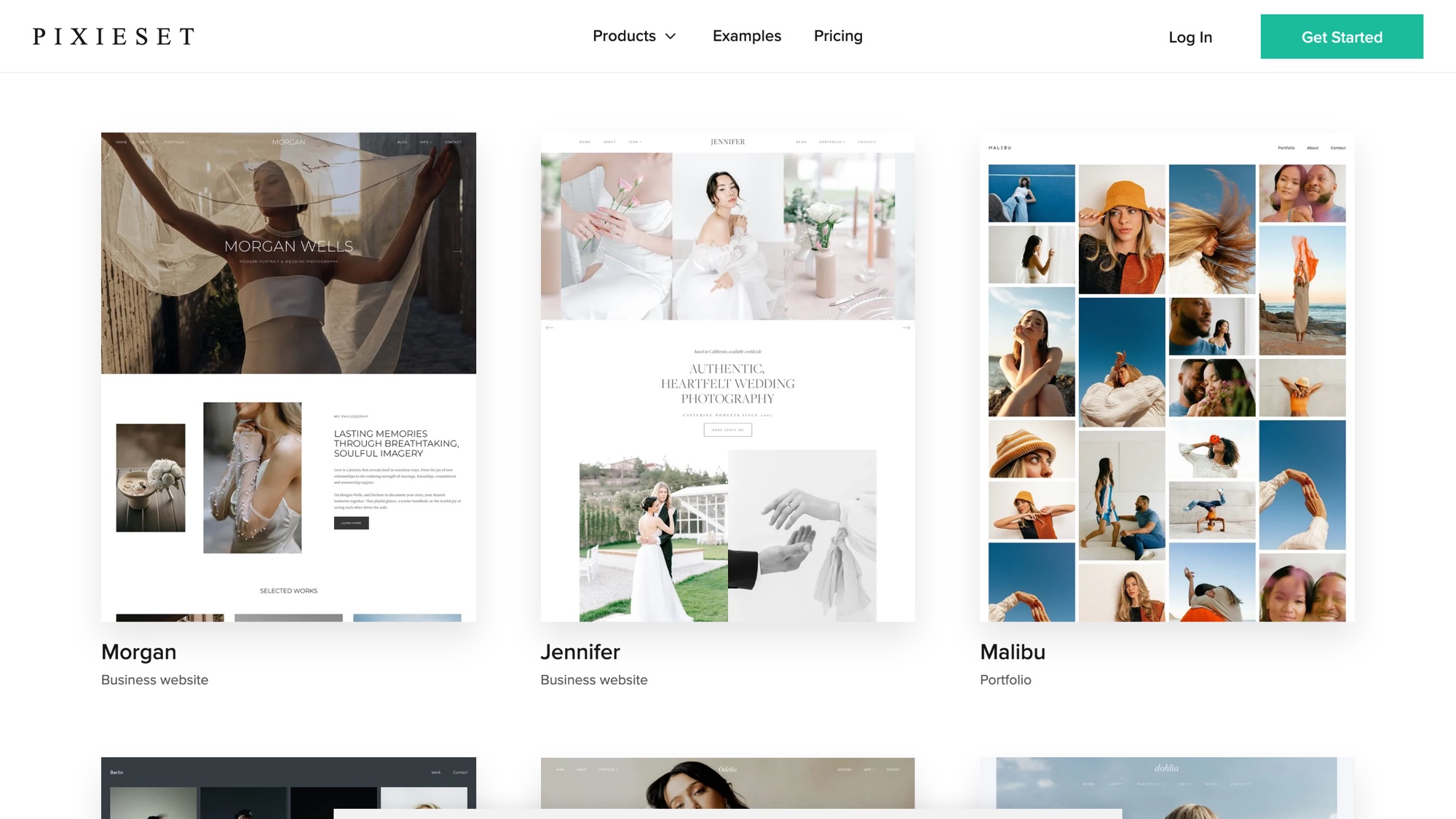
What it does well: Photography templates, the Flex Editor, a blog, built-in SEO and free SSL, in the same account as Pixieset’s Client Gallery, Store and Studio Manager. Pixieset says it has over 1 million users who have sold more than $2 billion through it.
Watch out for: The website and Client Gallery are separate subscriptions, so you pay twice unless you buy Suite. Client Gallery’s Free plan takes 15% of store sales (paid plans take none). And your site lives on Pixieset.
Price: Website Free (15 pages, 100 photos, 5 blog posts, a Pixieset banner), Plus $12 ($15 monthly) with a custom domain, Pro $18 ($24) with custom code and AI alt text. Client Gallery runs from Free (3 GB) and Basic $8 (10 GB) to Ultimate $40 (unlimited). Suite starts at $28.
Format
Best for: clean photography portfolio websites you publish straight from Lightroom or Capture One.
What it does well: Portfolio-first templates, uploads from Lightroom and Capture One, client galleries, password protection and a commission-free store on the Pro plans. The 14-day trial needs no card.
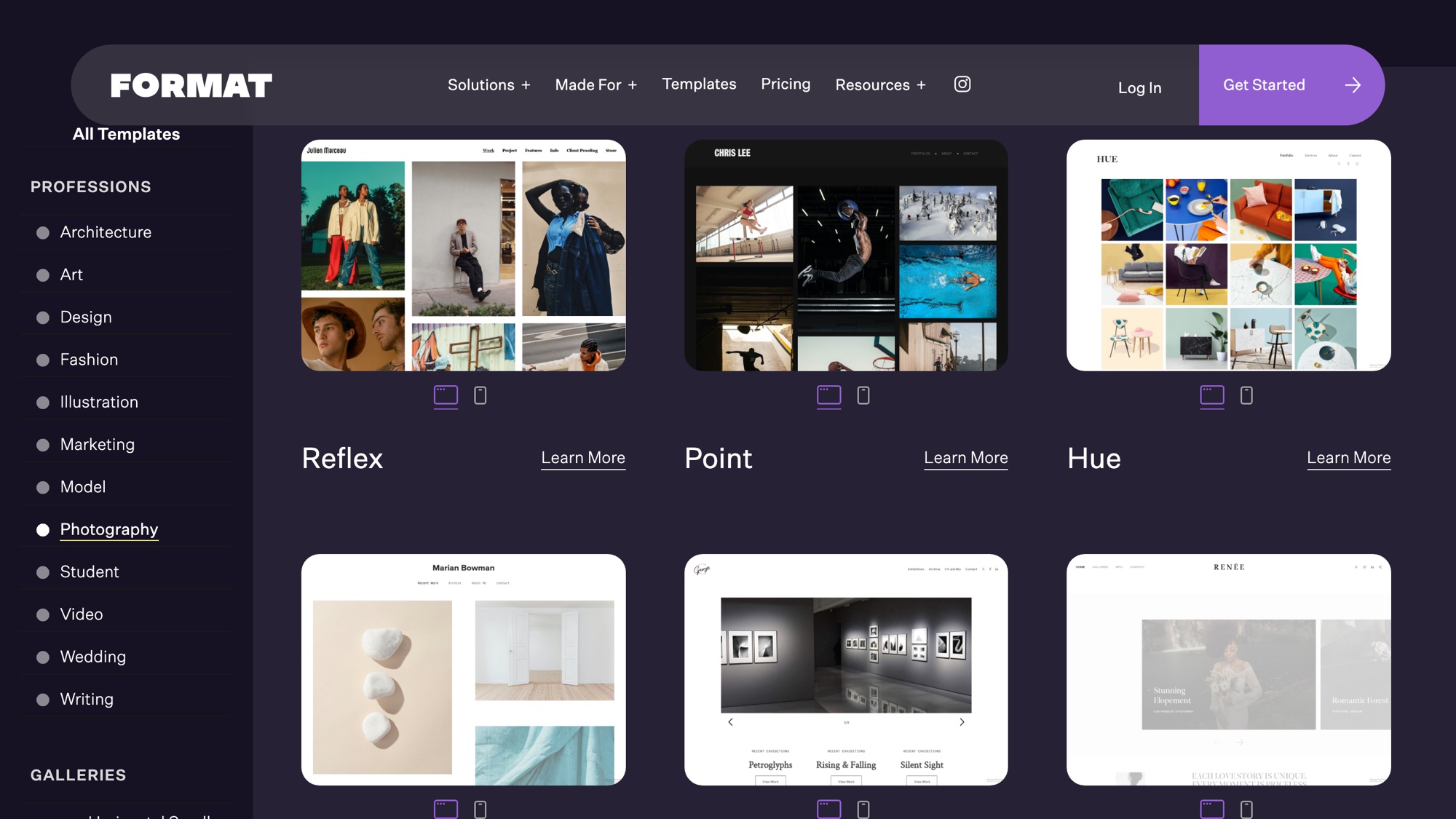
Watch out for: Basic caps you at 70 images and 10 pages, with no store and no video. Pro and Pro Plus prices are first-year offers (redeem the codes by October 31, 2026) that renew higher; see Format’s pricing page.
Price: Basic $10. Pro $12 for the first year (1,500 images, 100 GB, 15 products). Pro Plus $15 for the first year (unlimited images, 1 TB, 1,000 products). Monthly billing is normally $14, $24 and $36.
SmugMug
Best for: big archives and print sales with lab fulfillment.
What it does well: Unlimited photo storage on every plan, a Lightroom plugin, galleries, and print and download sales from Portfolio up. Pro adds client favoriting, download limits and multiple price lists. RAW files need an add-on: $10 a month for 1 TB.
Watch out for: Among the photo platforms here, it’s the priciest way to start selling, and SmugMug’s help center says SmugMug keeps 15% of your markup. Pixpa’s builder roundup calls the interface dated; ExpertPhotography says it isn’t the easiest.
Price: Direct $20 (no selling), Portfolio $23.50, Pro $37, Enterprise on request. 14-day trial.
Zenfolio
Best for: portrait, school and event photographers working at volume.
What it does well: Client galleries with favorites and comments, booking and print labs.
Watch out for: A 7% commerce fee on every order, plus payment-processor fees. Booking is a $10/month add-on below Advanced. And Zenfolio’s plans page contradicts itself on whether Basic includes a website (the grid says no, the FAQ says yes), so check that before you choose Basic.
Price: Basic $7 ($9 monthly, 15 GB, no selling), Professional $11.50 ($23 monthly, 150 GB, selling), Advanced $20 ($40 monthly, unlimited JPEG storage plus 150 GB of video, booking included). The US prices come from Zenfolio’s FAQ.
Pixpa
Best for: the cheapest site, client galleries and store in one plan.
What it does well: Website, client galleries, blog and a store with 0% commission, all in one subscription. There’s a 15-day trial without a card and a 30-day money-back guarantee.
Watch out for: Storage is tight: 3 GB on Basic, 5 GB on Creator. Pixpa says itself that it doesn’t do contracts or invoicing.
Price: Basic $5.40 ($9 monthly; 3 GB, 10 pages, 200 images), Creator $9 ($15), Professional $12 ($20; 25 GB), Advanced $15 ($25; 100 GB).
Showit
Best for: wedding and brand photographers who want a design-led site.
What it does well: Free-form drag-and-drop design, with the blog running on WordPress. Advanced Blog accepts any WordPress plugin and includes free blog migration from WordPress or Squarespace.

Watch out for: No client galleries or store of its own. The base plan has no blog, so you pay more for one and still run a WordPress blog. The 14-day trial gives you no domain and no WordPress admin.
Price: Showit $22 ($27 monthly; 20 GB, no blog), Showit & Basic Starter Blog $27 ($34), Showit & Advanced Blog $39 ($49).
Adobe Portfolio
Best for: photographers already paying for Creative Cloud.
What it does well: It comes with paid Creative Cloud plans, pulls work from Lightroom and Behance, and gives you unlimited pages. The Photography plan also includes Lightroom, Photoshop and 1 TB of cloud storage.
Watch out for: It’s a website builder for photography portfolios only: no store and no client proofing. Your site depends on keeping a paid Creative Cloud plan.
Price: The Photography plan is $19.99 a month, an annual plan billed monthly.
Also worth a look
- PhotoShelter suits commercial photographers who need a searchable archive.
- Cargo and Framer are design-led builders with no client-gallery tools.
- ShootProof and Pic-Time are client-gallery and sales tools, not website builders. Pic-Time gives you a portfolio page and blog posts to embed in a site you run elsewhere.
Building your photography website on WordPress with Modula
Modula is a WordPress gallery plugin with 14 gallery types, plus client proofing, downloads, watermarks and password protection on its paid plans. It has no store. We make Modula, so weigh this section with that in mind. For the full build, step by step, follow our guide to creating a photography website.
What you get
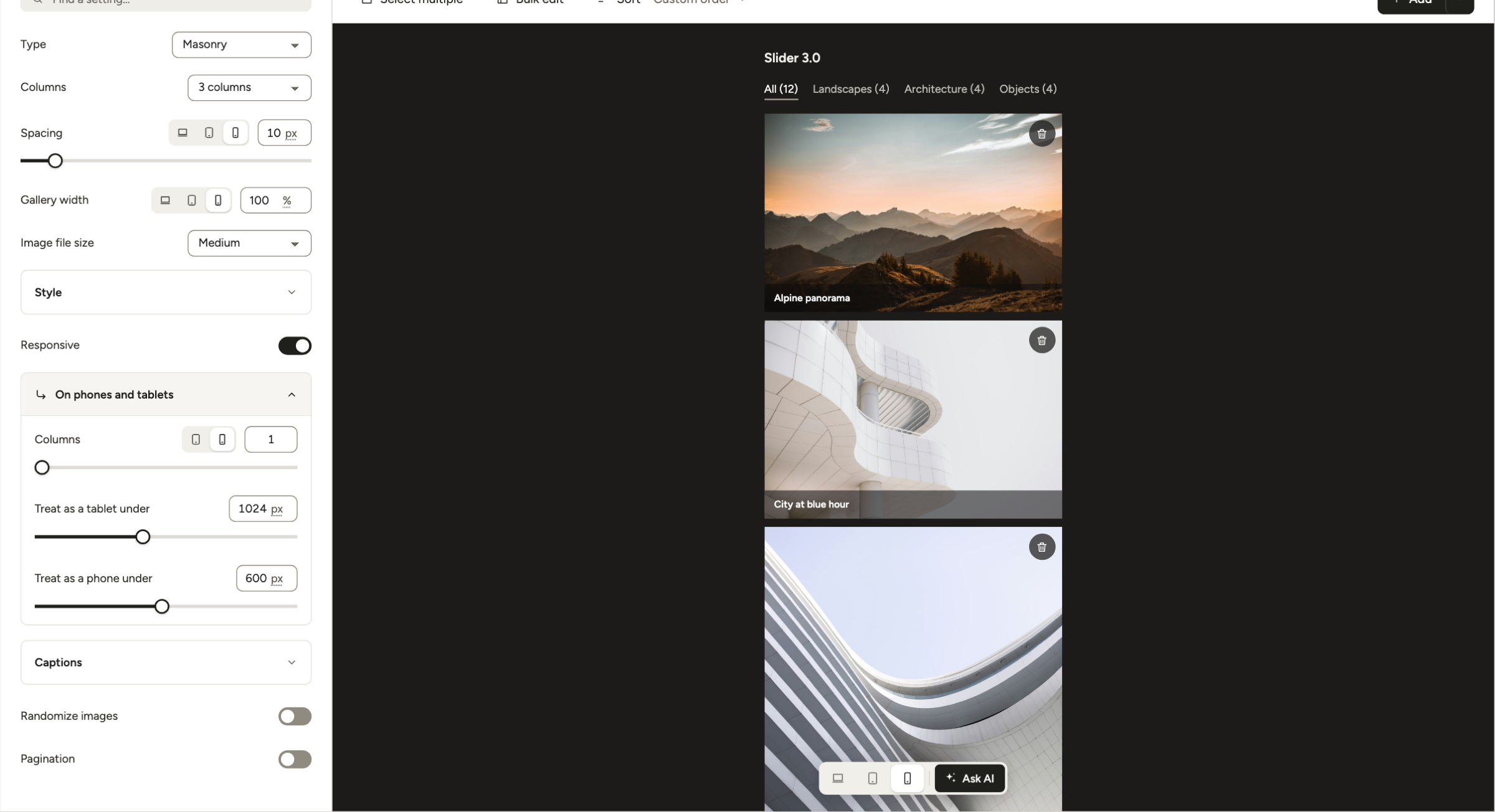
- 14 gallery types, 7 of them free: Masonry, Uniform grid, Fit grid, Justified grid, Custom grid, Creative and Polaroid. Pro adds Canvas, Parallax, BnB, Showcase, Story, Slider (Trio and up) and Video gallery (Starter and up).
- An editor that shows the real thing: the live preview switches between Desktop, Tablet and Mobile, and every change saves on its own.
- Modula AI writes titles, alt text and captions. Paid plans include credits: 250 on Starter, 1,000 on Trio, 2,500 on Business.
- Right-sized images: each photo loads at a size that fits its column, so phones don’t download desktop-size files.
- Works with your builder: the block editor, Elementor, Divi and Beaver Builder, or the shortcode from Embed.
Modula has 160,000+ active installations and 4.7/5 from 616 ratings on wordpress.org (checked October 2026).
Client work and protection, by plan
| Feature | What it does | Lowest plan |
|---|---|---|
| Password protect | Locks a gallery or album behind a password | Trio |
| Image Guardian | Blocks right-click saving and hides image addresses | Trio |
| Albums | Groups galleries, with albums inside albums | Trio |
| Standalone | Gives each gallery and album its own address | Trio |
| Image licensing | Shows a license (All rights reserved or Creative Commons), also as structured data | Trio |
| Compression + image CDN | Smaller files, served fast | Trio |
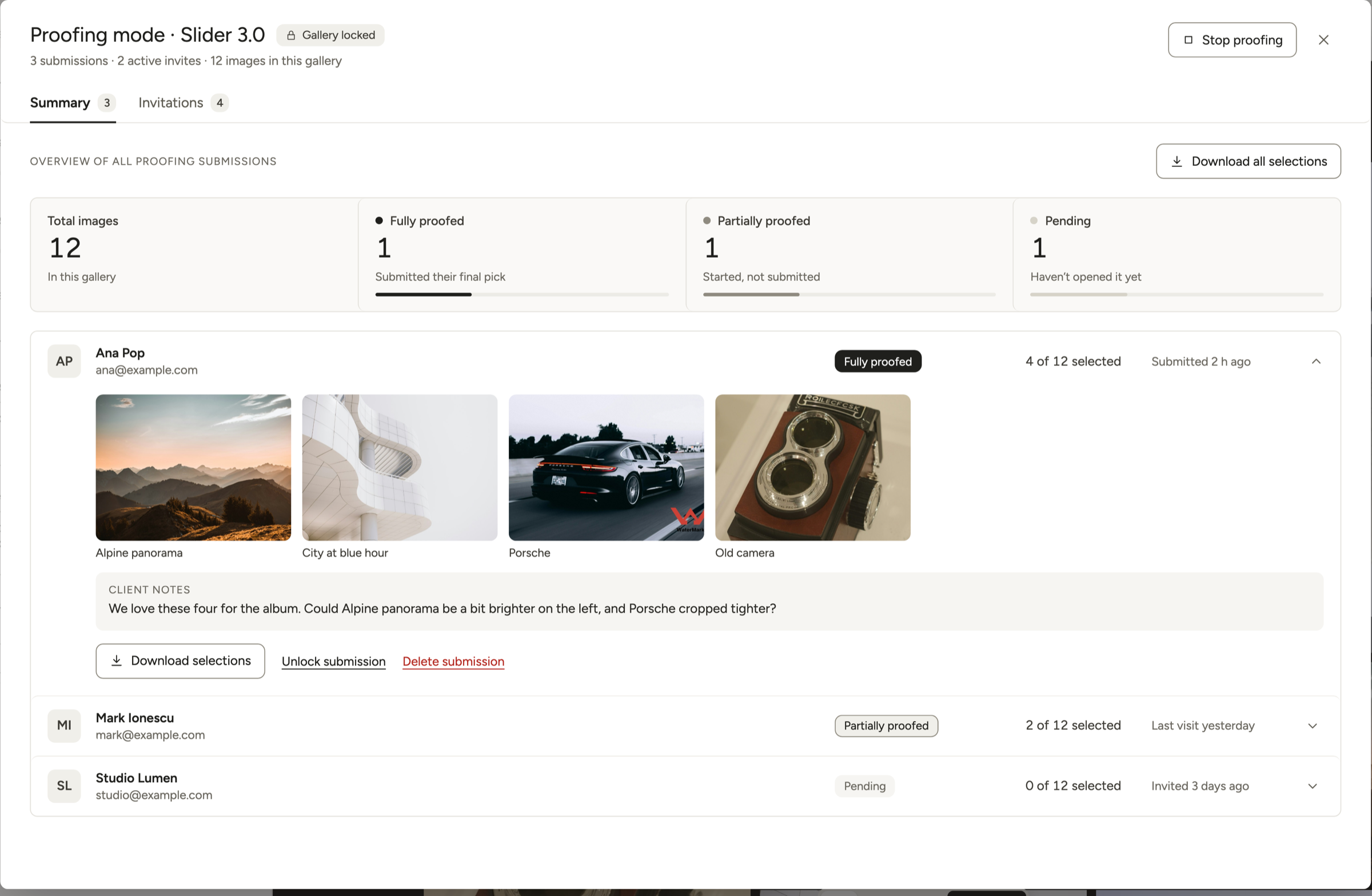
| Image Proofing | Clients pick photos within a minimum and maximum and add notes; invitation links you can expire, a Summary tab and Download all selections | Business |
| Comments | Comments on each photo, in the lightbox | Business |
| Download | One image or the whole gallery as a ZIP, at the size you choose | Business |
| Watermark | A text or logo mark on every photo | Business |
Plans: Starter $39 the first year ($78 a year after, 1 site), Trio $69 ($138 after, 3 sites), Business $99 ($198 after, 5 sites), each with a 14-day money-back guarantee. See pricing, image proofing and password-protected galleries.
Good to know
Two server fixes worth knowing. If a password-protected gallery keeps showing the password form after the right password, a page cache is serving a saved copy. Exclude WordPress’s wp-postpass_* cookie in your caching plugin, and use the gallery’s own password instead of adding a page password on top.
If a watermark doesn’t appear, your server may be missing PHP’s GD or Imagick image library. Ask your host to turn one on, then apply the watermark again.
Organizing a big portfolio
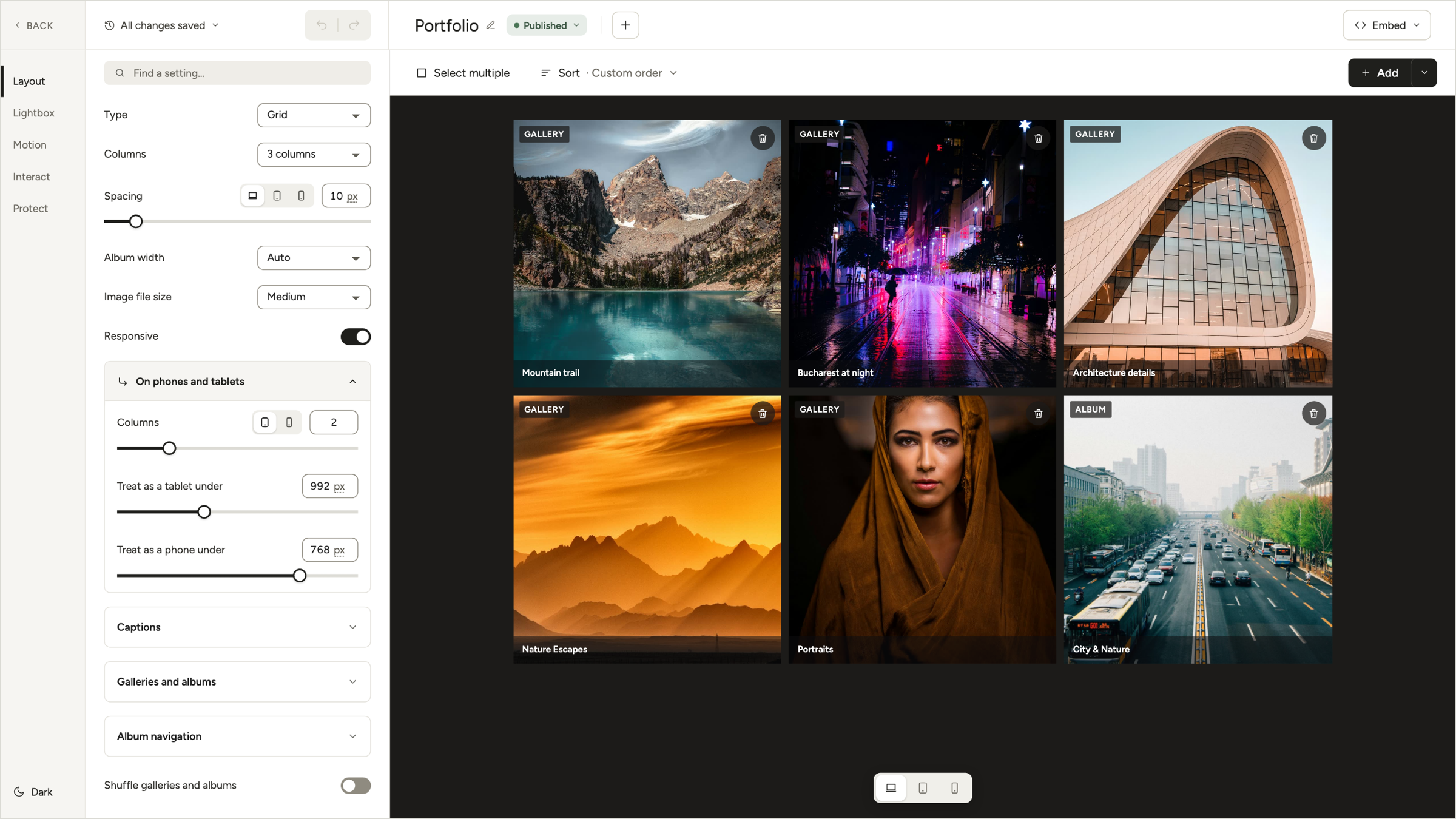
- Albums as categories. Put galleries in albums, and albums inside albums: Weddings, then each year, then each couple. Albums have no filter bar on the page, though. For one wall of work visitors can filter, use a single gallery with Filters (Starter and up).
- An address for every gallery. Switch on Standalone in Modula → Extensions, and each gallery gets its own link you can send a client (how Standalone works).
- Bulk uploads. Open the menu next to + Add, choose Upload files and select every file in the folder at once, or pick A ZIP archive (a Pro option).
What Modula doesn’t do
- No store, cart or checkout, and no print-lab fulfillment.
- No selling of digital files or licenses. Image licensing labels your photos; it doesn’t sell anything.
- No included storage. Your photos live in the WordPress Media Library, on your hosting.
- No mobile app, face search, booking, contracts, CRM or email marketing.
If you sell, pair it with a shop. Click a photo in the editor, set its On click to Custom link and paste the address of its WooCommerce product page. Or keep a Pixieset or ShootProof store for sales.
Client galleries and selling: which builders have a store
If print sales with automatic lab fulfillment are a big slice of your income, choose a hosted photography platform with a store. WordPress with Modula isn’t a shop.
Here’s what each builder takes per sale (checked October 2026):
- Pixieset: 15% on the Free Client Gallery plan, 0% on paid plans.
- SmugMug: 15% of your markup, from the Portfolio plan.
- Zenfolio: 7% per order plus processor fees, from Professional.
- Format: 0% on the Pro and Pro Plus store.
- Pixpa: 0% on every plan.
- Squarespace: 2% on Basic, 0% from Core, plus payment processing.
- Wix: payments start on Core.
- Adobe Portfolio, Showit, WordPress + Modula: no store of their own.
Thinking of a second tool just for client galleries? First see how proofing and photo delivery work. You may need only one.
What a photography website costs in a year
A photography website costs anywhere from $0, with tight limits, to a few hundred dollars a year. For the hosted plans in the table below, yearly totals run from $108 to $470 (checked October 2026), before sales fees.
| Setup | Per year (checked October 2026) | Note |
|---|---|---|
| WordPress + Modula Trio | $69 first year, $138 after | Plus hosting and a domain; Business (proofing, downloads, watermarks): $99, then $198 |
| Pixpa Creator | $108 | Professional: $144 |
| Zenfolio Professional | $138 | Plus 7% of each order |
| Format Pro | $144 | Offer ends Oct 31, 2026; renews higher |
| Adobe Photography plan | $239.88 | Includes Lightroom and Photoshop |
| Pixieset Website Plus + Client Gallery Basic | $240 | Two subscriptions ($144 + $96) |
| Showit | $259 | Showit’s yearly price; $470 with Advanced Blog |
| SmugMug Portfolio | $282 | Pro: $444 |
| WordPress.com Business | $300 | Managed WordPress; add a gallery plugin |
| Pixieset Suite | $336 | All Pixieset apps |
| Squarespace Core | $348 | Was $276 before July 2026 |
| Wix Core | $348 | 50 GB |
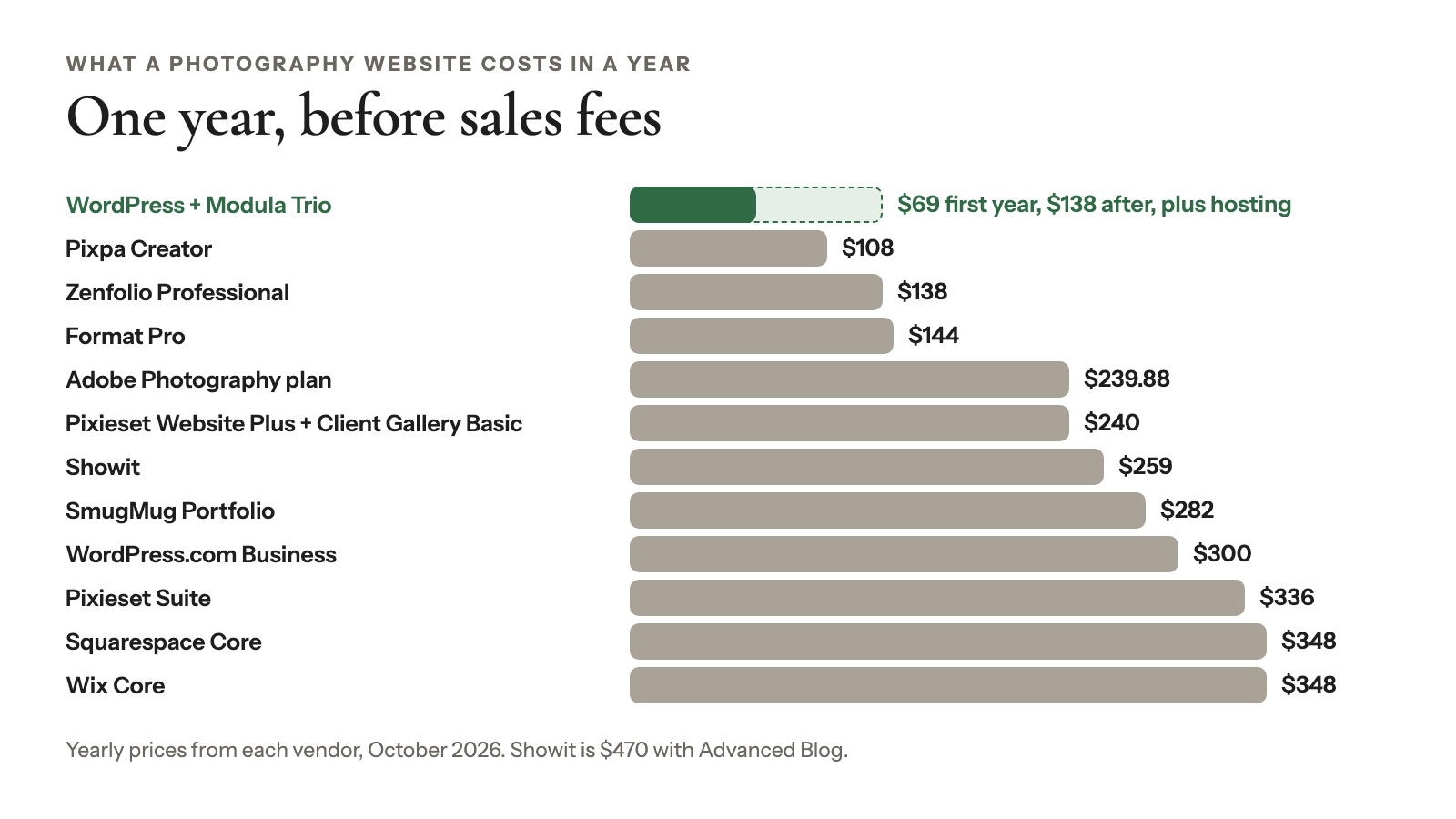
Three things push the real number up:
- Intro prices renew higher. Format, Modula and most web hosts discount the first year.
- Storage upgrades. Pixieset, Pixpa and Wix price by storage; SmugMug and Squarespace list no caps.
- Sales fees. If you sell, add each platform’s cut.
How to choose the right photography website builder
The right photography website builder comes down to six questions about your photos, clients, sales, blog, time and exit plan.
- How many photos will you host? A few hundred fit almost anywhere, but watch the caps (checked October 2026): Wix Light 2 GB, Pixpa Basic 3 GB, Format Basic 70 images. Past 100 GB, look at SmugMug, Format Pro Plus, Squarespace or your own hosting.
- Do clients need to pick and download photos? Choose WordPress with Modula’s Business plan, Pixieset, Zenfolio, SmugMug Pro or Pixpa.
- Will you sell prints? If prints pay the bills, pick a platform with a store and lab fulfillment. If you sell a few, a shop on the side will do.
- Do you want a blog and search traffic? WordPress gives you the most room, with any theme and SEO plugin. Our SEO guide for photographers shows what to do with it.
- How much time will you give the site each month? Close to none? Go hosted. Some time each month for updates and backups? WordPress is fine.
- Could you want to leave later? Hosted designs don’t move with you. If you’re already planning an exit, read moving from Squarespace to WordPress first.
Still torn? Start with one of three: WordPress if you want to own everything, Squarespace for polish, or Pixieset if galleries and prints are the business. Going the WordPress way? Our guide to creating a photography website walks you through the build.
Frequently asked questions
The best website builder for photographers depends on the job: WordPress with Modula, the gallery plugin we make, suits anyone who wants to own the site, Squarespace a polished portfolio with booking, and Pixieset client galleries and print sales. Format fits a Lightroom-fed portfolio and SmugMug a huge archive.
Wix and Pixieset Website both have free plans, with limits: Wix’s runs on a Wix subdomain with ads, and Pixieset’s gives you 15 pages and 100 photos.
WordPress itself is free, though you still pay for hosting, and Modula Lite is free with 7 gallery types. Adobe Portfolio needs a paid Creative Cloud plan.
Squarespace is better if you want polished templates with little fiddling, Wix if you want a free start and full layout freedom. Both have booking tools. Since Squarespace’s July 2026 increase, Core, the plan most sellers need, costs $29 a month billed yearly on both (US prices as listed in October 2026).
WordPress is good for a photography website if you’ll look after it. You get your own files, any theme, a strong blog and no platform commission. In return, you handle hosting, updates and backups. WordPress runs 39.6% of all websites (W3Techs, October 2026), so help is easy to find.
Pixieset is better if client galleries and print sales drive your income, because the store and lab fulfillment are built in. WordPress is better if your portfolio, blog and search traffic matter most and you want to own them. Our Pixieset alternative article compares them side by side.
A photography website costs from $0, with limits, to a few hundred dollars a year. The setups in our cost table run from $108 (Pixpa Creator) to $470 (Showit with Advanced Blog), checked October 2026. Add sales fees if you sell.
Modula alone can’t sell prints, because it has no store. Add WooCommerce, keep a hosted store such as Pixieset, or use a plugin made for selling photos inside WordPress, such as Sunshine Photo Cart.
Moving to another builder is possible, but hosted builders don’t export designs. You re-upload photos, rebuild pages and set permanent (301) redirects from the old URLs to keep your search traffic. A WordPress site moves to a new host with all its files. Our Squarespace to WordPress guide shows the steps.