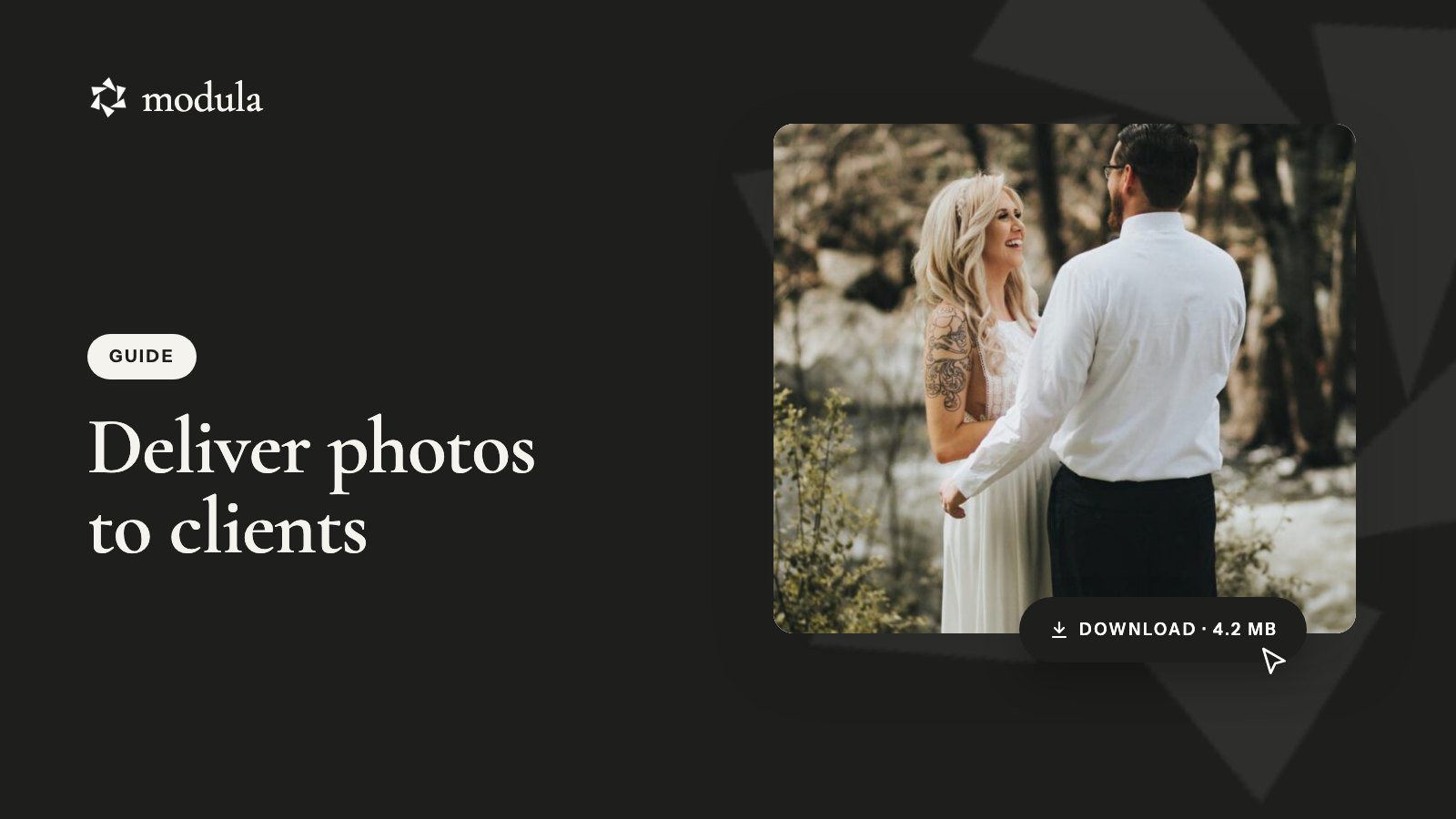
Most photographers deliver photos to clients through a private online gallery with a download button. Email and transfer links still work, but only for a handful of images or a quick commercial job.
A gallery gives your client one link to browse, pick favorites and download everything at full size. The whole handoff, in short:
- Pick a delivery route (the comparison below has real limits and prices).
- Export two sets: full size for prints, web size for viewing.
- If the client chooses the final images, run a proofing round first.
- Deliver the finals in a password-protected gallery with full-size downloads.
- Send one clear email, with the password in a separate message.
The best way to send photos to clients, compared
The best way to send photos to clients is a private client gallery with full-size downloads. It holds hundreds of files, looks professional and lets the client pick favorites. Email, transfer links and cloud folders suit smaller or quicker jobs.
Here’s how the five photo delivery options compare (checked October 2026):
| Route | Free limit or price | Link lasts | Branding | Proofing | Full-size downloads |
|---|---|---|---|---|---|
| Email (Gmail) | 25 MB per message | In their inbox | No | No | A few files |
| WeTransfer Free | 3 GB or 10 transfers per 30 days | 3 days at most | No | No | Yes |
| Google Drive, Dropbox | 15 GB shared (Google), 2 GB (Dropbox) | While files stay | No | No | Yes |
| Pixieset, Pic-Time | Free tiers of 3–10 GB; paid from $7–8/month yearly | Until you remove it | Theirs by default | Yes | Yes (Pixieset: Basic up) |
| Your WordPress site (Modula) | Plugin free; downloads and proofing from $99 first year | Until you remove it | Your domain | Yes (Business) | Yes (Business) |
Use it for three to five web-size images, like a headshot preview. Personal Gmail caps attachments at 25 MB and swaps anything bigger for a Google Drive link (Google). A full session won’t fit.
Transfer links
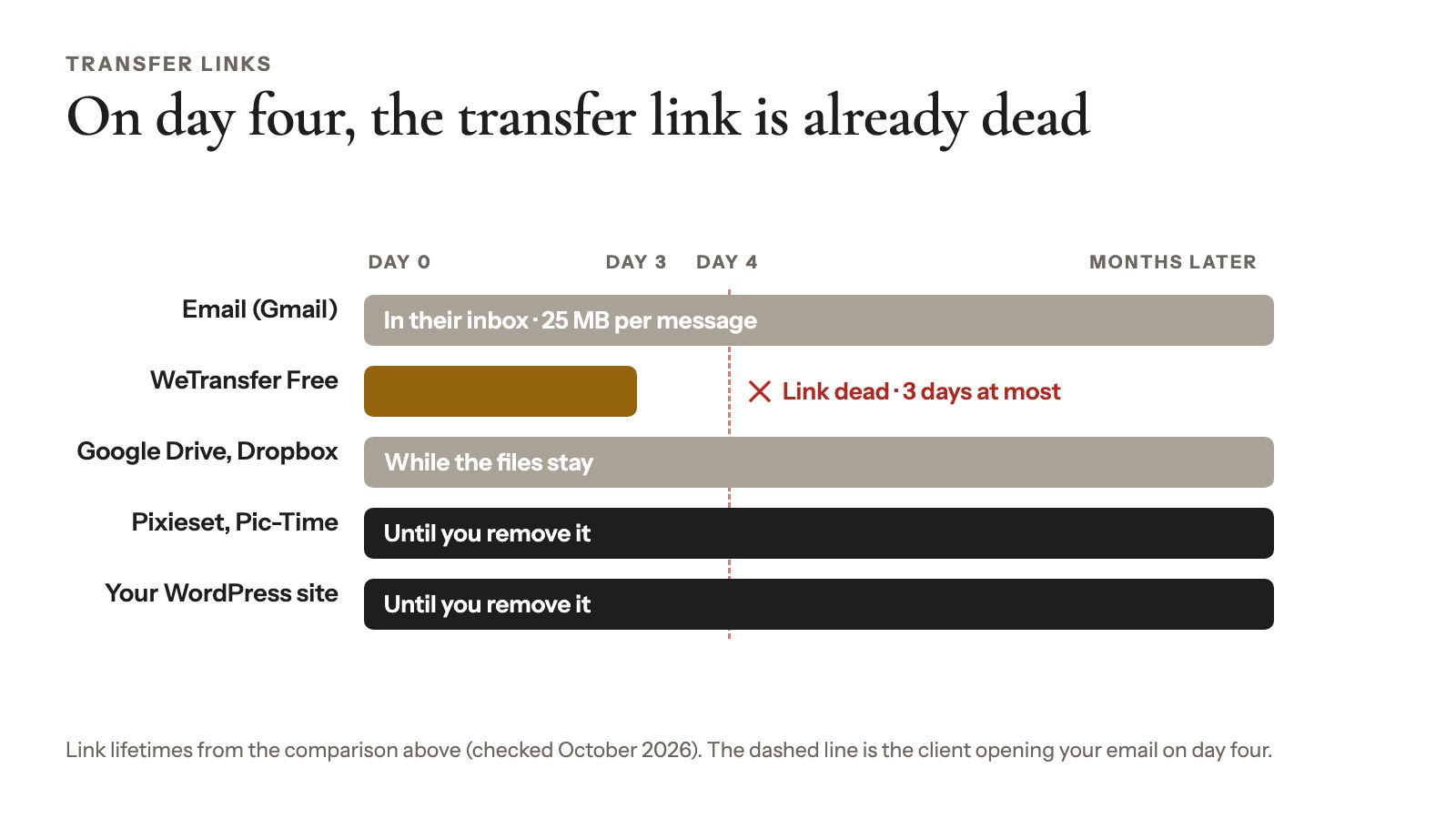
Use one for a quick commercial handoff. WeTransfer Free allows 10 transfers or 3 GB in any 30-day window (WeTransfer), and Free transfers expire after at most 3 days (WeTransfer).
The catch: no gallery and no favorites. If your client opens the email on day four, the link’s already dead.
Cloud folders
Use them for clients who already live in Google Drive or Dropbox. Google gives you 15 GB shared across Gmail, Drive and Photos (Google); Dropbox Basic gives 2 GB (Dropbox).
The link works as long as the files stay, which usually means until you need the space back. There’s no presentation either, so add a note saying which folder to open first.
Hosted client galleries
This is where a lot of wedding and portrait photographers end up, and for good reason (Pixieset alone says it has more than 1 million users). Between them, Pixieset and Pic-Time offer polished galleries, download PINs and limits, a mobile app, video and RAW delivery, and print stores with lab fulfillment.
Pixieset’s Client Gallery costs $8 to $40 a month billed yearly, from 10 GB to unlimited (Pixieset, checked October 2026). Pic-Time costs $7 to $42 a month billed yearly, from 20 GB to unlimited (Pic-Time, checked October 2026).
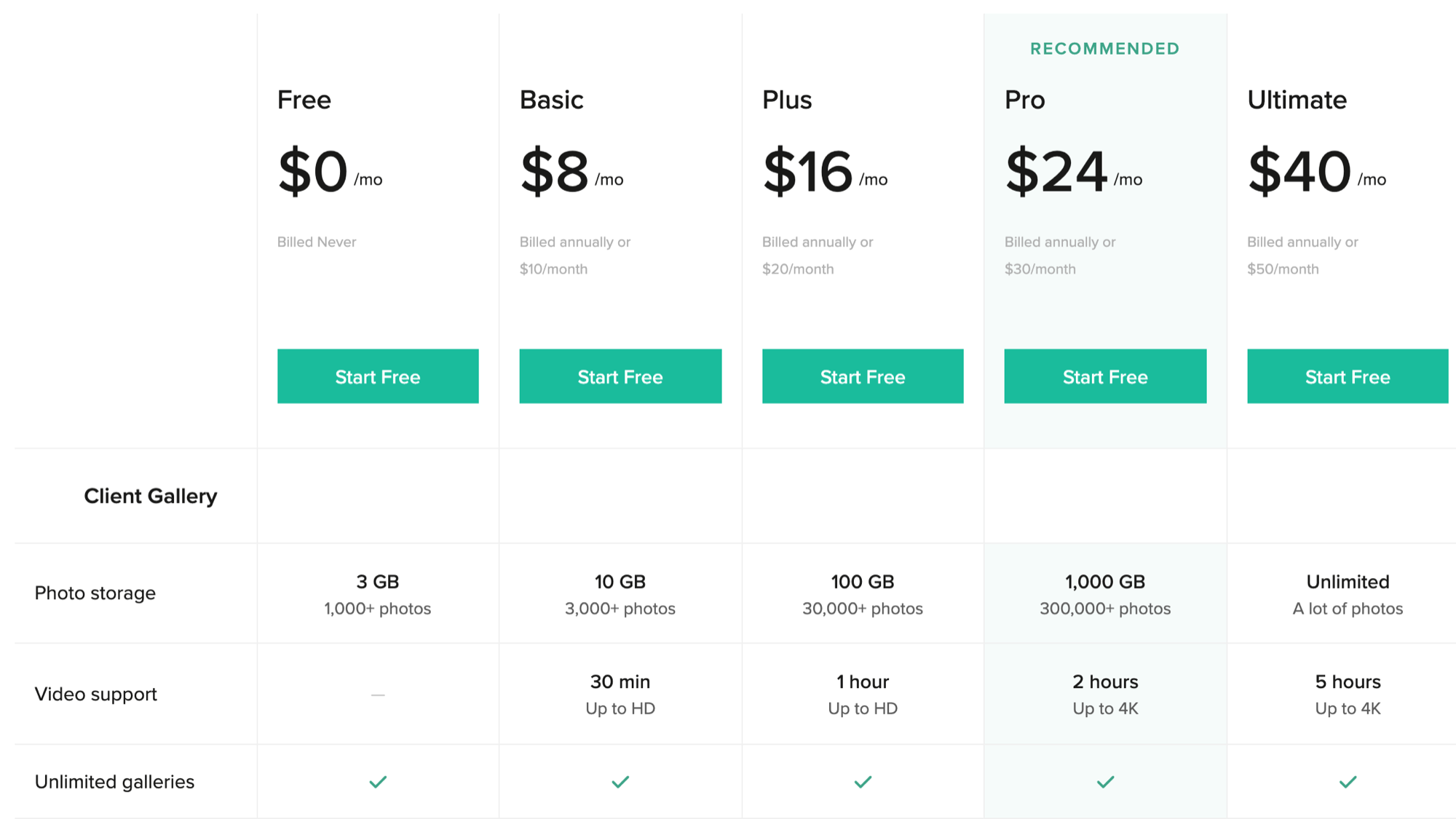
The catch: the fee grows with your storage, it’s one more platform to run, and galleries sit on their domain unless you connect yours.
A client gallery on your own WordPress site
If your portfolio runs on WordPress, you can deliver from the same site: your domain, your design, no per-GB tiers. The trade-off is that hosting space, speed and updates are on you, and there’s no print lab.
This is the route we know best, because we make Modula, the gallery plugin used for the steps below. Modula Lite is free on wordpress.org (160,000+ active installations, rated 4.7/5). The client delivery tools come with the paid plans.
How to send photos to clients for free
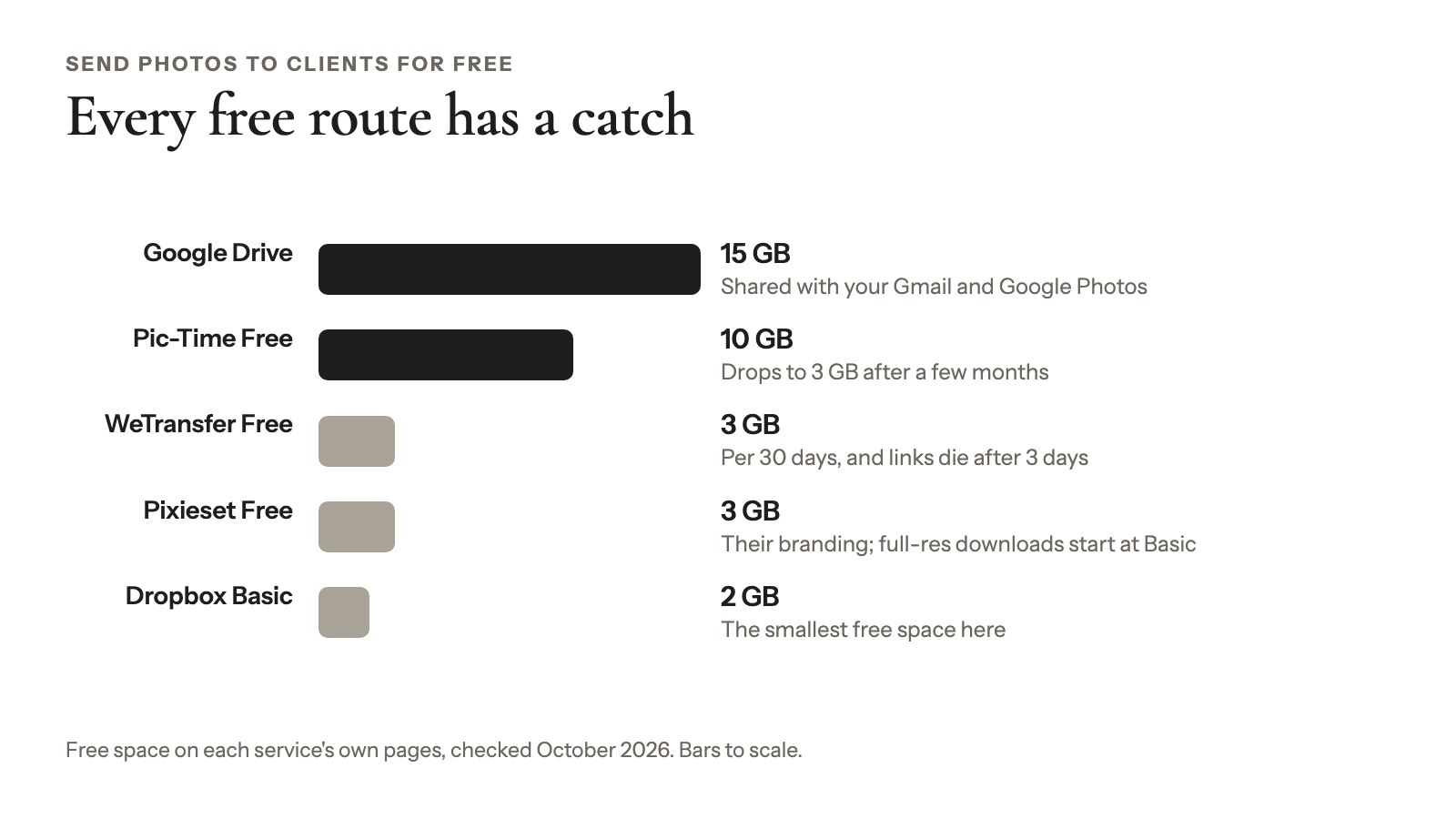
You can send photos to clients for free, but every free route has a catch: a short expiry, a small cap, someone else’s branding, or no full-size downloads.
- WeTransfer Free: 3 GB per 30 days, and links die after 3 days.
- Google Drive: 15 GB, shared with your Gmail and Google Photos.
- Pixieset Free: a free client gallery with 3 GB, Pixieset branding and a 15% commission on store sales. Full-resolution downloads start at Basic.
- Pic-Time Free: 10 GB, which its pricing page says drops to 3 GB after a few months (3 months in one place, 6 in another).
- WordPress, no plugin: a password-protected page with a ZIP link. Free, but there’s no gallery, and the ZIP has a public address.
- Modula Lite: a good-looking free gallery (7 of the 14 gallery types are free). Downloads and proofing are in the Business plan.
Get the photos ready before you deliver
Three bits of prep make every photo delivery smoother: two exports, sensible file names and a written promise.
Export two sets
Export full-resolution JPEGs for prints and a smaller web-size set for proofing and social media, both in sRGB (the standard for screens and most labs). Our guide to web size vs high resolution covers the numbers.
Leave RAW files (unprocessed camera data) out unless your contract says otherwise. WordPress doesn’t accept them anyway (supported file types).
Name files so you can find them later
Use the job, the date and the camera’s sequence number, with no spaces: harper-wedding-20260614-0412.jpg. Your client’s picks come back as file names, and spaces can trip up Lightroom’s filename search (Adobe Community).
Put the promise in writing
Agree on the number of images, the delivery date, full-size or web-size downloads, and how long the gallery stays online. Thirty to 90 days is common practice, per 2026 guides from Aftershoot and fast.io.
What you need in Modula for client delivery
Modula’s full client-delivery flow, proofing plus full-size downloads, needs the Business plan. Password protection and albums start at Trio.
| Feature | What it does | Plan |
|---|---|---|
| Password Protect | Locks a gallery or album | Trio and up |
| Albums | Groups a client’s galleries | Trio and up |
| Image Guardian | Blocks right-click and dragging | Trio and up |
| Compression + image CDN | Faster browsing | Trio and up |
| Image Proofing | Client picks favorites | Business |
| Download Images | One photo or a ZIP | Business |
| Watermark | Marks your proofs | Business |
| Comments | Feedback per photo | Business |
Business costs $99 for the first year ($198/year after) for 5 sites; Trio costs $69 ($138/year after) for 3 sites. Both have a 14-day money-back guarantee (pricing page, October 2026). Switch each feature on in Modula → Extensions.
Let the client choose first: a proofing round
A proofing round lets your client pick the final images, say for an album, before you deliver anything. Skip it when you hand over a finished edit. New to this? Read what photo proofing is or see Image Proofing.
Set up the proofing gallery
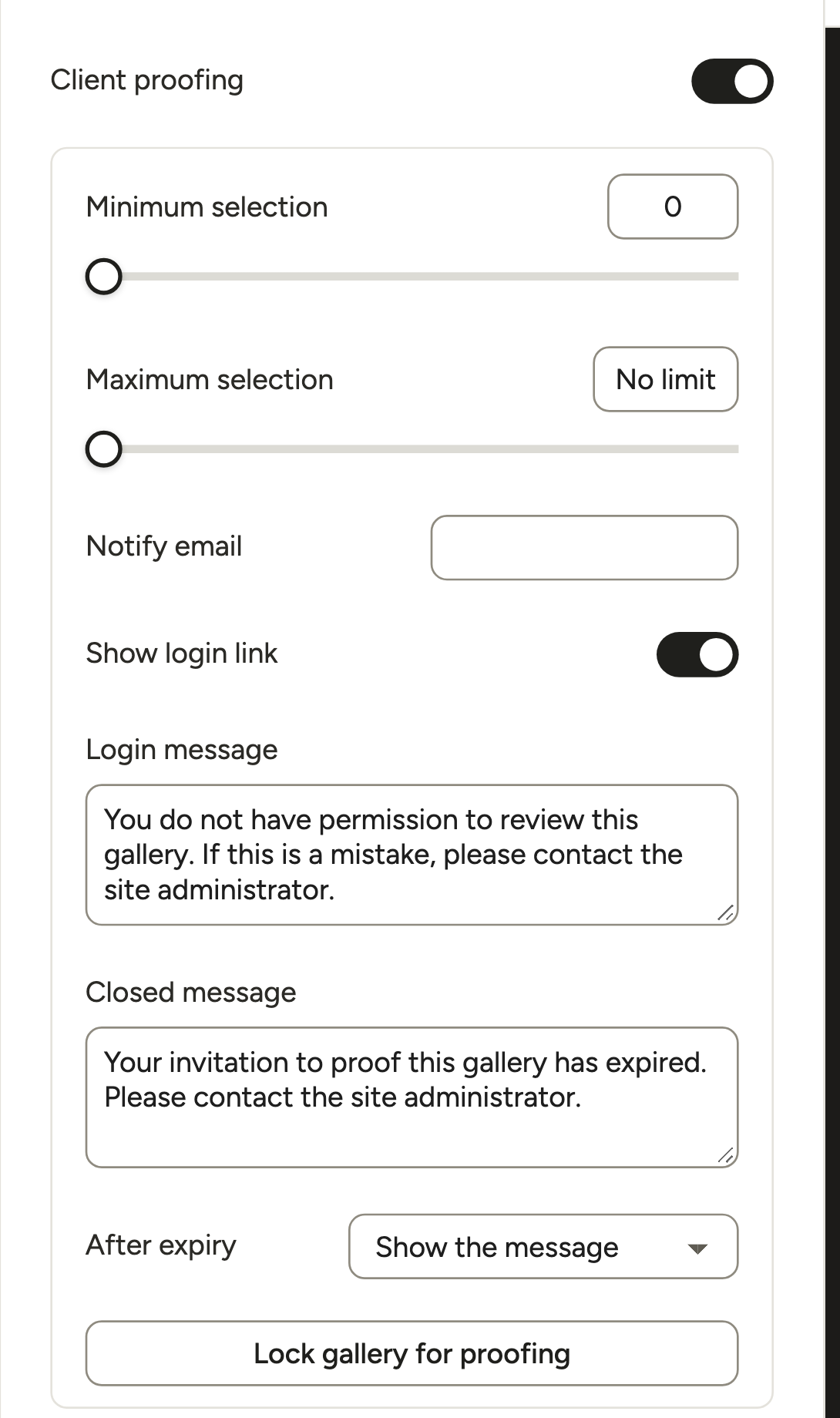
Create a gallery with your web-size exports, then open Proofing in the editor’s left rail:
- Turn on Client proofing.
- Set Minimum selection and Maximum selection. For a 30-photo album, set both to 30.
- Add your address under Notify email so you hear when the client submits.
- Write a Closed message for anyone who opens an expired invite.
- Click Lock gallery for proofing. Now only people you invite can see it.
A three-column Masonry layout makes picking easy.
Invite your client
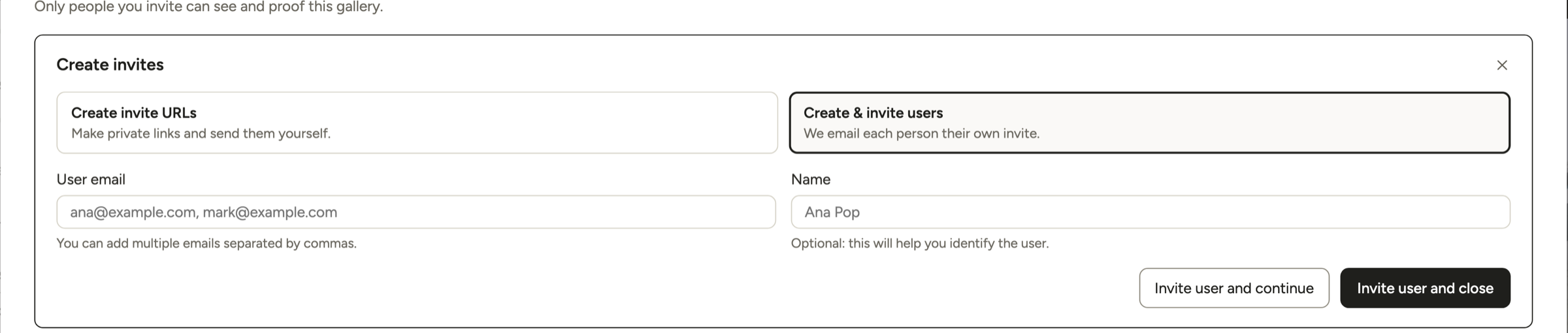
Open Invitations → Create invites:
- Create invite URLs makes a private link you send yourself. No account needed.
- Create & invite users emails each person an invite. Modula creates a WordPress account for them (Client role), and WordPress sends its set-password email, so warn them.
Either way, your client works on the front of your site, never in the dashboard. Add your logo to the invitation email in Modula → Settings → Email.
What your client does
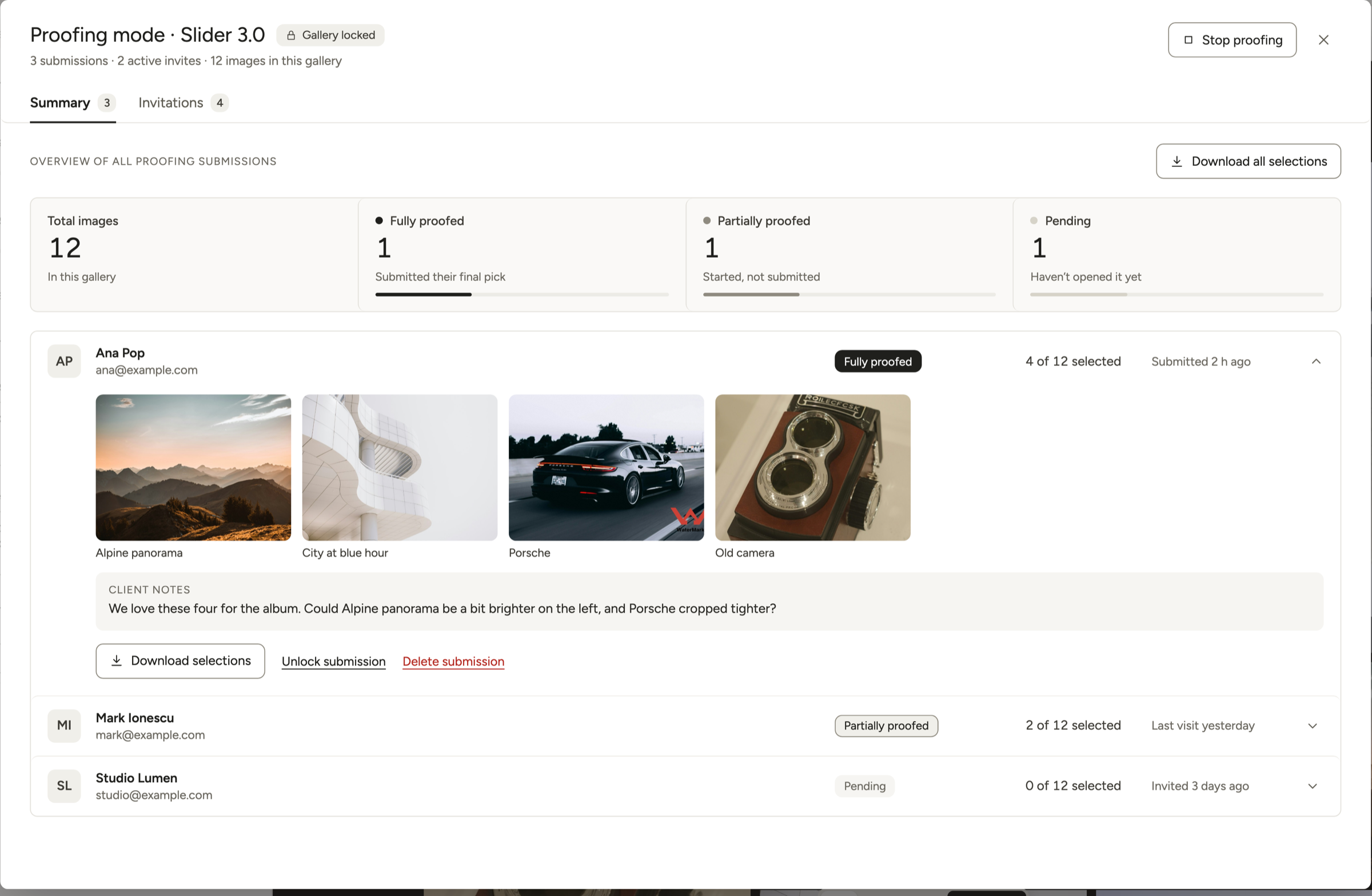
Your client selects photos and adds anything you should know under Additional notes. Save progress lets them come back later; Submit final selection sends you the list.
After they submit, the selection stays locked until you click Unlock submission. Notes cover the whole selection, so ask clients to name file numbers (“brighten 0412”).
Get the picks into Lightroom
The Summary tab shows each client as Fully proofed, Partially proofed or Pending, with picks and notes. Download selections (one client) and Download all selections give you a CSV file of the chosen images: id, file name and address. It’s a list, not the photos, and a list is exactly what you need to find the originals.
Tip
Lightroom Classic users report this works, though we haven’t tested every version. Open the Library Filter, choose Text → Filename → Contains, and paste the file names from the CSV, separated by commas. Lightroom should show only those images.
Watermark the proofs, not the finals
Protect → Watermark (Business) writes the mark into the image file itself. Every download of that image, and every other gallery using it, shows the mark too.
So watermark the web-size proofing set and deliver the clean full-size export as separate files. Leave Keep originals without watermark on; it’s what lets Remove watermark undo it. Our watermarking guide has placement ideas.
Feedback on single photos
For comments on one image, turn on Interact → Enable comments (Business). Comments open in the lightbox, and you moderate them in WordPress’s Comments screen. More in our comments guide.
How to deliver photos to clients in a private gallery
To deliver final photos with Modula, put the full-size finals in their own gallery, lock it with a password and switch on full-size downloads.
Create the gallery
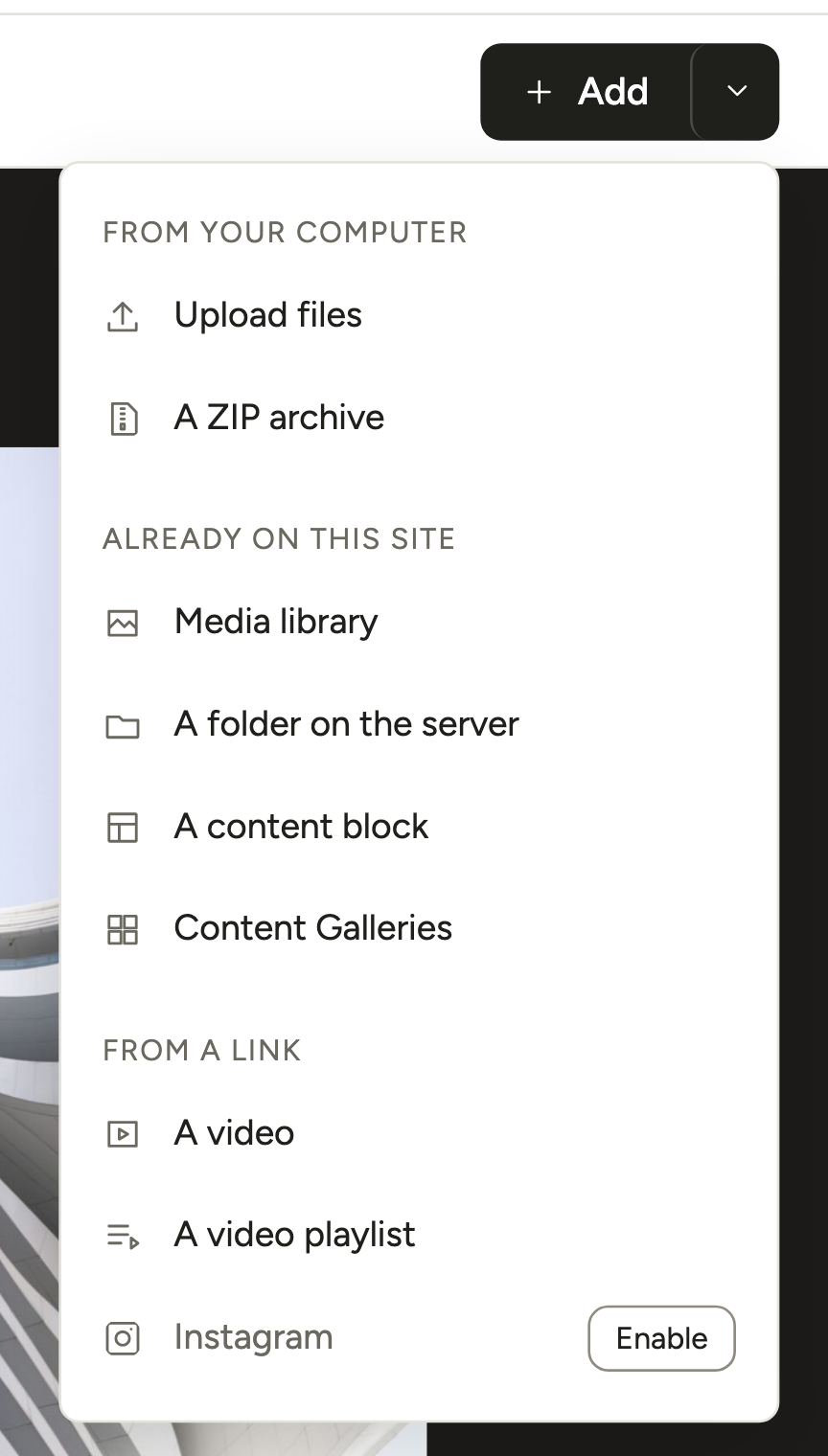
Go to Modula → Content → New gallery. Click the arrow next to + Add and choose A ZIP archive or Upload files. Under Layout → Type, Masonry or Justified grid suits most sessions. The editor saves as you go (All changes saved).
Lock it with a password
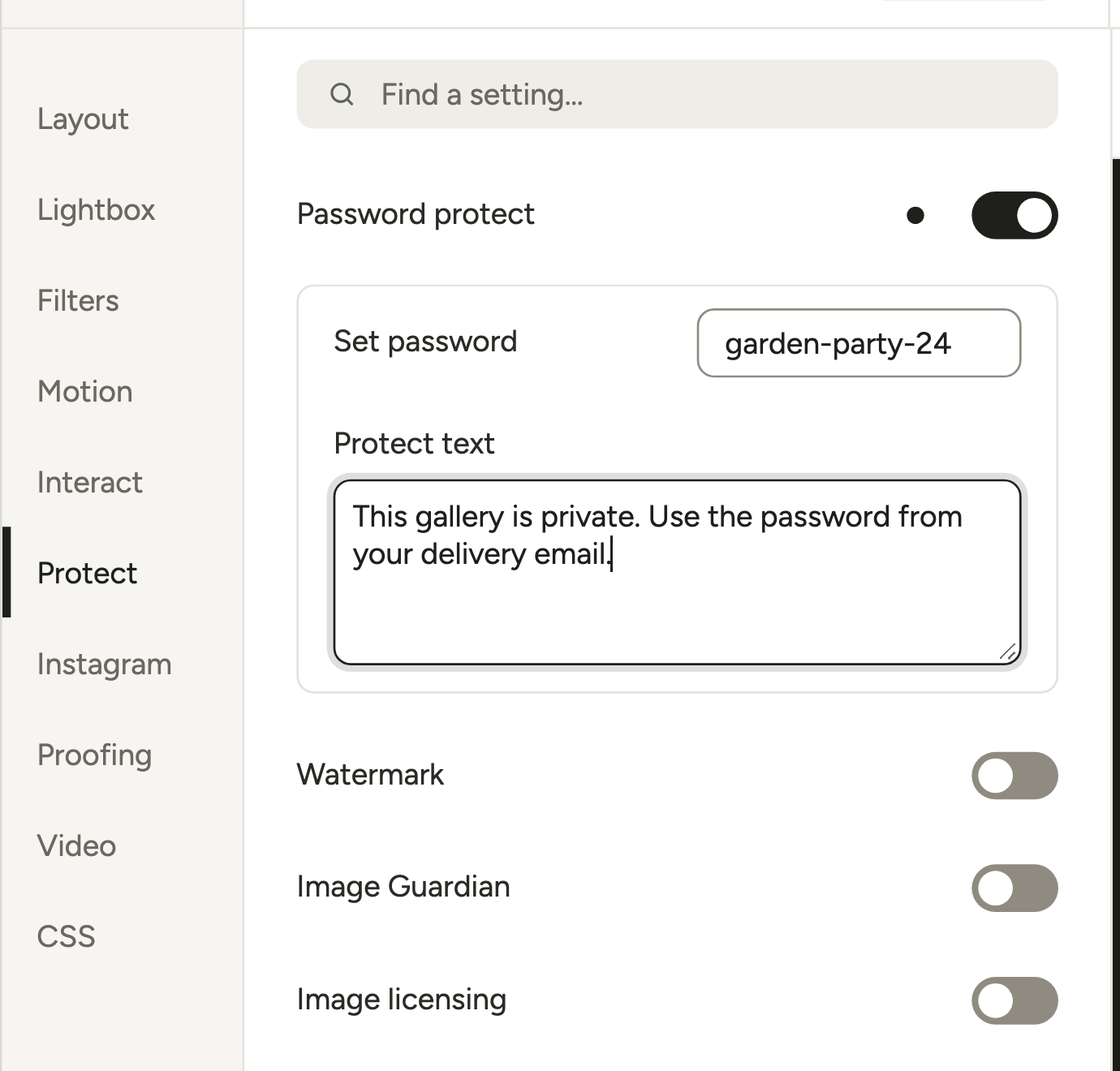
Open Protect → Password protect. Type the password under Set password and a short line under Protect text. Your client sees a password form instead of the gallery, and their browser remembers the password for 10 days.
It works for albums too. One password per gallery means one gallery per client. More in our password-protected gallery guide.
Turn on full-size downloads
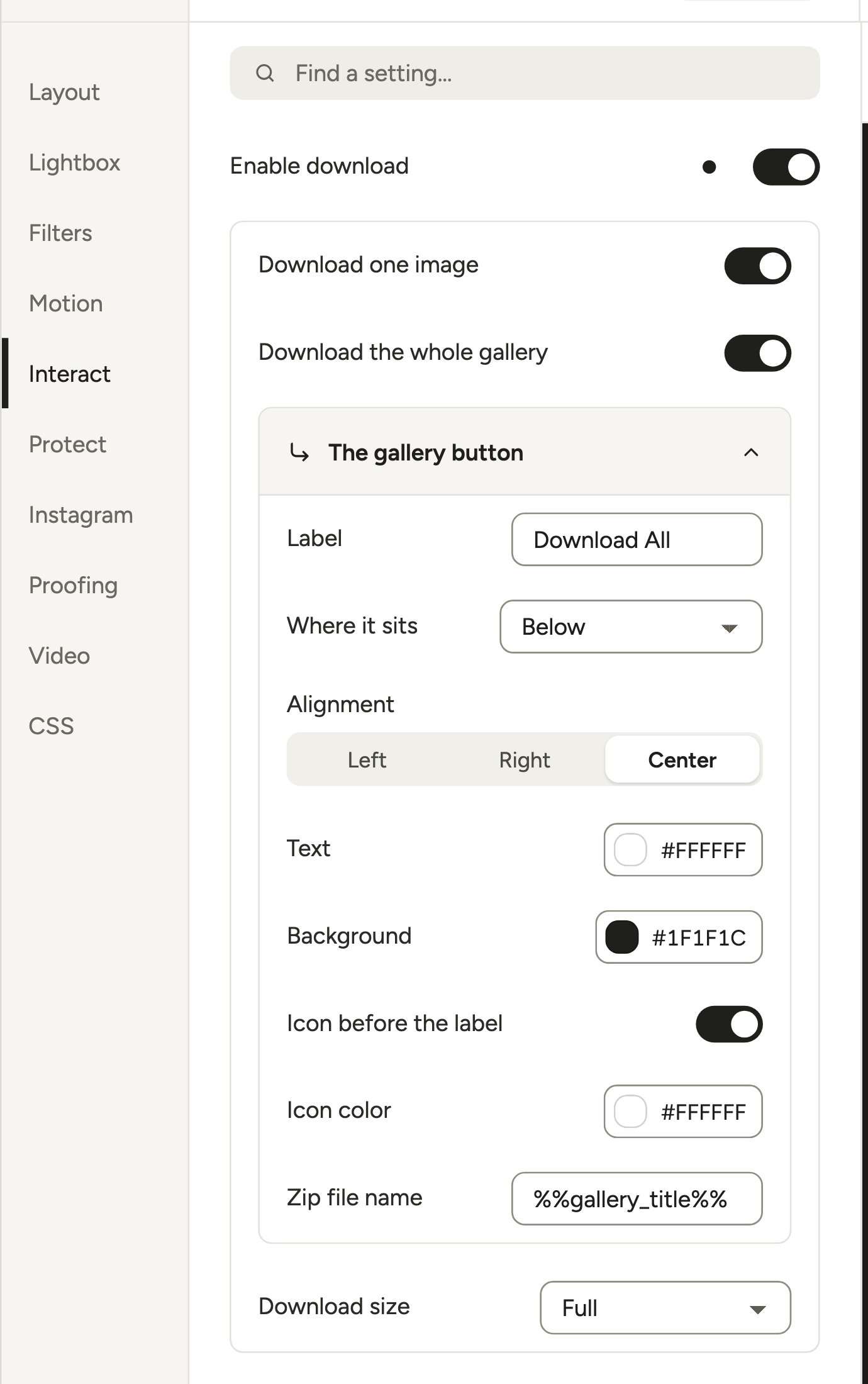
In Interact, turn on Enable download, then Download one image, Download the whole gallery (a button that downloads a ZIP), or both.
Now the setting people miss most often: Download size starts at Thumbnail. Change it to Full. Full gives your client the original file, even when WordPress made a smaller “-scaled” copy of an image over 2560 px (WordPress).
The lightbox can show a Download button too (Lightbox → More settings → Lightbox & Links → Show toolbar). It saves the displayed copy, which can be scaled or compressed, so point clients to each photo’s download icon or the ZIP for originals. Downloads follow the password: if the gallery is locked, so is the ZIP. See the downloadable gallery guide for every option.
Give the gallery an address
Click Embed and add the gallery to a page you keep out of your menu. Or switch on Modula → Settings → Galleries → Standalone pages → Galleries get their own page, so every gallery gets its own URL (Standalone docs). Proofing invite links rely on this too.
Check it like your client will
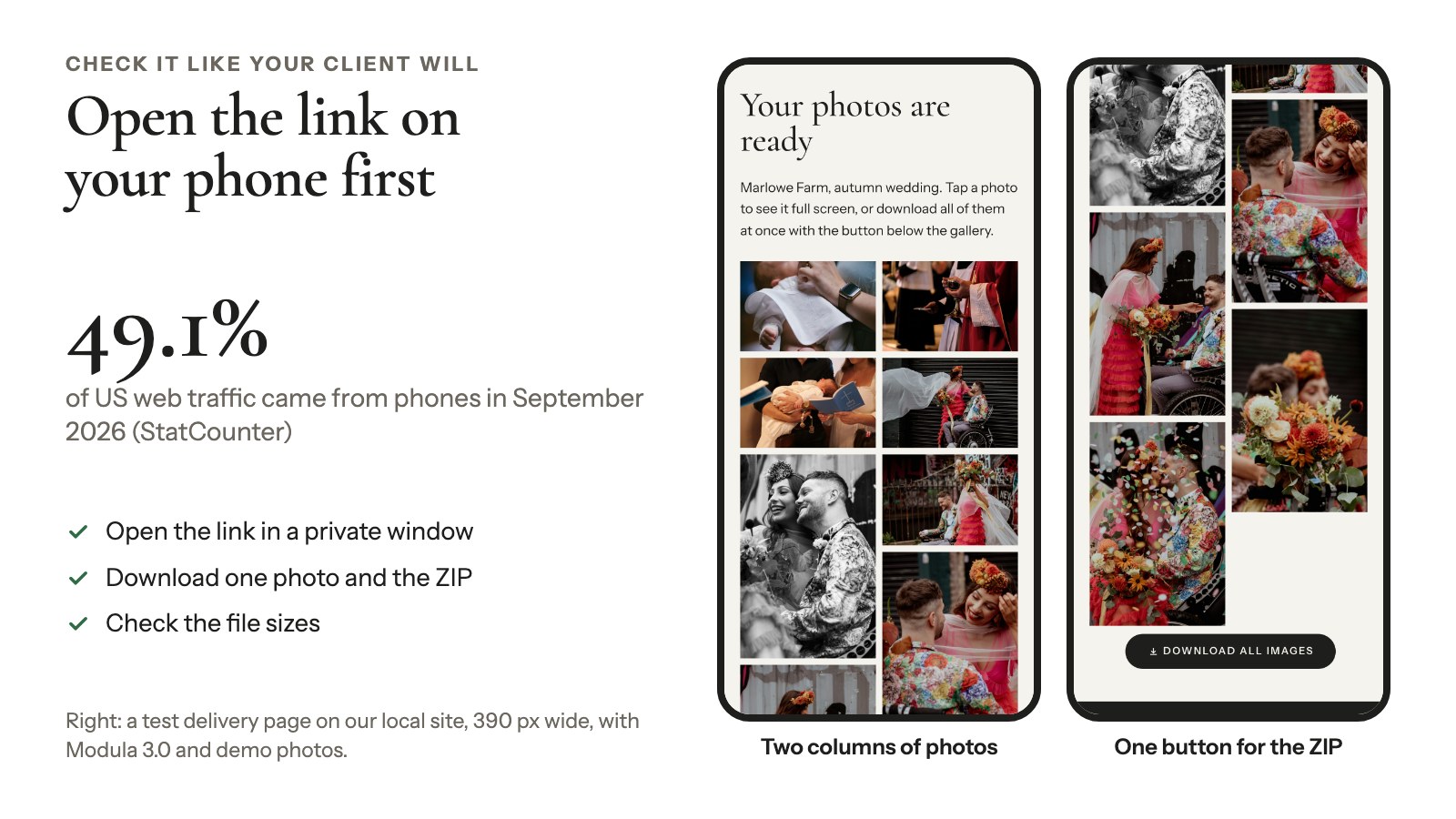
Open the link in a private window and on your phone: 49.1% of US web traffic came from phones in September 2026 (StatCounter). Download one photo and the ZIP, and check the file sizes.
Keep the gallery fast and the downloads full size
A Modula gallery can show your client light copies and still hand over the original files.
- Resized copies: the grid shows copies sized to fit your columns, not your originals.
- Lazy loading: Load images as people scroll is on by default. Leave it on.
- Compression: Settings → Performance → Compression (Lossless, Lossy or Glossy; Trio and up) shrinks the browsing copies and serves them from Modula’s image CDN, a network of servers close to your visitors.
- Originals stay original: with Download size on Full, each photo’s download icon and the ZIP serve your originals, not the CDN copies.
- One page per client: give each client a page or an Album (Trio) instead of stacking ten galleries on one page.
More in our guide to faster gallery images.
Send the gallery: the delivery email
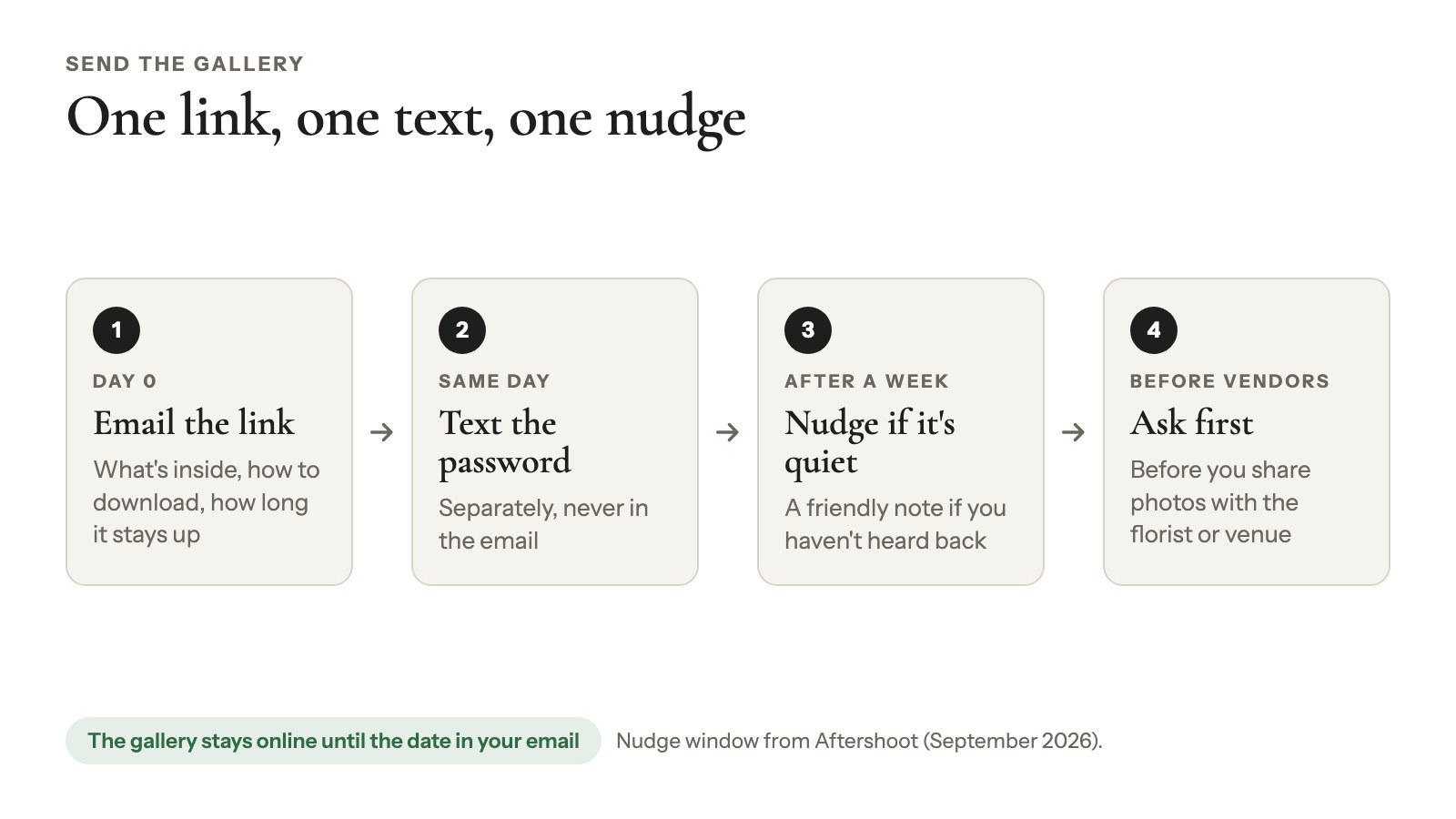
A good delivery email is short: the gallery link, what’s inside, how to download and how long the gallery stays up. Send the password separately.
Example
Subject: Your photos from [session] are ready
Hi [name], your gallery is ready: [link]. I’ll text you the password.
Inside are [number] edited photos in full resolution, ready to print. To save one, use the download icon on the photo. To save everything, use the button under the gallery: you’ll get one ZIP file, which a phone may save to Files rather than Photos.
The gallery stays online until [date]. Questions? Just reply.
For proofing, swap the download lines for: “Select the photos you love. Use Save progress while choosing and Submit final selection when you’re done.”
If you haven’t heard back within a week, send a friendly nudge (the window Aftershoot recommends, September 2026). And ask your client before you share photos with vendors, like the florist or venue.
When something doesn’t work
Six problems can get in the way of delivering photos to clients with Modula. Three came straight from our support conversations, and each has a fix.
The password is right, but the gallery won’t open
Your page cache is serving a saved copy, so the password check never runs. It can show up in one browser only, such as Safari on iPhone. Fix it once, site-wide:
- Exclude pages with protected galleries from the page cache.
- Add WordPress’s password cookie (
wp-postpass_*) to your cache plugin’s cookie exceptions (in FlyingPress: Bypass Cache for Cookies).
Use only the Modula gallery password, not a WordPress page password on top.
The invite link opens your homepage or a 404
Check this first: invite links point to the gallery’s own address, which exists only when Galleries get their own page is on. Switch it on in Modula → Settings → Galleries. If the link still fails, open WordPress’s Settings → Permalinks, click Save Changes and clear your cache. We’ve worked this out from the code and support cases, not tested every setup.
The lightbox button downloads the whole ZIP
In Lightbox & Links, turn Download all button off and keep Download button on.
The downloads are tiny
Download size is still on Thumbnail. Set it to Full.
There’s no button for the whole gallery
Modula builds the ZIP with PHP’s ZIP extension. Without it, the download-all button never shows up. Ask your host to switch the extension on.
Your client’s photos have your watermark
It’s written into the files. Deliver a clean export, or use Remove watermark (it needs Keep originals without watermark).
What a self-hosted gallery won’t do
A self-hosted Modula gallery delivers photos; it doesn’t sell them. If you need any of these, Pixieset or Pic-Time is the better pick:
- No print store, lab fulfillment (Pic-Time lists 30+ labs, checked October 2026), or selling of photos or downloads.
- No included storage: photos live on your hosting, within your host’s upload limit.
- No RAW delivery, mobile app or face search.
- No download PINs, limits or tracking.
- No automatic expiry: you change the password, use Expire invite or Stop proofing, or unpublish.
- No CRM, contracts, bookings or marketing automation.
Also, a password hides the gallery, not the files: each image still has a public address. Image Guardian (Trio and up) blocks right-click and can load the main image from a signed address that breaks when pasted elsewhere. The real files stay reachable through the page’s srcset, so it slows casual copying, nothing more. See protecting images from theft.
Still weighing platforms? Compare our Pixieset alternative and Pic-Time alternative guides.
Frequently asked questions
Most photographers send a private gallery link, the best way to share photos with clients for most sessions. The client browses, picks favorites and downloads at full size. The gallery lives on a photo delivery service like Pixieset or Pic-Time or on the photographer’s own website.
Thirty to 90 days is common, according to 2026 guides from Aftershoot and fast.io. Put the end date in your contract and delivery email. Modula has no automatic expiry, so on that date you change the gallery’s password or unpublish it.
Only if your contract says so. Most photographers deliver edited JPEGs, since RAW files need editing software and don’t show your edit. WordPress doesn’t accept RAW uploads, so a Modula gallery delivers JPEGs; use a transfer link for the rare client who needs RAWs.
Use a client gallery or a transfer link, which sends each file as you exported it; messaging apps often compress photos. In Modula, set Download size to Full: your client gets the original upload, not the 2560 px “-scaled” copy WordPress makes of big images.
No. A password-protected Modula gallery needs only the password, and a proofing invite URL works without logging in. Only Create & invite users creates a WordPress account (Client role) and sends WordPress’s set-password email, so use invite URLs for zero sign-up.
Yes. Modula gives each gallery one password, so create a separate gallery, with its own password, for each client. A client with several galleries, say a wedding and an engagement session, can get one password-protected Album instead (Trio and up).