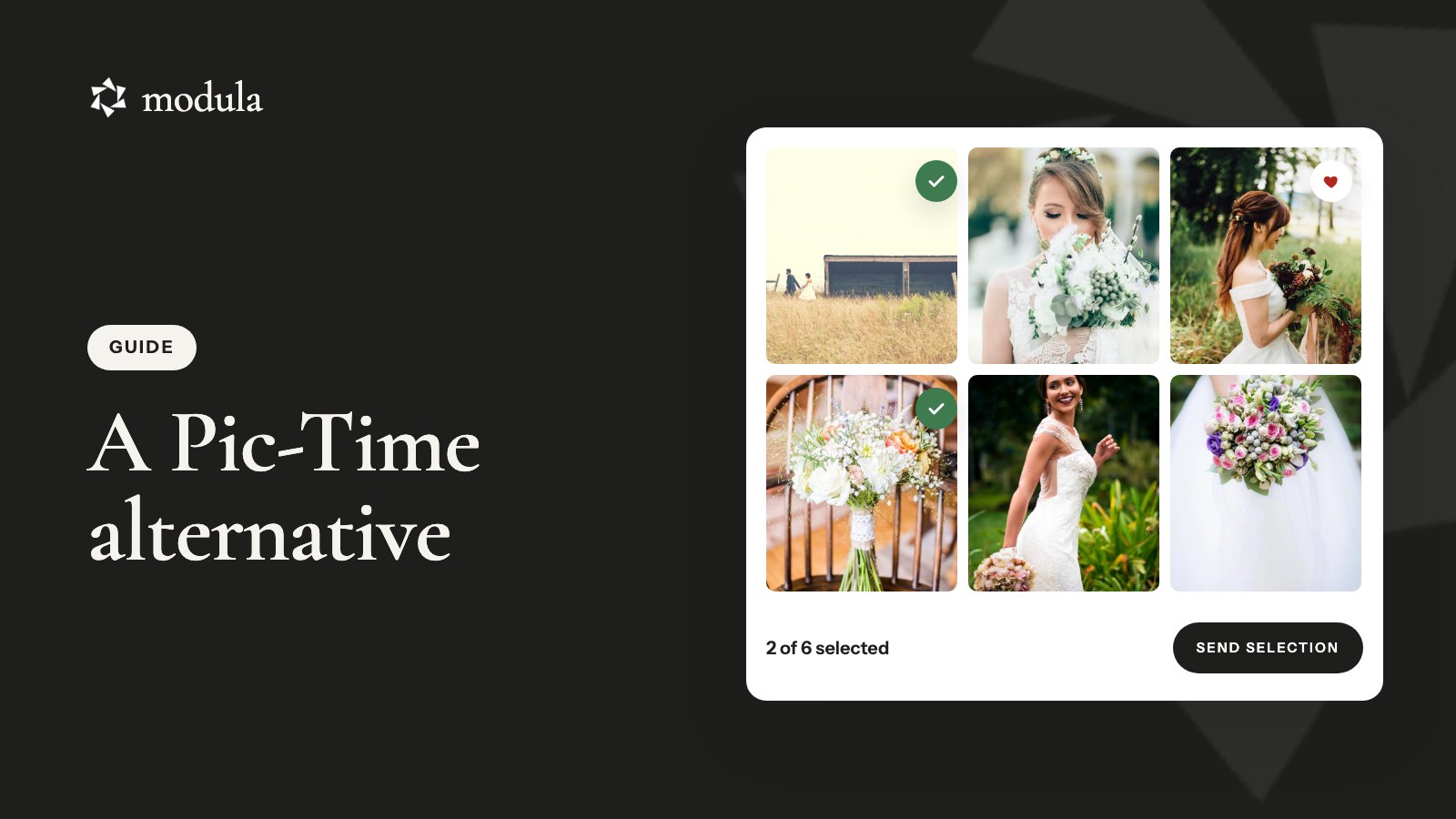
Pic-Time is a sales platform for client galleries: a print store with 30+ labs, sales automations and smart search. It doesn’t build your website, so if you’re looking for a Pic-Time alternative, you probably run a site already.
If that site is WordPress, a gallery plugin can take over proofing (clients choosing their photos), delivery and private galleries on your own domain. It won’t replace Pic-Time’s store, its automations, its AI and selfie search or its app.
So here’s the rule: if your Pic-Time store pays for itself, keep it. Below you’ll see what you can move, what you can’t and what each route costs, plus the commission rates and deletion rule most “Pic-Time alternatives” lists skip.
Prices and plans were checked on each vendor’s pages in October 2026.
Do you need a Pic-Time alternative? Start with your store
Whether you need a Pic-Time alternative comes down to one number: your store’s profit over the last 12 months, after commission, set against your plan’s price.
| If… | Do this | What it costs you |
|---|---|---|
| The store pays for your plan, or you rely on automations, selfie search or album sales | Keep Pic-Time; WordPress runs your portfolio and blog | Nothing new |
| You get a few print orders a year | Split: proofing and delivery on WordPress, a small Pic-Time account for the store | Can be more than staying |
| You deliver digital files and the store is quiet | Leave: move proofing, delivery and private galleries to WordPress | $99 the first year for Modula Business; photos use your hosting |
| You’d rather not run WordPress at all | Switch platforms | See Pic-Time vs Pixieset below |
Want to sell inside WordPress instead? Modula can’t: it has no store, cart or payments. A store plugin such as Sunshine Photo Cart can, and our Pixieset alternative guide covers your options.
Check four things in your Pic-Time account first:
- Store profit: what you kept from orders in the last 12 months.
- Automations: whether a campaign produced an order, or just sent emails.
- Storage: how much you use today. It sets the plan you’d need to stay or split.
- Open work: galleries with selections in progress or orders waiting.
What Pic-Time does well, and what it leaves to your website
Pic-Time is very good at one thing: selling from the gallery after the shoot. That’s the fair Pic-Time review in one line. Everything below comes from Pic-Time’s own pages, mainly its pricing page, checked October 2026.

Selling
- Print store on every plan, Free included: 30+ labs, online payments, automatic fulfillment and an album builder.
- Card fees covered: when Pic-Time collects the payment, it pays the card processing fees.
- Sales automations on every plan: Pic-Time’s examples include an early-bird discount, an abandoned-cart offer, a promotion before the gallery expires and an anniversary offer (Pic-Time blog).
The gallery experience
- Professional and up: Client Selections, Album Proofing, guest pre-registration, slideshows, a vendor network and Smart Image Search for you.
- Advanced: Smart Search for your clients (by person, keyword or selfie) and extra brands.
- Every plan: Lightroom integration and a mobile app for you, not your clients: you create and share galleries from your phone.
What Pic-Time doesn’t do
Pic-Time doesn’t build websites. You get a Portfolio Page and blog posts that you embed into a site you run somewhere else. No contracts or invoices either; it connects to studio-management tools instead. So a Pic-Time photographer usually pays for a website as well.
Pic-Time features and their WordPress equivalents
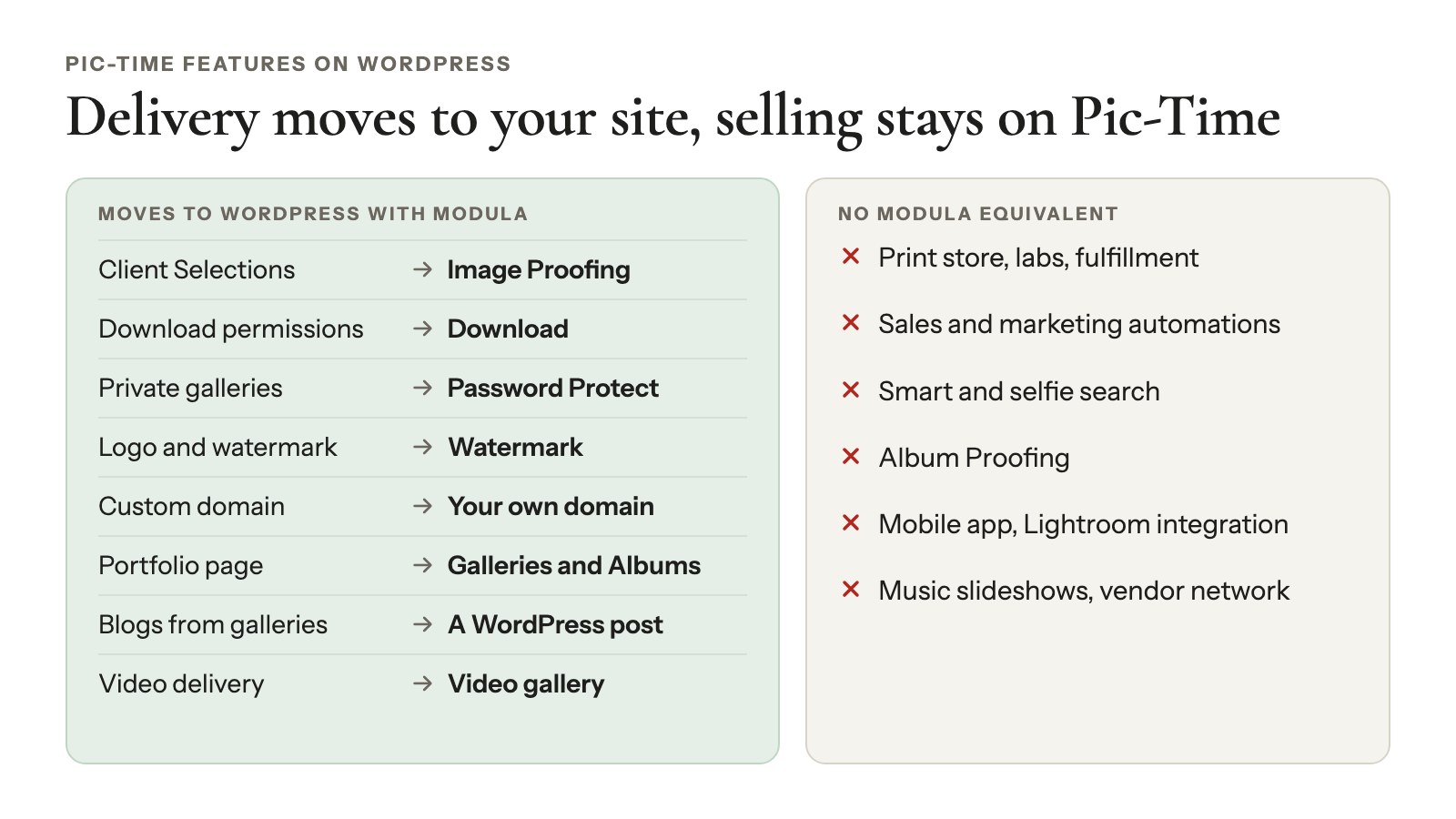
Most of what Pic-Time does after the shoot has a WordPress equivalent; selling and AI search don’t. We make Modula, the plugin in the right-hand columns.
| Pic-Time feature | Pic-Time plan | On WordPress with Modula | Modula plan |
|---|---|---|---|
| Client Selections | Professional and up | Image Proofing: selection limits, one invite per client, a Summary | Business |
| Download permissions | All plans | Download: one image or a ZIP, at the size you pick | Business |
| Private galleries | All plans | Password Protect for galleries and albums | Trio and up |
| Your logo and watermark | Beginner and up | Watermark, plus your logo in the proofing invite email | Business |
| Custom domain, no Pic-Time branding | Professional and up | Your own domain. Standalone gives each gallery its own address | Trio and up |
| Portfolio page | All plans | 14 gallery types, plus Albums | 7 types free; Albums Trio and up |
| Blogs built from galleries | Professional and up | A WordPress post with a gallery in it | Free |
| Video delivery | All plans (1–60 GB) | Video gallery: YouTube, Vimeo or your own files | Starter and up |
| Gallery expiry dates | All plans | No expiry date. You close each invite with Expire invite | Business |
| Storage | 10 GB (later 3 GB) / 20 GB / 100 GB / unlimited | Your hosting. Speed Up adds compression and a CDN | Trio and up |
| Album Proofing | Professional and up | None. Proofing picks photos; it doesn’t proof an album layout | – |
| Print store, labs, fulfillment | All plans | None | – |
| Sales and marketing automations | All plans | None | – |
| Smart and selfie search | Professional / Advanced | None | – |
| Mobile app, Lightroom integration | All plans | None | – |
| Music slideshows, vendor network | Professional and up | None. Modula’s Slideshow is lightbox autoplay | – |
What Modula adds, and what it costs
Two things Modula has that Pic-Time’s pricing page doesn’t list:
- Comments on each photo: a thread per image in the lightbox, stored as WordPress comments (Business).
- Image Guardian: blocks right-click and dragging, and can blur your photos when a visitor leaves the tab (Trio and up).
No add-ons to buy, either: they’re extensions in your plan, switched on in Modula → Extensions.
Business costs $99 for the first year, then $198 a year, for 5 sites. Trio is $69, then $138 a year, for 3 sites. Both come with a 14-day money-back guarantee (pricing).
The free Modula Lite has 160,000+ active installations and a 4.7/5 rating (October 2026) on wordpress.org, but none of the client tools. Weighing other plugins? See our comparisons.
Pic-Time pricing: what you really pay
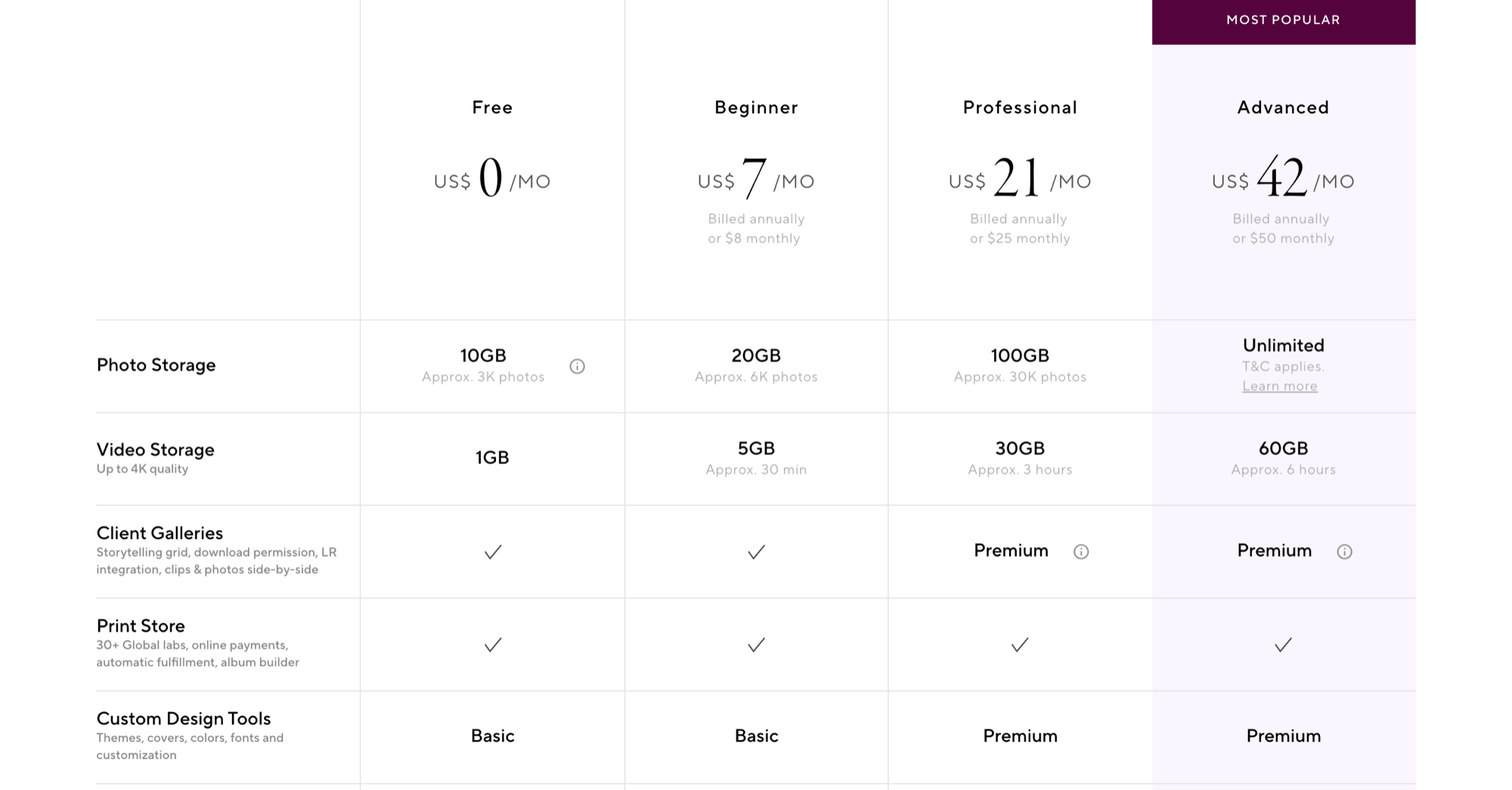
Pic-Time pricing covers four plans, from Free to $50 a month, or $7 to $42 a month billed yearly (checked October 2026). Three things set what you really pay: storage, commission on print sales, and which features sit behind Professional.
Plans
| Plan | Monthly | Billed yearly | Photo storage | Video |
|---|---|---|---|---|
| Free | $0 | $0 | 10 GB (about 3,000 photos), later 3 GB | 1 GB |
| Beginner | $8 | $7/mo ($84/yr) | 20 GB | 5 GB |
| Professional | $25 | $21/mo ($252/yr) | 100 GB | 30 GB |
| Advanced | $50 | $42/mo ($504/yr) | Unlimited (terms apply) | 60 GB |
Each extra brand costs $6 a month, and the 30-day trial includes every Advanced feature (Pic-Time pricing).
When does Free drop to 3 GB? The pricing page says 3 months in its table and 6 on the plan card. The downgrade help article uses 3 months, so plan on that.
Commission
When Pic-Time collects the payment, it takes 15% on Free and Beginner, 8% on Professional and 6% on Advanced (Pic-Time help center).
- It comes out of your markup, the order’s profit, not the lab cost.
- Collecting payments yourself is commission-free on Professional and Advanced.
- Beginner always pays 15%. Pic-Time says it’s “always collected, regardless of store setup.”
An example, with our arithmetic: on a $100 print order with $40 of markup, you pay $6 on Free or Beginner, $3.20 on Professional and $2.40 on Advanced.
What needs Professional
Client Selections, Album Proofing, a custom domain, removing Pic-Time branding, slideshows and blogs all start at Professional. So if you proof and brand on Pic-Time, you pay at least $252 a year.
A year side by side
Leaving saves some money. Splitting rarely does after the first year. Billed yearly, our arithmetic:
| Set-up | First year | After that | The catch |
|---|---|---|---|
| Pic-Time Professional | $252 | $252 | 8% commission when Pic-Time collects |
| Pic-Time Advanced | $504 | $504 | 6% commission when Pic-Time collects |
| Modula Business alone | $99 | $198 | No store. Photos use your hosting |
| Modula Business + Pic-Time Free | $99 | $198 | 15% commission, 3 GB for store galleries |
| Modula Business + Pic-Time Beginner | $183 | $282 | 15% commission, 20 GB for store galleries |
Against Professional, leaving saves $153 the first year and $54 a year after. Against Advanced, it saves $306 a year once Modula renews.
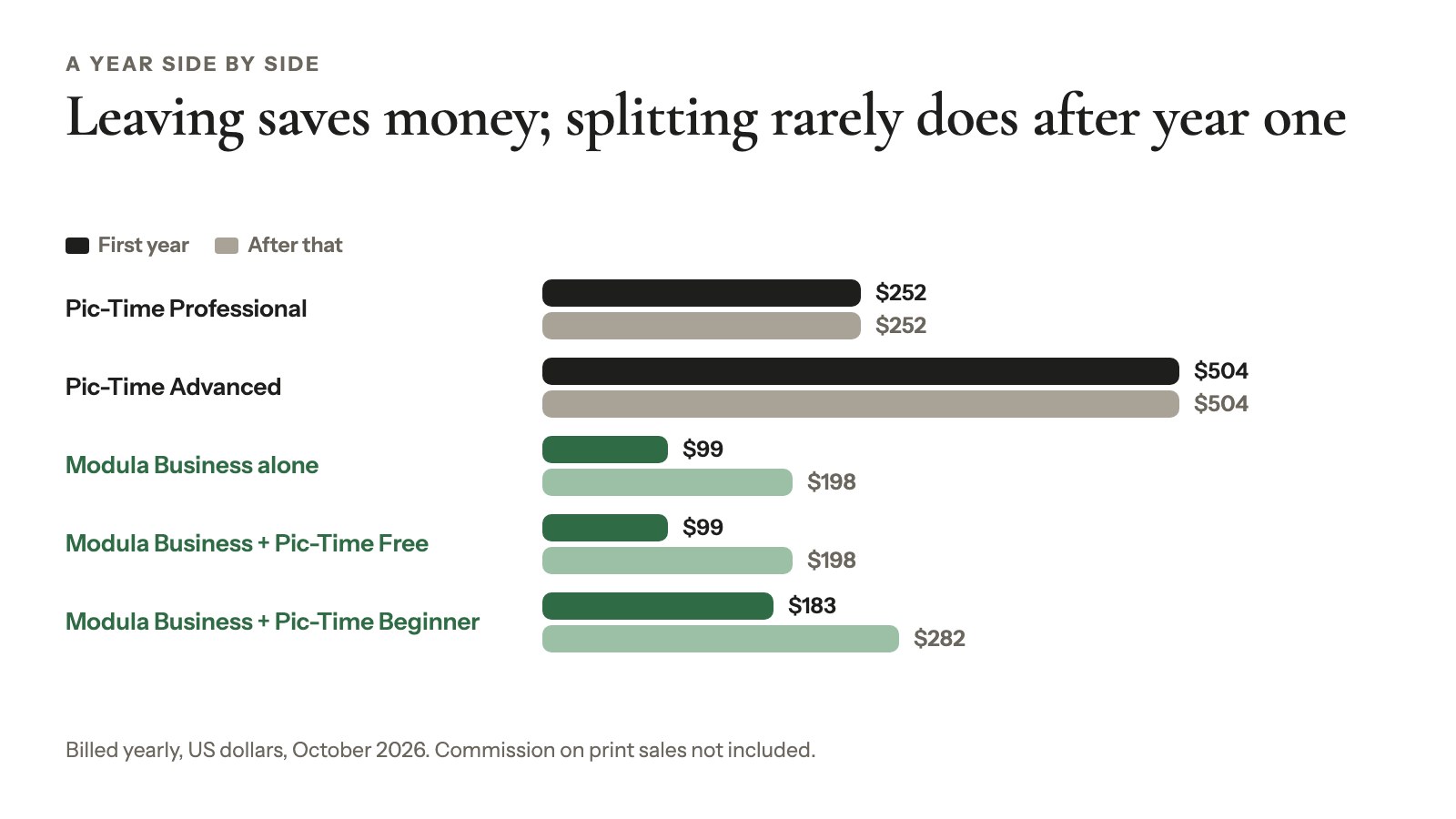
With Beginner, the split costs $30 a year more than Professional from year two. With Free, it saves $54, but you pay 15% commission instead of 8%. By our math, those 7 extra points eat the $54 once your store’s markup passes about $770 a year, sooner if you’d collect payments yourself on Professional.
So move to own your galleries: no storage tiers, no deletions on downgrade. Not for a smaller bill.
The split set-up: Pic-Time for the store, WordPress for everything else
Splitting Pic-Time and WordPress works when only some clients buy prints. Proofing and delivery happen on your site; clients who want prints get a Pic-Time store gallery. Pic-Time handles the order, payment and lab; your site just links there.
How Pic-Time connects to WordPress
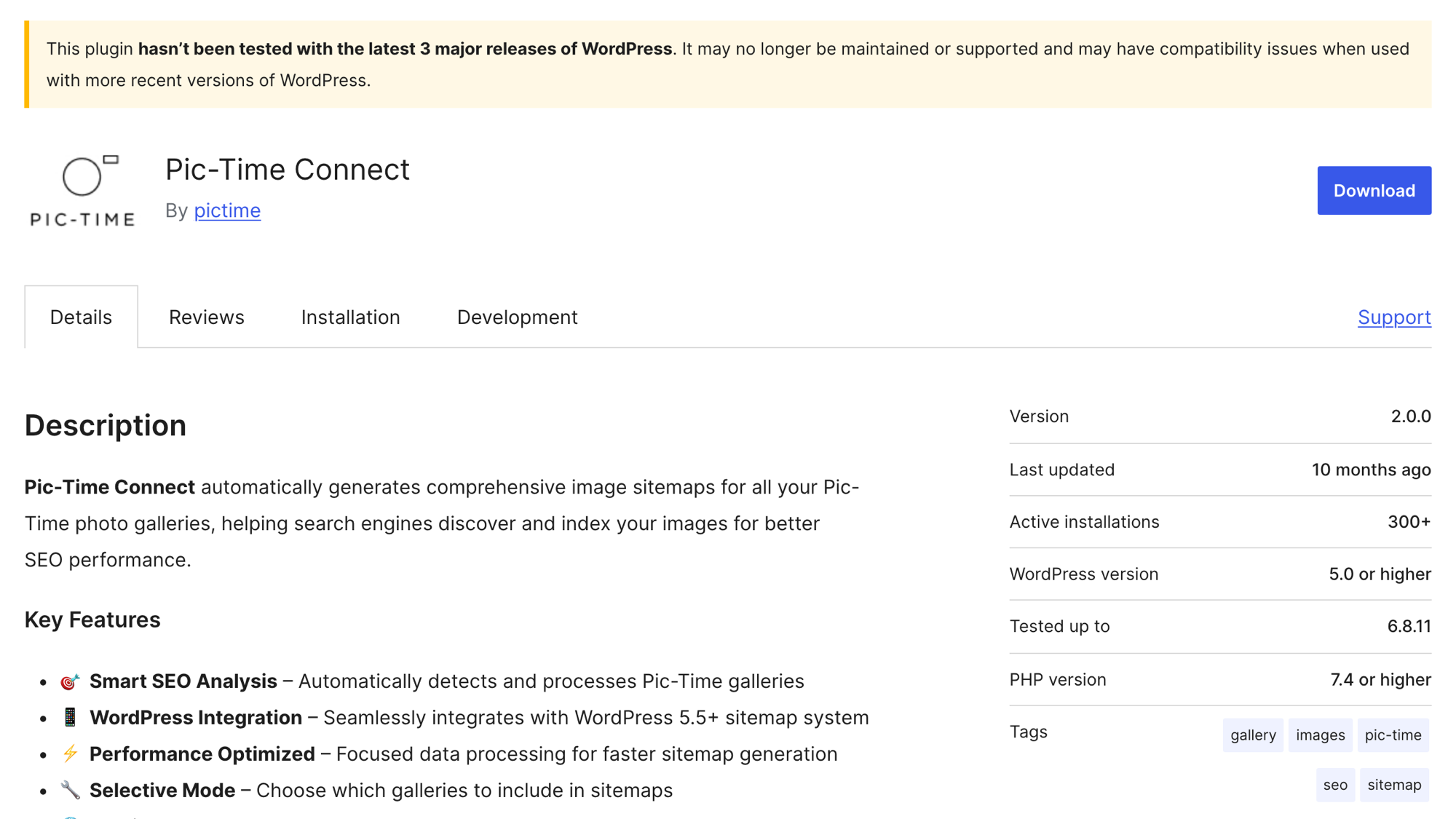
- Pic-Time Connect: Pic-Time’s own plugin (v2.0.0, 300+ active installations, updated December 2025). It adds photos from embedded Pic-Time content to your sitemap.xml, but doesn’t display galleries (help center).
- Portfolio Page: comes with integration code for your site. An advanced option sends invited clients to your portfolio page first, which Pic-Time notes adds a step for them.
- Blog posts: embed through a Blog Integration Code.
What goes where
- On WordPress: the proofing round, the password-protected download gallery and your portfolio.
- On Pic-Time: a store gallery with print-ready files for clients who order, linked from your delivery page.
Where the split breaks
- Storage: print-resolution files fill Free (3 GB) or Beginner (20 GB) fast.
- Commission: Beginner charges 15% even on payments you collect.
- Friction: two logins for you, and two sets of emails for your clients.
A wedding on WordPress: from album picks to final download
Pic-Time’s Client Selections has a WordPress stand-in: Modula’s Image Proofing. Here’s one wedding run through it, all on Modula Business: 600 edited photos, a couple who picks 60 to 80 for the album, then gets the full set. Click-by-click steps are in the Image Proofing guide, and what photo proofing is covers the basics.
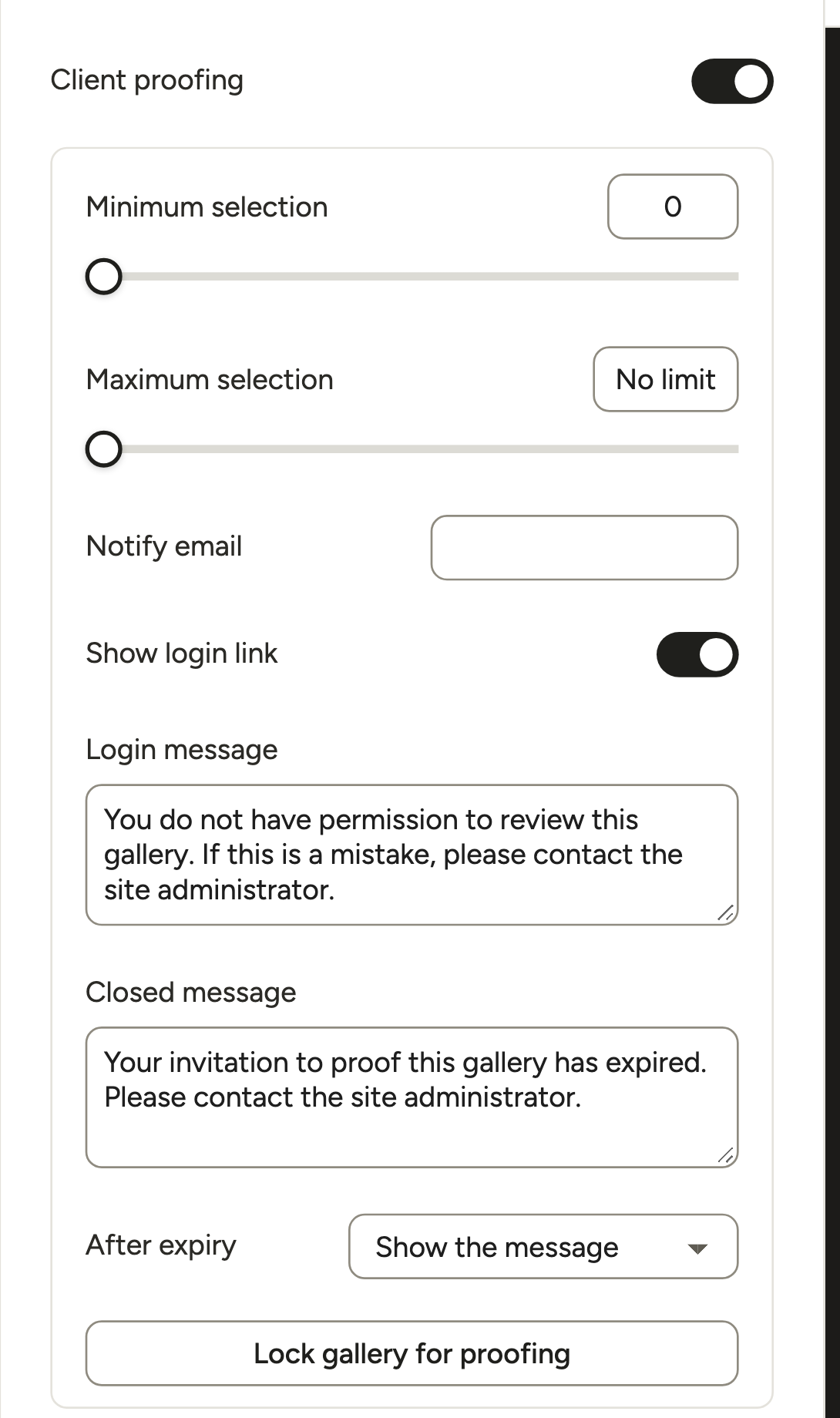
Set the album rules
In the gallery’s Proofing section, turn on Client proofing. Set Minimum selection to 60 and Maximum selection to 80, add your address in Notify email, then click Lock gallery for proofing.
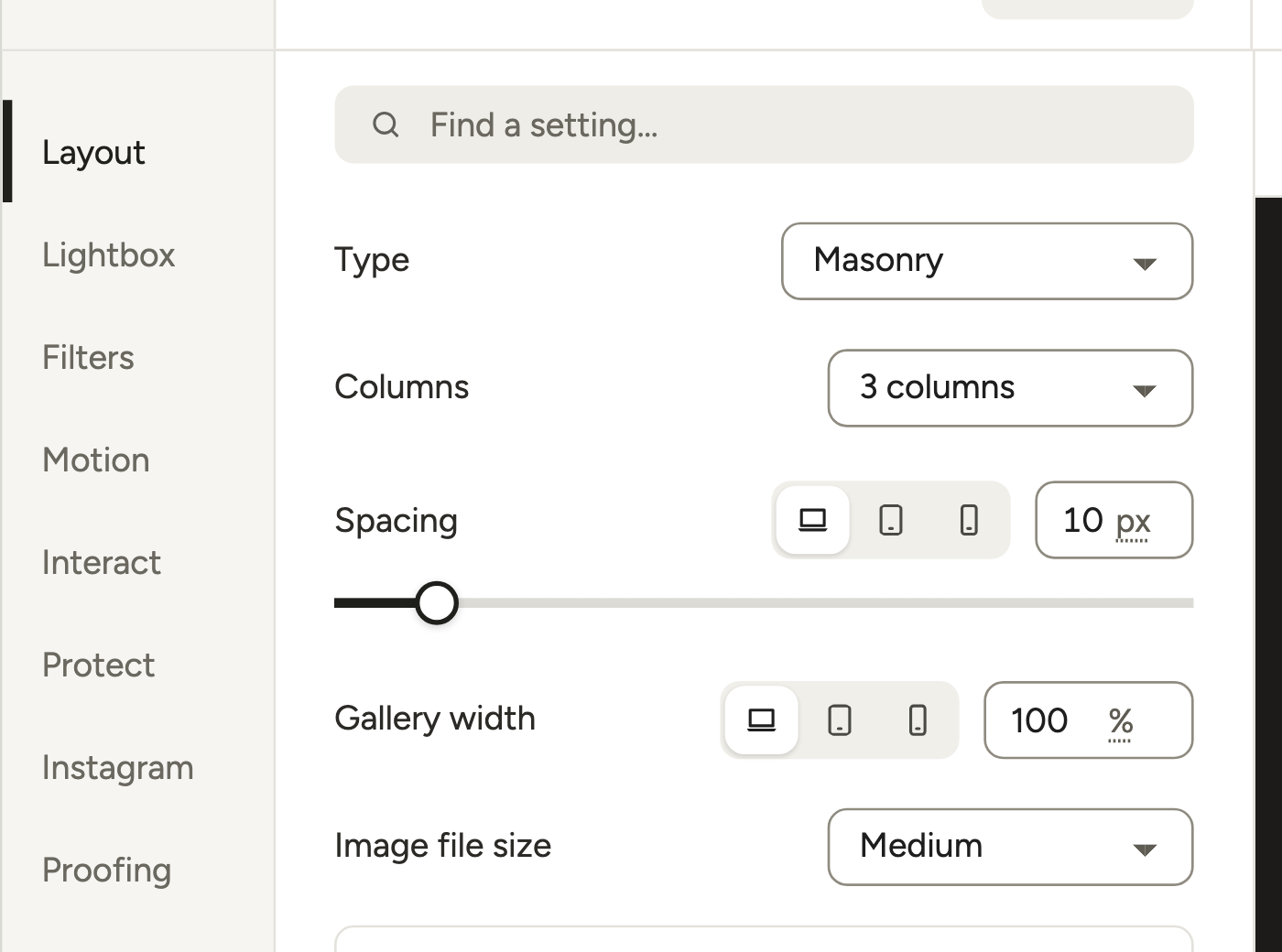
For picking, a Masonry layout with 3 columns keeps each photo big enough to judge.
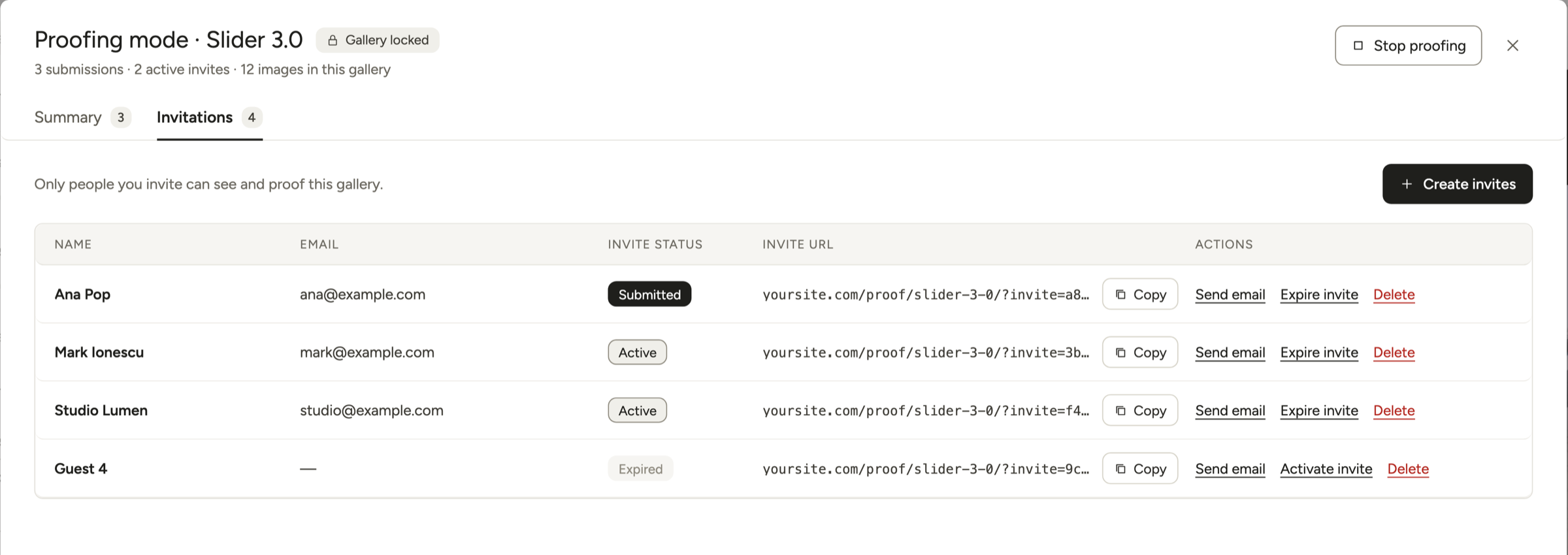
Invite both of them
Invite links open the gallery’s own page, so first turn on Galleries get their own page in Modula → Settings → Galleries → Standalone pages (included in Business). It’s off by default, and without it the link opens a 404 or your homepage.
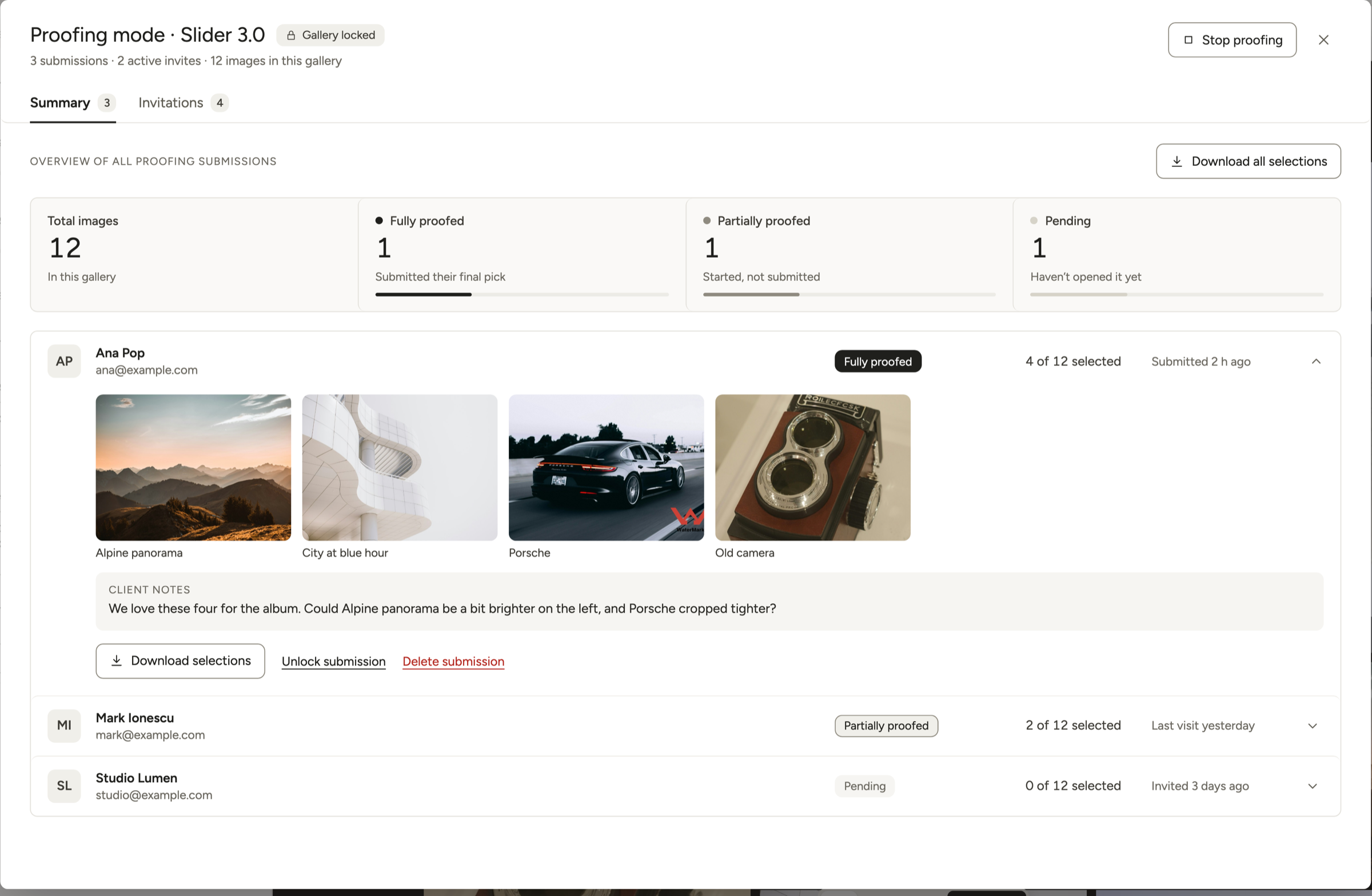
In the Invitations tab, click Create invites, then Create & invite users with both email addresses, or Create invite URLs to send the links yourself. Each person’s submission shows up separately in the Summary.
Want your logo on that email? In Modula → Settings → Email, add your Logo under Sender. Put {{logo}} in the Invitation email message, then click Send a test email.
Good to know
Link still opens your homepage? Re-save Settings → Permalinks, clear your cache and create a fresh invite.
Let them change their minds
Your couple sees Select images, Additional notes, Save progress and Submit final selection. Tell them to use Save progress until they’re sure, because Submit final selection ends their round.
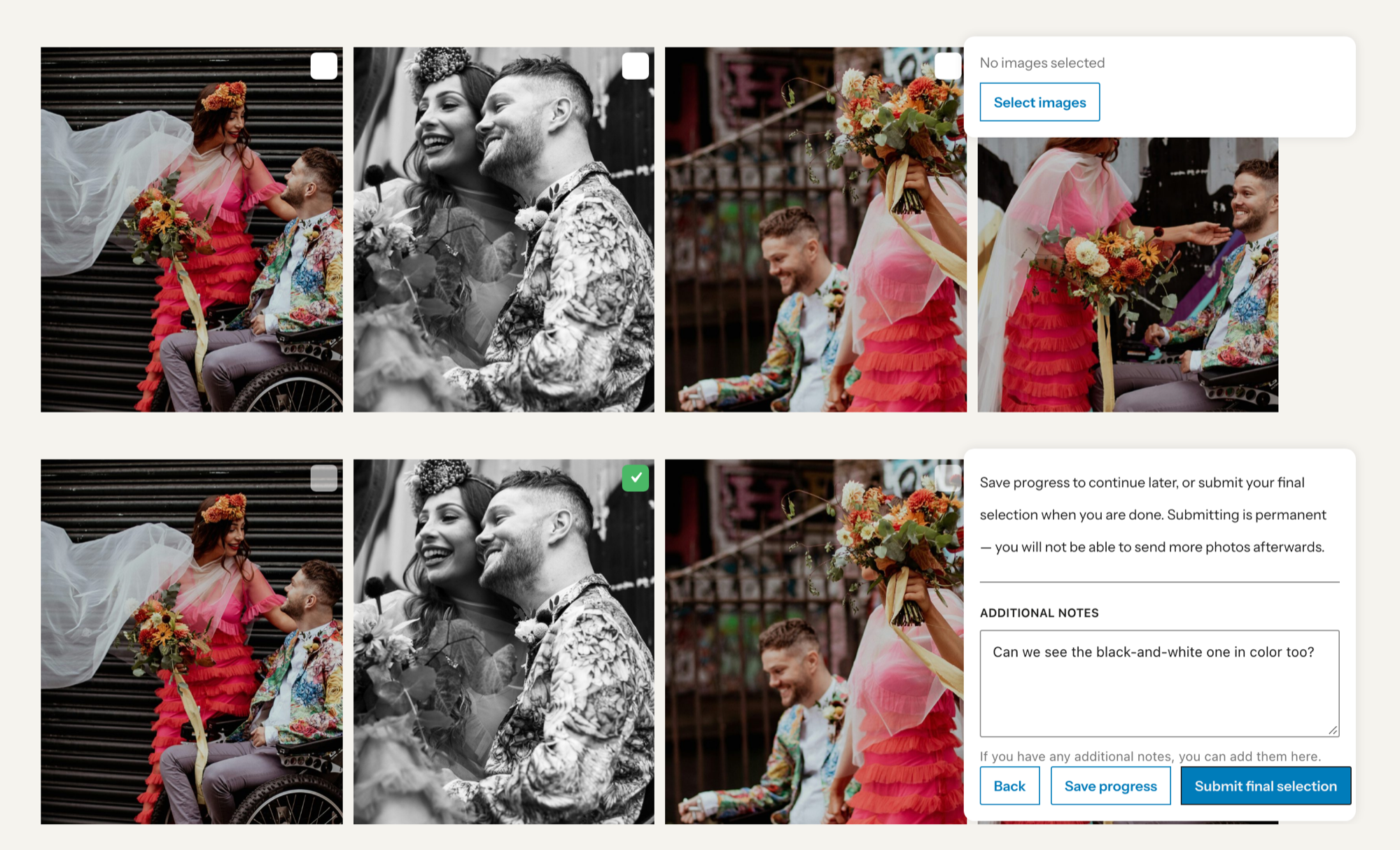
Submitted, then changed their minds? Click Unlock submission in the Summary, and the same link works again.
Notes cover the whole selection. For “crop this one tighter” on a single photo, turn on Enable comments in Interact.
Hand the picks to your album software
The Summary shows who’s Fully proofed, Partially proofed or Pending, with each person’s photos and Client notes. Download selections saves one person’s picks as a CSV of file names; Download all selections does it for everyone. Use those names to pull the picks in Lightroom or your album software.
Deliver the full gallery
The essentials, with more in how to deliver photos to clients:
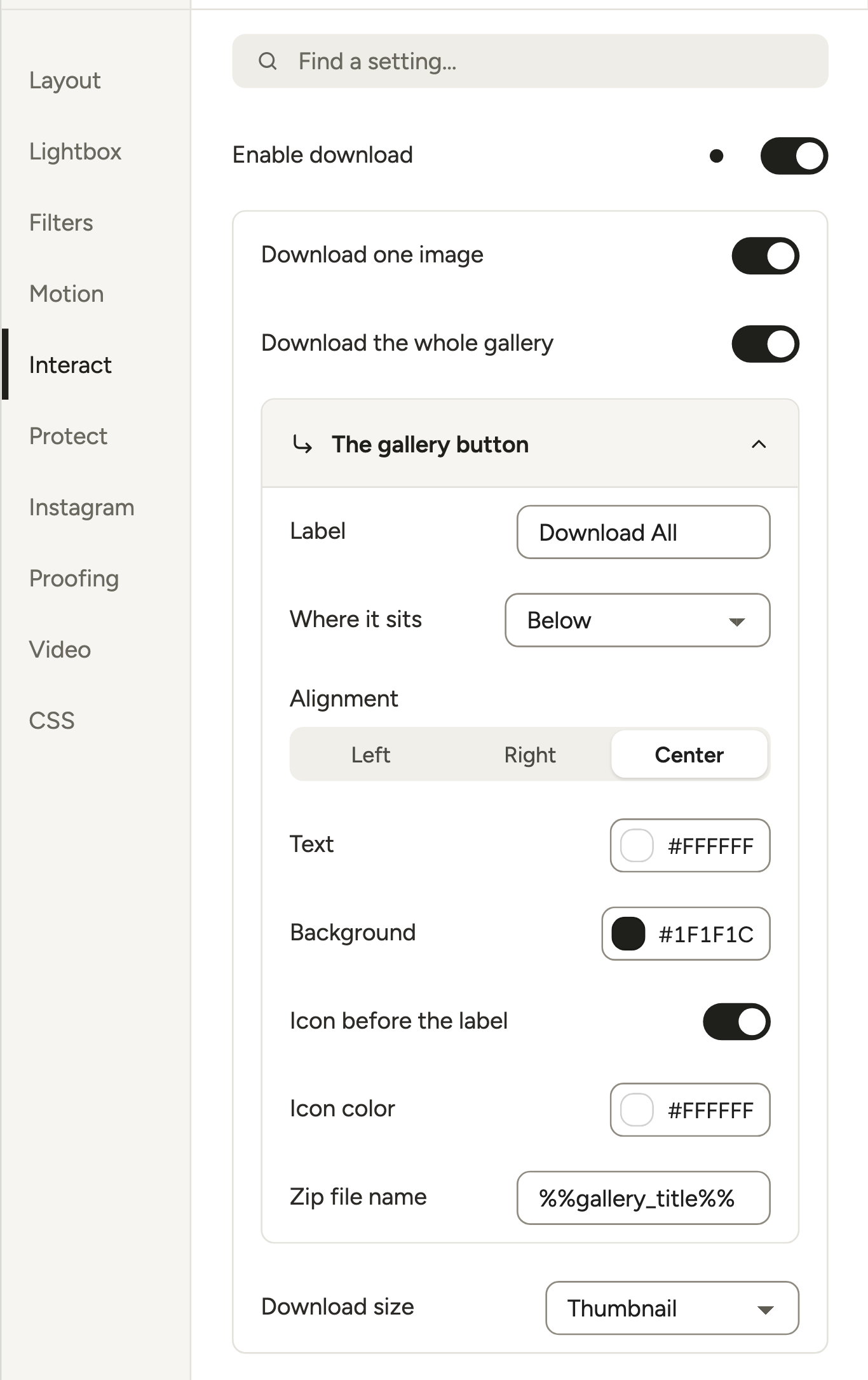
- Downloads: in Interact, turn on Enable download, then Download the whole gallery for a ZIP. Set Download size to Full, because it starts at Thumbnail.
- ZIP name: Zip file name starts as
%%gallery_title%%; add the couple’s names. - Grid vs files: Image file size (Layout) only sets the grid, so Medium is fine.
- Single photos only? Turn on just Download one image, and leave the lightbox’s Download all button off.
- Privacy: turn on Protect → Password protect. After they type the password, that browser stays unlocked for 10 days.
- Server check: ZIP downloads need PHP’s ZIP extension, which your host can turn on.
Pic-Time vs Pixieset, if you’d rather switch platforms
Pic-Time has stronger selling tools than Pixieset; Pixieset is the broader suite, and cheaper at about 100 GB. From Pic-Time’s and Pixieset’s pricing pages, checked October 2026:
| Pic-Time | Pixieset | |
|---|---|---|
| About 100 GB, billed yearly | Professional, $21/mo ($252/yr) | Plus, $16/mo ($192/yr) |
| Free plan | 10 GB, later 3 GB; 15% commission | 3 GB; 15% commission |
| Commission on paid plans | Beginner 15%, Professional 8%, Advanced 6% when Pic-Time collects; 0% when you collect on Professional or Advanced | None |
| Selling extras | Sales automations, 30+ labs | Email campaigns, 100 to 10,000 a month by plan |
| Website builder | None (Portfolio Page and embeddable blog posts) | Yes, a separate Website product |
| Business tools | Integrations only | Studio Manager (contracts, invoices, booking) |
| Apps | An app for the photographer | Mobile Gallery App for clients (3 on Free, unlimited from Basic) |
Where does WordPress fit? If you already run it, you’d skip Pixieset’s Website product, while Pic-Time’s focus on selling sits next to your site naturally. Don’t sell prints? You need neither, and our Pixieset alternative guide covers the Pixieset side.
Leaving Pic-Time without losing a gallery
When you cancel Pic-Time, your paid plan runs to the end of the period, then the account becomes Free. Galleries above the Free limit are permanently deleted, oldest first (cancel, downgrade).
The limit is 3 GB for accounts 3 months or older, 10 GB for newer ones; Beginner keeps 20 GB. Deleted galleries can’t be restored.
- Download originals while you’re still on a paid plan. In Pic-Time 2.0, media download “is not available on Free plans” (help article). Plan the export gallery by gallery.
- Finish open work on Pic-Time, such as selections in progress and unfilled print orders.
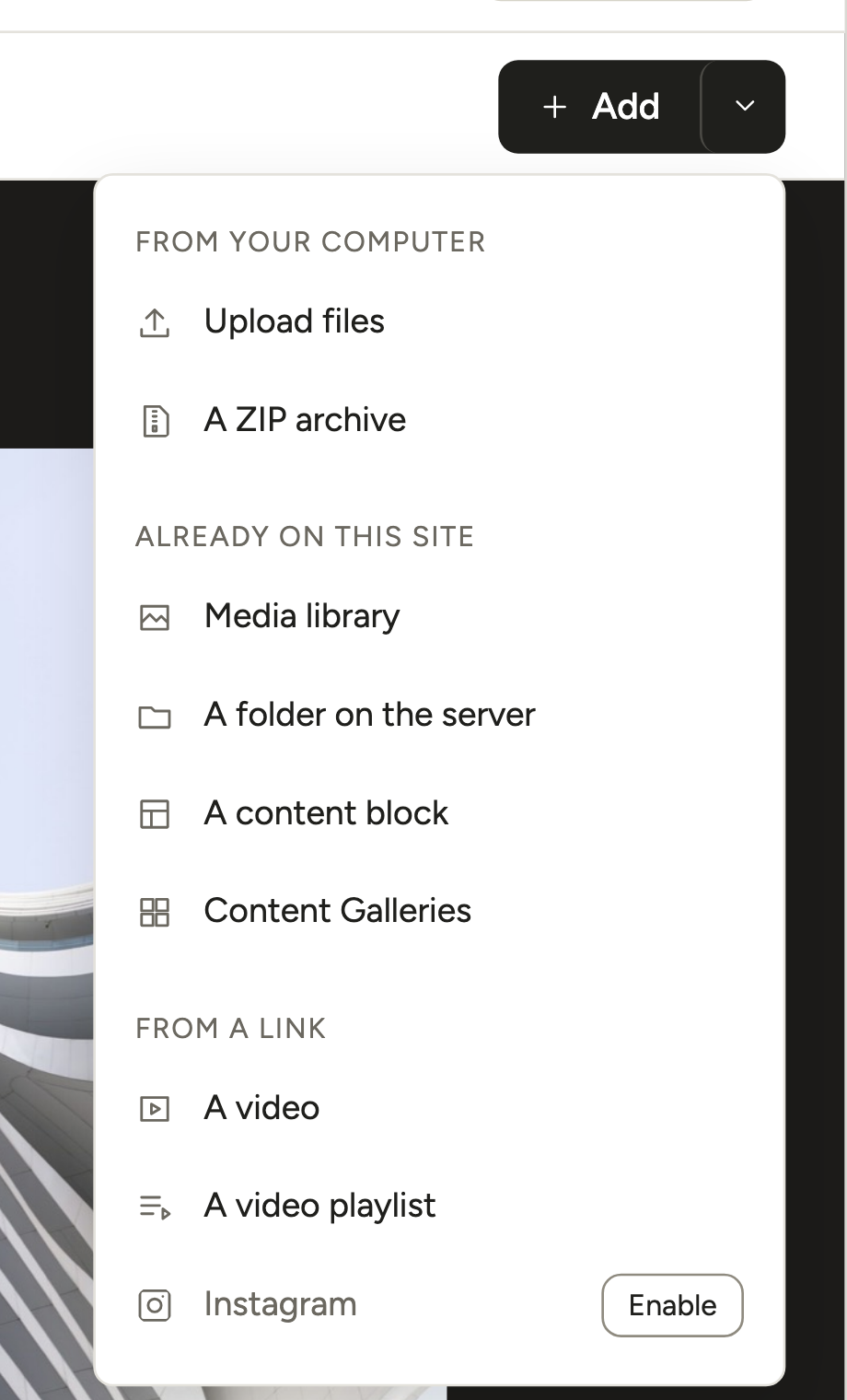
- Bring the finals into Modula with + Add → A ZIP archive (Modula Pro, within your upload limit). For big weddings, upload by FTP and use A folder on the server (ZIP and folder guides).
- Re-create open selection rounds in Modula and send new invite links. Pic-Time’s selections and favorites don’t transfer.
- Replace Pic-Time embeds (Portfolio Page, blog posts), then remove Pic-Time Connect.
- Tell past clients where their galleries now live, then cancel or step down to Free.
Frequently asked questions
Yes: a WordPress gallery plugin can replace Pic-Time’s proofing, delivery and private galleries. Modula handles client selections, downloads and password-protected galleries on your own domain (Business plan). It has no print store, sales automations, selfie search or app, so keep Pic-Time if you rely on those.
Yes. Pic-Time Connect adds photos from embedded Pic-Time content to your sitemap, but doesn’t display galleries. The older FloPicTime plugin is closed. Pic-Time also works with StyleCloud, a WordPress-based site builder.
Pic-Time gives you integration code for its Portfolio Page and blog posts. We didn’t find an official way to embed a single client gallery, so link to it instead.
There’s a Free plan with 10 GB that later drops to 3 GB, and a 15% commission. It doesn’t include Client Selections or custom branding. The 30-day trial includes every Advanced feature.
When Pic-Time collects the payment, it takes 15% of your markup on Free and Beginner, 8% on Professional and 6% on Advanced. Collect payments yourself on Professional or Advanced, and there’s none.
Your account moves to Free when the paid period ends. Galleries above the Free limit are then deleted, oldest first, and can’t be restored. Download what you need before then.
No. Modula has no store, cart, payments or lab fulfillment. Image Licensing only labels your images with a license; it doesn’t sell one. Keep Pic-Time’s store, or see our Pixieset alternative guide for WordPress store plugins.
If you proof on Pic-Time, usually. Modula Business is $99 the first year, then $198 a year; Pic-Time Professional, the first plan with Client Selections, is $252. Against Beginner ($84 a year), Modula costs more. Your photos also use your own hosting, and you give up the store.